
Most product teams think digital product translation is just swapping English text for another language. That’s like saying cooking is just heating food. In reality, translating digital products requires cultural adaptation, UI adjustments, technical internationalization, and strategic QA processes to ensure your product resonates with global users. This guide walks you through the essential components of digital product translation, from understanding localization layers to implementing AI-driven workflows that save time and maintain quality. You’ll learn how to avoid common pitfalls, integrate translation into your product roadmap, and leverage modern tools to ship faster in multiple markets.
Key Takeaways
Point | Details |
|---|---|
Localization is multidimensional | Digital product translation requires cultural adaptation, UI adjustments, and technical internationalization beyond simple text swap. |
QA is essential | Linguistic, visual, and functional testing in staging prevents broken experiences after release. |
AI driven workflows | AI tools can streamline translation pipelines while preserving accuracy and consistency. |
Internationalization early | Build i18n into the codebase from the start to avoid costly retrofits and resource overruns. |
Cultural adaptation matters | Colors, icons, tone, and examples must resonate with local sensibilities rather than merely translating words. |
Understanding the core components of digital product translation
Digital product translation is a multidimensional process that extends far beyond converting text from one language to another. Product localization involves cultural adaptation, UI adjustments, and technical internationalization to ensure your product feels native in every market. Understanding the difference between translation and localization is crucial for product teams aiming to build truly global products.

The linguistic layer focuses on accurate, contextually appropriate text conversion. Your translators need to understand not just the words but the intent behind every button label, error message, and help text. A literal translation of “Sign up” might confuse users in markets where “Register” or “Create account” is the standard terminology. Context matters enormously in digital interfaces where space is limited and clarity is paramount.
Cultural adaptation goes deeper than language. Colors, imagery, icons, and even feature priorities vary across cultures. Red signals danger in Western markets but represents luck and prosperity in Chinese culture. A thumbs-up icon works great in the US but can be offensive in parts of the Middle East. Your product’s tone, humor, and examples need to resonate with local sensibilities without feeling like a forced translation.
The UI layer presents unique technical challenges:
Text expansion and contraction: German text can be 30% longer than English, while Chinese is typically more compact
Right-to-left language support: Arabic and Hebrew require complete interface mirroring
Font and typography adjustments: Not all fonts support all character sets or maintain readability across languages
Date, time, and number formatting: MM/DD/YYYY versus DD/MM/YYYY, comma versus period as decimal separators
Technical internationalization, or i18n, is the foundation that makes translation possible. This involves designing your codebase to separate translatable strings from logic, supporting Unicode character encoding, and building flexible layouts that accommodate text length variations. Without proper i18n architecture, even the best translations will break your interface. Product teams should implement i18n early in development rather than retrofitting it later, which typically costs three to five times more in engineering resources.
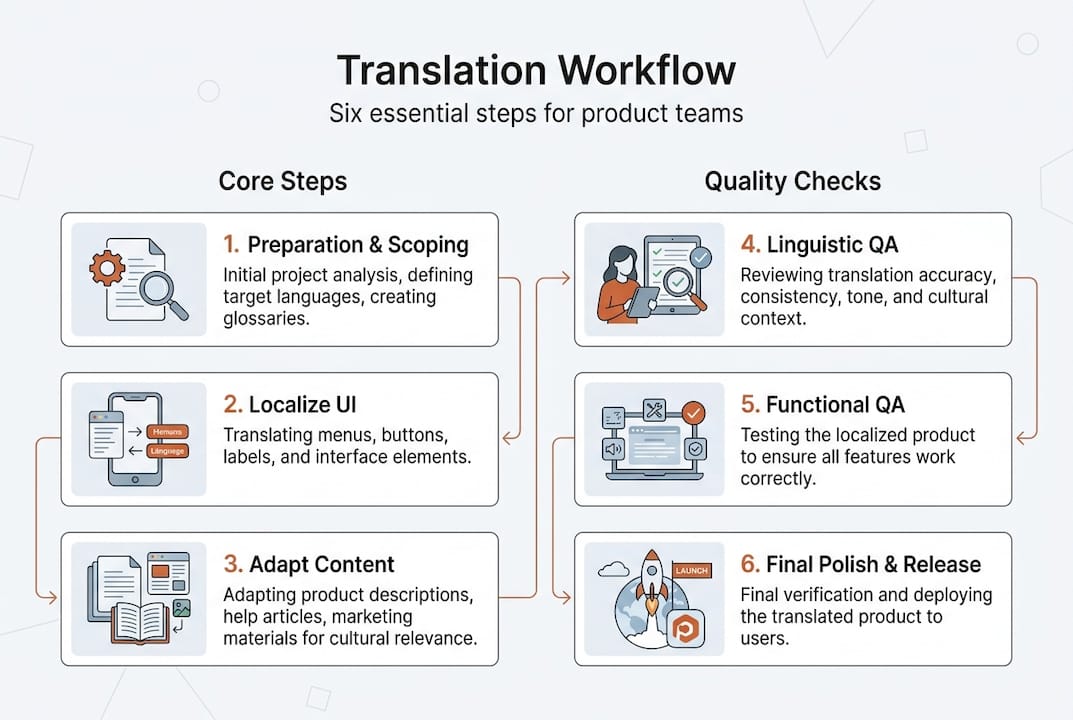
Quality assurance in digital product translation: Avoiding common pitfalls
Quality assurance separates functional localized products from broken user experiences. Software localization requires linguistic, visual, and functional testing in staging environments before release. Many product teams skip comprehensive QA and pay the price in user complaints, negative reviews, and emergency hotfixes.
Linguistic QA verifies translation accuracy, consistency, and appropriateness. Native speakers review every string in context, checking for mistranslations, awkward phrasing, and terminology mismatches. This process catches issues like gender agreement errors in Romance languages or formal versus informal address confusion in German and Japanese. Your linguistic reviewers should understand your product’s domain and target users, not just speak the language fluently.
Visual QA examines how translations appear in your actual interface. Common translation challenges include:
Untranslated strings: Hardcoded text or missing translation keys that display in the source language
Text truncation: Longer translations cut off by fixed-width containers, making buttons or labels unreadable
Layout breaks: Text overflow causing misaligned elements, overlapping components, or broken responsive designs
Right-to-left issues: Incorrectly mirrored interfaces in Arabic or Hebrew, with icons and navigation in wrong positions
Font rendering problems: Missing glyphs, incorrect character display, or poor readability in target languages
Functional QA tests whether your localized product actually works. This includes verifying that forms accept local address formats, payment systems process regional currencies, and date pickers display correct calendar systems. A product that looks translated but fails when users try to complete tasks is worse than no translation at all.
Pro Tip: Implement automated visual regression testing to catch layout breaks automatically when new translations are added. Combine this with manual review by native speakers who use your product in realistic scenarios to catch subtle issues that automated tools miss.
Test early and continuously in staging environments that mirror production. Waiting until the release candidate phase to start QA creates bottlenecks and forces rushed compromises. Build QA checkpoints into your translation workflow so issues are caught and fixed incrementally rather than all at once before launch.
Leveraging AI-driven tools to streamline translation workflows
AI-powered localization tools have transformed how product teams approach translation, dramatically reducing manual workload while improving consistency and speed. Modern AI goes beyond basic machine translation to understand context, maintain brand voice, and integrate directly into your design and development workflows.
AI translation engines now handle nuanced context that earlier systems missed. They understand that “book” might be a noun or verb depending on surrounding words, and they maintain consistent terminology across your entire product. Semantic translation memory learns from your previous translations and style choices, ensuring new content matches established patterns. This contextual awareness produces translations that sound natural rather than robotic.
Integration capabilities make AI tools practical for product teams. The Gleef Figma plugin lets designers see translated text directly in their mockups, catching layout issues before development starts. The Gleef CLI integrates with your development pipeline, automatically pulling new strings and pushing translations without manual file management. These integrations eliminate the context switching and file juggling that slow traditional workflows.
Implementing AI localization in your workflow:
Extract translatable strings from your codebase using i18n libraries and establish a single source of truth for all content
Connect your design tools and repositories to your localization platform so new content automatically flows into translation queues
Configure AI translation with your glossaries, style guides, and brand voice parameters to ensure consistent output
Set up automated QA checks for common issues like missing variables, broken formatting tags, or length violations
Route AI translations through human review for critical content while auto-approving low-risk strings like common UI labels
Deploy translations to staging environments for visual and functional testing before production release
Aspect | Traditional Workflow | AI-Driven Workflow |
|---|---|---|
Speed | Days to weeks for initial translation | Hours to days with instant AI drafts |
Consistency | Varies by translator availability | Uniform through translation memory and glossaries |
Design integration | Separate translation phase after design freeze | Real-time preview in design tools |
Developer workflow | Manual file exports and imports | Automated CLI integration with version control |
Cost | High per-word rates for all content | Reduced costs with AI handling routine translations |
Pro Tip: Implement continuous localization where translations happen alongside development rather than in a separate phase at the end. This approach prevents translation from becoming a release blocker and enables faster iteration cycles for global markets.
AI tools excel at handling the 80% of content that follows predictable patterns, freeing human translators to focus on the 20% that requires creativity, cultural nuance, or strategic messaging decisions. This hybrid approach delivers both efficiency and quality, giving you the optimized localization workflow that modern product velocity demands.
Best practices for integrating translation in your product roadmap
Strategic translation planning prevents last-minute scrambles, reduces costs, and improves market fit. Product teams that treat localization as an afterthought consistently face delayed launches, budget overruns, and compromised quality. Integrating localization into your product roadmap from the start transforms it from a blocker into a competitive advantage.
Start localization planning during the discovery phase, not after feature completion. When you’re defining requirements and user stories, identify which markets you’re targeting and what localization requirements those markets demand. This early awareness influences technical architecture decisions, design approaches, and resource allocation. A feature that seems simple in English might require significant adaptation for right-to-left languages or markets with different regulatory requirements.
Cross-functional collaboration ensures smooth execution:
Product managers define market priorities, coordinate timelines, and ensure localization aligns with go-to-market strategy
UX writers create source content with localization in mind, avoiding idioms, cultural references, and constructions that don’t translate well
Designers build flexible layouts that accommodate text expansion and work with localization teams to preview translations in mockups
Developers implement proper i18n architecture, maintain translation keys, and integrate localization tools into the build pipeline
Localization specialists manage translation workflows, maintain glossaries and style guides, and coordinate with external translation vendors when needed
The design and localization integration relationship is particularly critical. When designers and localization teams work in silos, you get beautiful mockups that break when real translations are added. Collaborative workflows where designers see actual translated content during the design phase catch problems early when they’re cheap to fix.
Budget for localization as a percentage of development costs rather than treating it as a separate line item. A reasonable benchmark is 5-10% of total development budget for products targeting three to five languages. This includes translation costs, QA time, tool subscriptions, and the engineering effort required for proper i18n implementation. Underfunding localization creates technical debt that compounds with every release.
Plan translation sprints parallel to development sprints rather than sequentially. As features reach stable states in development, they can enter translation workflows even before the overall release is complete. This parallel processing eliminates the traditional bottleneck where translation blocks the entire release while waiting for all content to be finalized. Your translation team needs advance notice and clear priorities to work effectively in this model.
Measure localization success beyond just launch dates. Track metrics like time from string freeze to translated release, translation error rates found in QA, user engagement in localized versions compared to English, and customer support tickets related to translation issues. These metrics reveal whether your localization process is actually delivering value or just checking a box.
Streamline your digital product translation with Gleef
Managing digital product translation across multiple languages, tools, and team members creates complexity that slows releases and compromises quality. Gleef eliminates this friction with AI-powered localization that integrates directly into your existing workflows, letting you ship global products faster without sacrificing quality.
The Gleef Figma plugin brings translations into your design environment, so you see exactly how text will appear in every language before a single line of code is written. No more discovering that your perfect button label becomes an unreadable mess in German. The Gleef CLI automates the tedious work of extracting strings, managing translation files, and deploying localized content, integrating seamlessly with your CI/CD pipeline.

Key features that accelerate your localization workflow:
AI-powered translation with semantic memory that learns your brand voice and maintains consistency across your entire product
Real-time collaboration tools that connect product managers, designers, developers, and translators in a single workspace
Automated QA checks that catch common errors before they reach production
Context-aware translation interface showing exactly where each string appears in your product
Pro Tip: Start with a pilot project in one or two priority languages to prove the workflow and build team confidence before expanding to your full language portfolio. Most teams see 40-60% faster localization cycles within their first quarter using integrated AI tools.
What is the difference between translation and localization?
Translation converts text from one language to another while preserving meaning. Localization adapts the entire product experience for a specific market, including cultural norms, visual design, functionality, and technical requirements. A translated product might have accurate text but feel foreign, while a localized product feels native. Understanding this distinction helps product teams plan appropriate scope and resources for global expansion.
How can I ensure quality in translated digital products?
Implement a three-layer QA process covering linguistic accuracy, visual presentation, and functional behavior. Use native speakers to review translations in context, not just in spreadsheets. Conduct visual testing in staging environments to catch layout breaks, truncation, and rendering issues. Test all functionality with localized content to verify forms, payments, and features work correctly. Combining automated checks with manual review catches both obvious errors and subtle problems that only human judgment can identify.
What are the benefits of using AI for digital product translation?
AI dramatically accelerates translation workflows, reducing turnaround from days to hours for initial drafts. It maintains perfect consistency across your product by applying glossaries and translation memory automatically. AI tools integrate directly with design and development environments, eliminating manual file management and context switching. This workflow optimization lets human translators focus on creative and strategic content while AI handles routine translations, delivering both speed and quality at lower costs than traditional approaches.
When should I start planning localization in my product roadmap?
Start during the discovery and requirements phase, before design and development begin. Early planning influences technical architecture decisions, ensures proper i18n implementation, and prevents costly retrofitting. Identify target markets, understand their specific requirements, and build localization considerations into user stories and acceptance criteria. This proactive approach transforms localization from a release blocker into a smooth, parallel process that doesn’t delay launches or compromise quality.
How do I choose which languages to prioritize for translation?
Analyze your user data, market opportunities, and business strategy to identify high-value languages. Look at where your current users are located, which markets show organic growth or high engagement, and where your competitors are investing. Consider total addressable market size, purchasing power, and strategic importance beyond just user numbers. Start with two to three priority languages, validate your localization process, then expand systematically rather than trying to launch in ten languages simultaneously and overwhelming your team.