TL;DR:
AI tools like Claude Code can expedite localization tasks but require strict workflows to prevent file corruption and misalignment. Proper setup, clear constraints in CLAUDE.md, diff-based reviews, and automated validation are essential for maintaining consistency across languages. Building repeatable, policy-driven processes ensures reliable localization at scale rather than relying on ad hoc prompts or improvisation.
AI-powered tools promise to slash localization time, but when the automation goes wrong, you’re left staring at a JSON file where every key/value pair is out of order and three languages are now quietly corrupted. Claude Code is genuinely useful for product teams managing localization at scale, but it comes with hard limits you need to understand before you run a single prompt. This guide walks you through a reliable, step-by-step workflow that gets real results from Claude Code while protecting your localization files from the most common and costly pitfalls.
Key Takeaways
Point | Details |
|---|---|
Know Claude Code limits | UI strings can’t currently be localized—plan around this by managing keys with discipline. |
Automate carefully | AI updates can break key/value structure if not diffed and tested with guardrails in place. |
Verify every change | Always check diffs, run tests, and review translations to catch errors early. |
Document policies | Long-term localization ROI comes from repeatable, team-wide policies, not one-off clever prompts. |
What you need: requirements, limitations, and workflow planning
Having previewed the context and risks, it’s critical to prepare the right tools and understand what Claude Code can and cannot help with before starting any localization work.
Before you touch a single key, you need a clear picture of the playing field. Claude Code is a powerful AI coding assistant, but it was not purpose-built for localization. Its boundaries matter enormously here.
What Claude Code can and cannot do for localization
The biggest limitation to know upfront: Claude Code’s built-in localization surface is limited, meaning the CLI UI strings appear hardcoded and cannot be customized or translated by users. You can configure which language Claude Code responds in, but every menu label, warning, and interface element stays in English. This is a hard wall, not a configuration option. In fact, there is an open request to localize the Claude Code UI, which signals that demand exists but has not yet been addressed by the Anthropic team.
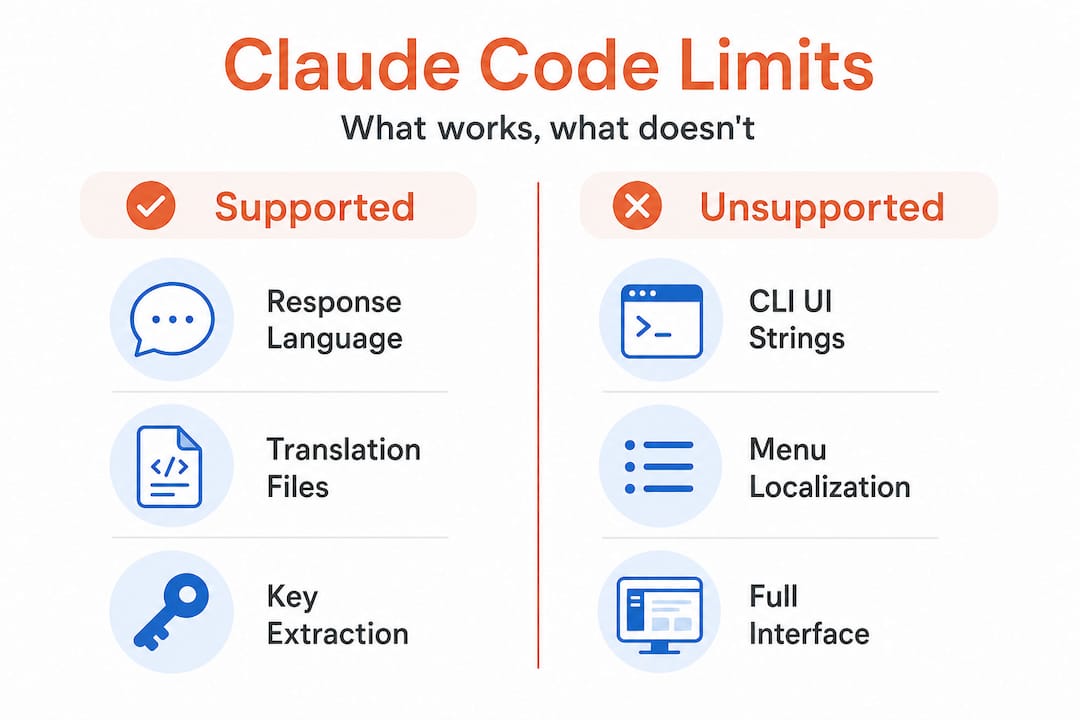
What this means practically: if your goal is to localize the tool itself for non-English-speaking teammates, you’re blocked. If your goal is to use Claude Code as an assistant for managing and generating localization keys in your own product files, that’s where it genuinely shines.
Task | Claude Code support | Safe to automate? |
|---|---|---|
Translating response language | Yes, configurable | Yes |
Localizing CLI UI strings | No, hardcoded | Not possible |
Extracting new keys from source code | Yes, strong | With guardrails |
Appending translations to existing files | Yes, with prompting | Yes, diff-based only |
Resorting or restructuring key files | Risky | No |
Generating missing translations in bulk | Yes | Yes, with review |
What you need before starting
Gather these before writing a single prompt:
Your source key files (usually JSON, YAML, or .strings format), with version control already in place
Access to your "CLAUDE.md` file, where you’ll embed rules that persist across sessions
A list of target languages and their expected file structures
A clear definition of which keys are “frozen” (do not touch) versus actively managed
A dedicated git branch for any AI-assisted localization work
“Before any automated session, write your constraints into CLAUDE.md. Claude Code reads this file at the start of every session, making it your most reliable guardrail against runaway automation.”
The reason you need all of this upfront is that ad hoc prompting is exactly where corruption happens. Teams that describe their localization problem loosely and let Claude Code “figure it out” are the ones who end up with the failing localization tools problem: a workflow that feels fast until it creates rework that costs three times the original effort.
Pro Tip: Define a standard prompt template for every localization task type (extraction, translation, append, review) and store these templates in your project repository. Reusable, tested prompts are safer and faster than creative prompting every time.
Step-by-step: Using Claude Code for safe localization key updates
Now that you’re clear on setup and boundaries, here’s how to execute each step in a way that minimizes risk and increases automation value.
This is the workflow that actually holds up in production. Follow it sequentially, without skipping verification steps, even when you’re under release pressure.
1. Create a dedicated branch Always start from a clean, version-controlled branch. Name it clearly, for example localization/add-fr-keys-2026-06. This makes rollback trivial and keeps your diff readable.
2. Prepare your CLAUDE.md constraints Write explicit rules before the session starts. For example: “Do not reorder existing keys. Only append new keys at the end of each file. Do not alter keys marked with the comment # frozen.” These constraints should be specific and unambiguous.
3. Run extraction first, not translation Start with key extraction from source code. Ask Claude Code to identify new or missing keys without altering any existing localization file. Review this list manually before moving to translation.
4. Use append-only operations for updates When you’re ready to add translations, instruct Claude Code explicitly to append values only, never to restructure, sort, or reorganize the file. Sub-agent workflows can corrupt localization files by reordering keys and misaligning values, so structural safety is not optional. This is the single most common source of localization corruption in AI-assisted workflows.
5. Generate a diff before accepting changes After every automated operation, generate a diff of the modified file against the original. Review it before staging the changes. A clean diff should show only additions, never removals or reordering.
6. Validate key counts and structure Run a quick script (or ask Claude Code itself) to count keys in each language file and compare them against the source. Any mismatch signals a problem. Also check that key ordering matches across language files, because mismatched ordering is one of the risks of key reordering that causes silent runtime bugs.
Operation type | Risk level | Claude Code suitable? | Recommended check |
|---|---|---|---|
Append new keys | Low | Yes | Diff + key count |
Bulk translate existing keys | Medium | Yes, with review | Human UX review |
Restructure file format | High | No | Manual only |
Delete deprecated keys | High | With guardrails | Manual approval |
Sort/alphabetize keys | Very high | No | Avoid entirely |
7. Apply tests before merging Run automated checks on localization files as part of your pre-merge process. Check for orphaned keys (keys that exist in translation files but not in source), missing translations, and placeholder mismatches (for example, {name} in English but missing in French). This is also a good point to explore automatic key translation tooling that integrates validation natively.
Pro Tip: Write a lightweight CI script that checks key parity across all language files on every pull request. A five-minute investment in that script can catch corruption that would otherwise survive for weeks.
Avoiding common mistakes: verification, tests, and guardrails
Once you’ve stepped through updates, it’s vital to verify correctness and ensure quality doesn’t drift over time.
The biggest mistake teams make with AI-assisted localization is treating a single automated pass as a finished result. It isn’t. Not because Claude Code is unreliable, but because edge-case nuance for AI-assisted localization means that even when the task is simply “add translations,” orchestration can accidentally reorder keys, causing key/value misalignment. Guardrails are what turn a fragile automation into a robust one.
Build a localization safety net
Your safety net has three layers:
Automated structure checks: Count keys, verify ordering, flag missing placeholders. These run in your CI pipeline and fail the build if something looks wrong.
Semantic spot checks: A UX writer reviews a sample of AI-generated translations per release. Not every string, but enough to catch tone, register, and brand voice issues that automated checks miss.
Version control as the final referee: Every localization file change is committed with a clear message. If something breaks in production, you can pinpoint the exact commit and roll back without drama.
“Never trust a single automated pass. Diff every change, count every key, and make your CI pipeline the last line of defense before any localization update ships.”
Here are the most common mistakes and how to prevent them:
Skipping the diff review: You see a green checkmark from Claude Code and merge directly. Instead, always read the diff yourself, even if it looks clean.
Over-broad prompts: Asking Claude Code to “update all translations” without constraints opens the door to resorting, value swaps, and file corruption. Narrow prompts with explicit file scope and operation type prevent this.
Ignoring placeholder syntax: Strings like
{username}or%smust survive translation intact. Build a regex check that flags any output where placeholders have been altered or dropped.No human review for new languages: The first time you add a new language to your product, have a native speaker or professional reviewer check 100% of the output. AI translation at launch sets the baseline for every future update.
Getting this right is the core of the solution to key challenges that most product teams are searching for. And if you’re coordinating across design, engineering, and product, the verification layer is also where cross-functional localization with AI teams build trust in the automation over time.
Scaling and maintaining: policies for sustainable localization with Claude Code
Beyond technical diligence, the most sustainable localization wins come from embedding your process into team culture and workflows.

One-off automations are exciting. Sustainable ones are valuable. The difference is documented policy.
Build a policy-driven localization workflow
Document your Claude Code localization rules in a shared team file, not just in CLAUDE.md. Include what tasks are approved for AI assistance, which files are off-limits, and what review steps are required before merging.
Create reusable checklists for each localization event: setup, update, test, and release. These checklists should be short enough to actually use under deadline pressure but specific enough to catch the common errors.
Train your team to recognize risky patterns. Developers who haven’t worked closely with localization files may not know that resorting keys is destructive. UX writers may not know what a placeholder mismatch looks like. A 30-minute onboarding session that covers AI localization risks pays for itself after the first prevented incident.
Run post-mortems after any localization incident. When something goes wrong (and at scale, it will), use that as raw material for improving your policy. The best ROI from Claude Code comes from embedding localization discipline into repeatable project instructions, not from single clever prompts.
Schedule regular policy reviews. Localization tooling evolves quickly. Set a quarterly reminder to reassess which tasks you’re automating, what new Claude Code capabilities exist, and where your guardrails need updating.
This kind of structured approach is exactly what separates teams that scale globally with confidence from those that struggle with localization fires at every release. Connecting your Claude Code workflow to a broader localization strategy best practices framework and investing in content consistency in localization are the two highest-leverage moves for any team thinking beyond the next sprint.
Pro Tip: After any post-mortem on a localization issue, update your CLAUDE.md and your team checklist within 48 hours. Memory fades. Policies don’t.
A better way: why persistent localization discipline is more valuable than clever one-off AI prompts
Here’s the uncomfortable truth most AI localization content doesn’t say out loud: the teams getting the best results from Claude Code aren’t the ones writing the most creative prompts. They’re the ones who have built the most boring, repeatable systems around it.
The appeal of AI for localization is speed. A single well-phrased prompt can generate 50 translated keys in seconds. That’s genuinely impressive. But speed without structure is how you end up with a corrupted French locale file three hours before a product launch, and no clean version to roll back to because nobody set up version control properly.
The CLI UI constraints in Claude Code are actually a useful forcing function here. Because you can’t localize the interface itself, you’re pushed toward what matters: building bulletproof workflows around your own product’s localization files. That constraint removes a distraction and sharpens your focus on what actually creates global product value.
The real wins come from repeatable policies, version control, and continuous checks. Not smarter prompts. Product/UX writers’ best ROI from Claude Code consistently comes from moving localization discipline into project instructions and reusable skills, not one-off cleverness. This mirrors what we’ve seen across the industry: teams that treat localization as a first-class discipline avoid the flaky results and expensive rework that plague ad hoc approaches.
Future-proofing your localization means structuring your work for maintainability and team learning. When a new team member joins, they should be able to understand the localization workflow from your documentation, run it successfully on day one, and recognize when something looks wrong. That’s not automation, that’s craftsmanship. And it’s why tools that fail product teams almost always fail at the policy layer, not the technology layer.
Next steps: upgrade your localization process with smarter tools
If you’re ready to move beyond the limits of Claude Code for localization, there’s a path forward that combines the speed of AI with the reliability your product demands.

Gleef is built for exactly this: giving product managers, UX writers, and developers a platform where AI-powered localization key management is safe, scalable, and designed for real product teams. From semantic translation memory and glossaries to in-context editing and Figma integration, Gleef makes the policy-driven workflow you just read about significantly easier to execute and maintain. Instead of building every guardrail yourself, you get a system that enforces consistency, catches errors, and keeps your team aligned across every language and every release. If you want to solve structural localization challenges at scale, explore what Gleef offers today.
Frequently asked questions
Can Claude Code UI menus be localized into other languages?
No. The CLI UI strings appear hardcoded and cannot be customized or translated by users, though you can configure the language of Claude Code’s responses.
How can I prevent corruption of localization key/value pairs when using Claude Code?
Use diff-based edits, enforce stable key ordering, and run automated tests after every change, because sub-agent workflows can corrupt localization files by reordering keys and misaligning values if operations are not constrained to structural-safe changes.
What is the best way to automate translation updates for localization keys in Claude Code?
Follow a repeatable, policy-based workflow with minimal, append-only changes and always review outputs before merging, since best ROI from Claude Code comes from embedding localization discipline into project instructions rather than relying on ad hoc prompts.
Why does my localization update change the order of keys or misalign values?
AI orchestration can reorder keys or swap values if not explicitly constrained, so build guardrails into your prompts and CLAUDE.md file, because even “add translations” tasks can accidentally reorder keys and cause key/value misalignment without structural-safe operations in place.