
TL;DR:
Angular’s translation methods in 2026 split into build-time with
@angular/localizeand runtime via libraries like ngx-translate, each offering distinct advantages. Build-time translation produces optimized bundles for each locale using XLIFF 2.0, ensuring high performance and full Angular optimization, while runtime translation loads JSON files dynamically for instant language switching. Choosing the appropriate strategy depends on content update frequency, team workflow, and performance needs, with best practices emphasizing template-based translation, correct locale detection, and automated CI validation.
Angular translate is the practice of managing translated strings in Angular applications, and in 2026 it splits into two distinct technical strategies: build-time internationalization via @angular/localize and runtime translation via libraries like ngx-translate. The official Angular i18n standard uses the LOCALE_ID injection token and XLIFF 2.0 file format to generate optimized, locale-specific bundles. Runtime libraries instead load JSON translation files on demand, swapping strings without a page reload. Choosing the wrong strategy for your project creates real costs: bloated bundles, broken language switching, or translation files that drift out of sync with your templates. This guide gives you the technical clarity to pick the right path and implement it correctly.
How does Angular translate work at build-time and runtime?
Angular localization in 2026 operates through two fundamentally different mechanisms. Understanding both is the foundation for every decision that follows.
Build-time translation with @angular/localize
The build-time approach uses @angular/localize to extract translatable strings from your templates during the build process. You run ng extract-i18n to generate a source message file, hand that file to translators, and then compile a separate optimized bundle for each locale. The Angular compiler replaces every $localize call with a locale-specific translated constant. That means zero runtime overhead from dictionary lookups. The tradeoff is deployment complexity: each locale lives at its own URL, and switching languages requires a full page navigation to load the correct bundle.
XLIFF 2.0 is the recommended format for this workflow. The Angular CLI supports --format xliff2 during extraction, and XLIFF 2.0 offers better tooling support and expressiveness than its predecessor, XLIFF 1.2. Most professional CAT tools and translation management systems read XLIFF natively, which makes handoffs to translators straightforward.
Runtime translation with ngx-translate
Runtime libraries like ngx-translate take a different approach entirely. They load JSON translation files on demand and swap displayed strings dynamically inside the running application. The user clicks a language selector, the library fetches the corresponding JSON file, and the UI updates instantly without a full reload. That instant switching is the primary reason teams choose this path.

The cost is a runtime translation lookup on every string render. Bundle size also increases slightly because the translation engine ships with your app. JSON files are simpler to edit than XLIFF, which makes them friendlier for non-developer translators working directly in a file editor or a lightweight translation platform.
Build-time vs runtime: a direct comparison
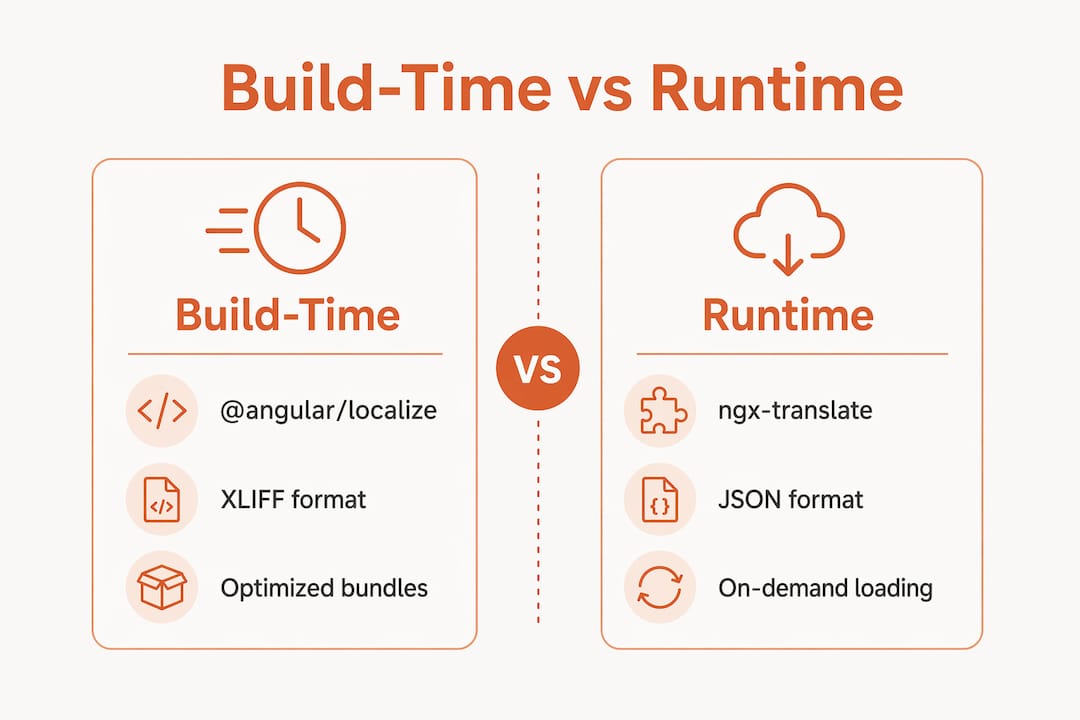
Feature | Build-time (@angular/localize) | Runtime (ngx-translate) |
|---|---|---|
Translation format | XLIFF 2.0 | JSON |
Language switching | Full page reload | Instant, no reload |
Bundle size | Smaller per locale | Single larger bundle |
Runtime overhead | None | Dictionary lookup per string |
Deployment complexity | High (separate URLs per locale) | Low (single deployment) |
Translator-friendly | Requires XLIFF tooling | Simple JSON editing |
Pro Tip: If your app serves millions of users and page load speed is a core metric, build-time bundles give you a measurable performance edge. If your translators are non-technical or your content updates weekly, runtime JSON is the practical choice.
What are best practices for implementing Angular translate?
Solid implementation separates apps that scale globally from apps that break at the first language switch. These practices apply regardless of which approach you choose.
Keep translation logic in templates
Translation logic belongs in templates, not in component classes. Angular’s compiler can only extract strings it sees in templates during the ng extract-i18n step. Strings buried in TypeScript component files get missed, which creates silent gaps in your translation files. Use the i18n attribute in templates for build-time strings and the translate pipe for runtime libraries.
Use Angular’s built-in pipes for locale-aware formatting
Angular ships with DatePipe, DecimalPipe, and CurrencyPipe, and all three read from the LOCALE_ID injection token to format values correctly for the active locale. Set LOCALE_ID at the application level and every pipe in your app automatically formats dates, numbers, and currencies to match the user’s locale. One configuration change produces correct output across your entire UI.
A critical detail: LOCALE_ID controls formatting, not the displayed language. You still need separate language detection and switching logic to change which translated strings appear on screen.
Detect the user’s preferred language correctly
Use navigator.language and the Accept-Language HTTP header to detect the user’s preferred locale on first visit. Redirect build-time apps to the correct locale URL. For runtime apps, load the matching JSON file automatically. This detection step prevents users from landing on a language they did not choose, which is a common UX failure in Angular i18n implementations.
Key implementation practices:
Set
LOCALE_IDat the app root so all formatting pipes inherit the correct locale without per-component configuration.Use URL-based locale routing for build-time apps (e.g.,
/en/,/fr/) to support CDN caching per locale.Keep translation keys descriptive, not positional. A key like
checkout.button.confirmis far easier to maintain thanbutton_47.Avoid unsaved state on locale switches. Build-time language changes reload the page, which wipes any in-memory state. Persist critical state to
localStorageor a backend before triggering a locale redirect.Validate translation files in CI by diffing the source XLIFF or JSON against translated files to catch missing keys before they reach production.
Pro Tip: Automate extraction and merging with your CI pipeline. Running ng extract-i18n after every template change and diffing translation files automatically catches untranslated strings before they ship.
When should developers choose build-time vs runtime translation in Angular?
The right choice depends on one core variable: how often your translations change relative to your code. This is the question most teams skip, and it causes the most regret later.
Choose build-time if your content is stable. Apps with infrequent copy changes, like enterprise dashboards or internal tools, benefit most from build-time bundles. The performance advantage is real: no runtime lookup overhead, smaller per-locale bundles, and full Angular compiler optimization. The deployment complexity is manageable when you only redeploy every few weeks.
Choose runtime if your content changes frequently. Marketing pages, e-commerce product descriptions, and content-heavy apps update copy constantly. Rebuilding and redeploying locale-specific bundles for every copy change is unsustainable. Runtime libraries let translators push JSON updates without touching the build pipeline.
Choose runtime if non-developers own translations. When your translation team works outside the codebase, XLIFF files and build triggers create friction. JSON files in a translation management system are far more accessible. The single-bundle deployment also simplifies your DevOps setup.
Choose build-time if SEO is a priority. Search engines index locale-specific URLs more reliably than JavaScript-rendered language switches. Build-time apps serve fully rendered HTML per locale, which gives each language version its own crawlable URL. For multilingual SEO, this architecture is significantly stronger.
Consider a hybrid approach for large apps. Some teams use build-time bundles for the core shell and runtime loading for dynamic content sections. This is more complex to maintain but captures the performance benefits of build-time while keeping content updates flexible.
Pro Tip: Map your translation change frequency before you write a single line of i18n code. If translations change more often than your release cycle, runtime wins every time.
What translation management tools and formats work with Angular?
Format choice determines which tools you can use, and tool choice determines how fast your team moves.
XLIFF 2.0 is the recommended format for Angular build-time projects in 2026. It offers richer metadata, better segment-level tooling, and wider support in professional CAT environments than XLIFF 1.2. The Angular CLI generates it directly with the --format xliff2 flag, and most enterprise translation management systems import and export it natively.
JSON is the standard for runtime workflows. It is human-readable, easy to version-control, and supported by virtually every translation platform. The flat key-value structure maps directly to ngx-translate’s loader, and most platforms can export JSON alongside XLIFF, so you are not locked into one format.
Key format and tooling considerations:
XLIFF 2.0 for build-time Angular i18n: best compatibility with professional translation vendors and CAT tools.
JSON for runtime libraries: fastest iteration cycle, easiest for non-technical translators.
Translation memory systems that support both formats let you reuse approved translations across projects, cutting costs on repeated strings.
Glossary enforcement at the platform level prevents translators from using inconsistent terminology across locales, which is a common quality failure in large apps.
For teams managing Angular localization at scale, Gleef’s localization best practices guide covers format selection and workflow design in depth. The 2026 product localization strategy overview also addresses how format choices affect release velocity.
Pro Tip: Choose a translation management system that exports both XLIFF 2.0 and JSON. Your architecture may evolve, and being locked into one format creates migration work later.
Key Takeaways
Angular translate strategy is the single most consequential i18n decision you make: build-time bundles maximize performance, while runtime libraries maximize flexibility, and the right choice depends entirely on your content change frequency and team structure.
Point | Details |
|---|---|
Two core approaches | Build-time (@angular/localize) and runtime (ngx-translate) serve different project needs. |
Format matters | Use XLIFF 2.0 for build-time workflows and JSON for runtime libraries. |
Templates over classes | Keep all translatable strings in templates so Angular’s extractor captures them. |
CI automation prevents drift | Run |
SEO favors build-time | Locale-specific URLs from build-time bundles give each language version a crawlable address. |
The choice most teams get wrong
Most Angular teams I have worked with default to runtime libraries because they feel simpler to set up. That instinct is understandable. JSON files are easy, ngx-translate has a clean API, and you avoid the multi-URL deployment headache. But I have watched that choice become a performance liability in apps that serve millions of users, where every millisecond of render time is measured and every string lookup adds up.
The build-time approach is genuinely underused. Teams see the deployment complexity and walk away. What they miss is that the complexity is a one-time infrastructure investment. Once your CI pipeline handles ng extract-i18n, bundle generation, and locale-specific deployments automatically, the ongoing maintenance cost drops to near zero. The performance payoff, especially on mobile networks, is permanent.
The real mistake is not choosing the wrong approach. It is choosing without thinking about translation change frequency first. I have seen teams build a full build-time pipeline for a marketing site that updates copy three times a week. The rebuild cycle became a bottleneck within a month. The reverse is equally painful: a runtime setup for a high-traffic dashboard where string lookup overhead accumulates into measurable latency.
My honest advice: treat this decision like a database schema choice. It is hard to change later, and the wrong call costs you more than the time you saved by not thinking it through. Map your content update cadence, talk to your translators about their workflow, and then pick your architecture. The technical implementation is the easy part.
— Antoine
How Gleef fits into your Angular localization workflow
Managing Angular localization across design, development, and translation teams creates real coordination overhead. Gleef connects those workflows in one place.
Gleef’s Figma plugin brings AI-powered translation directly into your design environment, so your team reviews localized copy in context before a single line of Angular code is written. Gleef’s semantic translation memory and glossary enforcement keep terminology consistent across every locale, whether you are working with XLIFF 2.0 files or JSON. Product managers, UX writers, and developers work from the same source of truth, which eliminates the back-and-forth that delays releases. If translation bottlenecks are slowing your Angular deployments, Gleef removes them.
FAQ
What is Angular translate?
Angular translate refers to the set of tools and techniques used to internationalize Angular applications. The two primary methods are build-time translation via @angular/localize and runtime translation via libraries like ngx-translate.
What is the difference between @angular/localize and ngx-translate?
@angular/localize generates separate optimized bundles per locale at build time with no runtime overhead, while ngx-translate loads JSON translation files dynamically at runtime and supports instant language switching without a page reload.
What translation file format should I use for Angular i18n?
XLIFF 2.0 is the recommended format for build-time Angular projects in 2026, while JSON is the standard for runtime libraries like ngx-translate due to its simplicity and wide tooling support.
How do I prevent translation files from going out of sync?
Run ng extract-i18n as part of your CI pipeline after every template change and diff the output against your existing translation files to catch missing or outdated strings before they reach production.
Does LOCALE_ID change the displayed language in Angular?
No. LOCALE_ID configures formatting pipes like DatePipe and CurrencyPipe globally, but it does not swap UI strings. You need separate language detection and switching logic to change which translated content appears on screen.