
Manual localization is one of the most underestimated bottlenecks in global product development. Your team ships a feature, and then it sits in a translation queue for days. Files get emailed back and forth, strings go missing, and inconsistencies creep in across languages. The result? Delayed releases, frustrated developers, and a product that feels native in one market but awkward in five others. API-driven localization flips this dynamic entirely. By automating the exchange of content between your codebase and translation systems, it transforms localization from a release blocker into a genuine competitive advantage. This guide breaks down exactly how it works and how your team can apply it.
Key Takeaways
Point | Details |
|---|---|
API-driven means automation | API-driven localization automates translation delivery, cutting manual steps and errors. |
Works with agile teams | APIs let localization move at the same speed as software releases, not holding up your CI/CD pipeline. |
Beware common pitfalls | Real-world challenges include API misconfiguration, lack of training, and poor documentation—have a mitigation plan. |
Integration trumps tool overload | Choosing flexible APIs over siloed tools leads to long-term localization and development success. |
What is API-driven localization?
At its core, API-driven localization uses application programming interfaces (APIs) to automate how translated content is sent, retrieved, and integrated into your product. Instead of manually exporting files, emailing them to translators, and re-importing finished strings, the API handles all of that automatically. Your codebase talks directly to a translation management system (TMS), and translations flow back in without anyone touching a spreadsheet.

This matters more than it sounds. Traditional localization tools are often slow, error-prone, and can’t keep up with rapid product changes. When your product ships updates every two weeks but your translation cycle takes three, you’re always behind. API-driven localization closes that gap by making translation a continuous, automated process rather than a periodic manual task.
Here’s what API-driven localization actually enables:
Real-time content updates across all supported languages without manual intervention
Faster release cycles because translation happens in parallel with development, not after it
Reduced human error from eliminating manual file exports, imports, and version tracking
Scalability across dozens of languages without proportional increases in workload
Continuous localization that aligns naturally with agile sprints and CI/CD pipelines
The API acts as a bridge between your engineering environment and your localization workflow. Developers push new strings programmatically. Translators and reviewers work inside their preferred tools. Finished translations are pulled back automatically before the next build.
“The shift from file-based to API-driven localization is not just a technical upgrade. It’s a workflow transformation that changes how product teams think about global releases.”
For product teams scaling into new markets, the ecommerce localization benefits of this approach are significant. Faster time to market, better consistency, and lower operational overhead all compound over time. The API isn’t just a convenience. It’s the infrastructure that makes global product development sustainable.
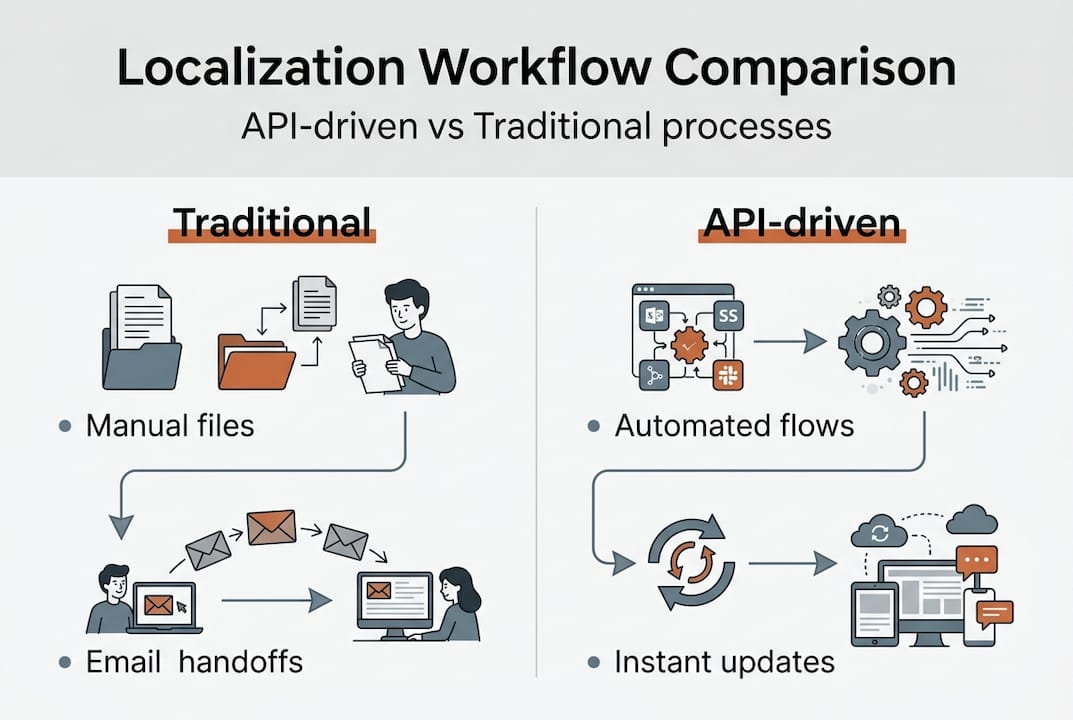
How API-driven localization integrates with modern product workflows
Streamlining localization for global product teams means embedding it into the processes your team already uses, not building a parallel workflow that everyone ignores. Modern global product teams need localization deeply embedded into their daily development practices for seamless releases. Here’s how that looks in practice.
The typical API-driven localization workflow follows four clear steps:
Developers mark content for translation. Using code annotations or localization keys, developers flag new or updated strings directly in the codebase. No separate file export required.
The API sends content to the TMS automatically. When a build triggers, the API pushes flagged strings to the translation management system in real time. Localization managers see new content immediately.
Translators and reviewers validate translations. Human reviewers and AI-assisted tools work inside the TMS to produce accurate, brand-consistent translations. Glossaries and translation memory keep quality high.
The API pulls approved translations back before release. Once strings are approved, the API retrieves them and injects them into the build. No manual re-import, no version conflicts.
This flow eliminates the context-switching that kills productivity. Developers stay in their IDE (integrated development environment). Translators stay in their TMS. Localization managers get visibility into progress without chasing anyone for status updates.
Role-based automation is another major advantage. Developers trigger pushes. Localization managers set review rules. QA teams run automated checks against translated builds. Everyone operates within their own domain, and the API coordinates between them silently.
Pro Tip: Map your current localization workflow before integrating an API. Identify every manual handoff point, because those are exactly the steps the API will eliminate. A 30-minute whiteboard session with your dev, localization, and QA leads can save weeks of integration confusion later.
The reduction in manual file handling alone is transformative. Teams that previously spent hours per sprint managing translation files can redirect that time to actual product work. And because translations ship with every release cycle, you stop accumulating localization debt.
Comparing API-driven vs. traditional localization: what really changes?
Understanding integration is one thing, but your team needs to see the concrete differences before committing to a new approach. Localization key challenges like duplicate translations and inconsistent launches are significantly reduced with API-driven processes compared to manual ones. Here’s how the two approaches compare across the dimensions that matter most.
Dimension | Traditional localization | API-driven localization |
|---|---|---|
Speed | Days to weeks per cycle | Hours to minutes per cycle |
Transparency | Low, status requires manual check-ins | High, real-time progress visibility |
Scalability | Degrades with language count | Scales linearly with automation |
Error risk | High, manual file handling | Low, automated exchange |
Developer workload | Heavy, file exports and imports | Minimal, API calls handle transfers |
Translation consistency | Inconsistent without strict governance | Enforced via TMS rules and memory |
The speed difference is the most immediately visible. Traditional workflows require someone to notice that new strings exist, export them, send them out, wait, and then manually import them back. That process takes days even when everyone is responsive. API-driven flows compress that entire cycle into automated steps that happen in the background.
Beyond speed, the consistency gains are significant:
Translation memory ensures previously approved phrases are reused automatically
Glossaries enforce brand terminology across all languages and all translators
Automated QA checks catch formatting errors, missing variables, and length overruns before they reach production
Scalability is where the gap becomes a chasm. Adding a new language to a traditional workflow means adding a new manual process. With an API-driven approach, you configure the new locale in your TMS and the existing automation handles the rest. Your team’s workload barely changes.
Process overhead shrinks dramatically. Fewer meetings to coordinate handoffs, fewer emails to track file versions, fewer last-minute scrambles before release. The API does the coordination work that previously fell on people.
Key challenges and common pitfalls in API-driven localization
To get the most from API-driven localization, you need to know where teams typically stumble. Translation challenges are more common than most teams expect, and technology teams frequently underestimate the operational and technical obstacles in adopting new localization approaches.
Here are the most common pitfalls and how to avoid them:
Poor API documentation. If your TMS or localization platform has incomplete docs, integration becomes a guessing game. Always audit API documentation quality before committing to a platform.
Lack of workflow mapping. Teams often implement the API without documenting who owns each step. Strings get stuck in review because no one knows whose job it is to approve them.
Inadequate QA processes. Automated translation exchange doesn’t automatically mean quality. Without structured review stages, errors ship to production faster than ever.
Inflexible translation formats. Some APIs only support specific file formats or string structures. If your codebase uses a format the API doesn’t handle well, you’ll hit friction immediately.
Pitfall | Impact | Mitigation |
|---|---|---|
Undocumented API endpoints | Integration delays | Require full API docs before vendor selection |
No workflow ownership | Strings stuck in review | Assign clear role owners at kickoff |
Missing QA gates | Errors in production | Build automated checks into every pipeline stage |
Format incompatibility | Manual workarounds | Test format support with a pilot project first |
Pro Tip: Run a cross-team kickoff before your API integration goes live. Bring developers, localization managers, and QA leads into the same room. Walk through the full workflow end to end and assign ownership for every step. This single meeting prevents most of the process failures teams encounter later.
The keys to successful localization always include continuous QA, not just at launch. Build automated checks that run with every build, not just before major releases. Catching a broken string in a sprint review is far cheaper than catching it after it ships to 50,000 users in a new market.
Our take: why product teams should think API-first, not tool-first
Here’s the uncomfortable truth most localization vendors won’t tell you: buying more tools rarely solves a localization problem. We’ve seen product teams invest heavily in translation platforms, only to find that their workflow is still broken because the tools aren’t connected to anything. The tools sit in silos, and the manual handoffs between them remain exactly as painful as before.
Real transformation happens when you flip the priority. Design your API integration first. Map the data flows, define the automation triggers, and establish the review rules. Then select tools that fit that architecture, not the other way around. This approach, grounded in SaaS localization strategies that actually scale, is what separates teams that ship globally with confidence from teams that are perpetually catching up.
A culture of process automation and robust API workflows also builds long-term ROI. Every hour saved on manual file handling compounds. Every inconsistency eliminated by automated glossary enforcement protects your brand. API-first thinking is not a technical preference. It’s a strategic one.
API-driven localization, made seamless with Gleef
If you’re ready to move from manual localization to an API-powered workflow, Gleef is built for exactly this transition. Gleef’s ecosystem connects your product team’s existing tools into a single, automated localization flow without the usual friction.

The Figma plugin for localization lets designers and UX writers manage translations directly inside Figma, eliminating the need to switch platforms mid-design. For developers, the CLI localization integration brings translation commands directly into the terminal, making it easy to push and pull strings as part of any build process. Together, these tools create an API-powered localization ecosystem where every role stays in flow and every release ships with quality translations already in place.
Frequently asked questions
What are the main benefits of API-driven localization over manual processes?
API-driven localization is faster, more reliable, and reduces human error by automating translation exchanges between software and translation management systems. It also scales cleanly as you add new languages or markets.
How do APIs streamline localization in agile development environments?
APIs connect localization to CI/CD pipelines, allowing real-time translation updates and faster deployment with every release cycle. Teams no longer need to pause development to wait for translations.
What are common challenges when implementing API-driven localization?
Teams often face issues like unclear workflows, insufficient API documentation, and quality assurance gaps when adopting APIs for localization. These operational obstacles are manageable with upfront planning and clear role ownership.
Does API-driven localization require specialized developer resources?
While APIs require some technical setup, modern tools and Gleef’s Figma plugin now make integration much easier for product teams without deep localization engineering expertise.