
TL;DR:
A translation start site in software localization is the foundational infrastructure where translation tools, workflows, and roles are first established for a product. It involves setting up a centralized platform, string extraction processes, translation memory, and assigning a translation manager before any translation work begins. Proper setup from the start prevents layout issues, inconsistent strings, and delays in global releases.
A translation start site in software localization is the foundational infrastructure entry point where translation resources, workflows, and tooling first come together to enable a product to reach international users. The term borrows from biology, where the translation start site refers to the AUG codon that initiates protein synthesis. In software, the concept is entirely different. It describes the moment your product team establishes the systems, roles, and processes that make localization possible. Getting this foundation right determines whether your global launch is bulletproof or riddled with last-minute blockers.
What is a translation start site in software localization?
A software localization entry point is the set of tools, processes, and infrastructure that product teams activate when they begin translating a digital product. This is not a single page or button. It is the organized starting point where strings get extracted, translation memory gets built, and language workflows get defined.
The biological definition creates real confusion in cross-functional teams. In genetics, the translation start site is a precise molecular signal. In product development, the term describes the organizational and technical setup that kicks off localization. Product managers, developers, and UX writers need to align on this distinction early. Miscommunication between technical and non-technical stakeholders on this point causes real delays.
Consumer tools like browser extensions that translate a webpage to English on demand are not a translation start site. They serve individual users browsing foreign content. Browser-based translation tools support over 100 languages but lack translation memory, API integration, and workflow controls. Product teams that rely on them for localization end up with inconsistent strings, broken UI layouts, and no source of truth.
A real translation start site for product teams includes:
A centralized localization platform with API access and version control
A defined string extraction process tied to the development pipeline
A translation memory that stores approved translations for reuse
A glossary that enforces terminology consistency across all languages
Assigned roles, including a translation manager, to own the workflow
What prerequisites and roles are essential to set up a translation start site?
The single most important prerequisite is appointing a Translation Manager before any translation work begins. Translation Managers handle onboarding, content management system setup, quality enforcement, and the coordination of translators. They are process facilitators and community leaders, not just language experts. Hiring this role after strings are already hardcoded is one of the most expensive mistakes a product team can make.
Beyond the Translation Manager, your infrastructure needs to be ready before the first string is submitted. The setup sequence matters because gaps in the foundation create compounding problems later.
Define your target locales. Decide which languages and regions you are supporting before writing a single line of UI copy. This shapes every downstream decision, from date formats to text expansion budgets.
Set up your content management system. Your CMS or localization platform must be configured to receive, store, and version strings. This is the backbone of your translate site infrastructure.
Extract and externalize all strings. Every piece of user-facing text must be pulled out of the codebase and stored in resource files. Hardcoded strings are the number one cause of localization failure.
Build your glossary and style guide. Define key terms, brand names, and tone guidelines before translators start working. This prevents inconsistent translations that erode brand voice.
Establish a review and approval workflow. Decide who reviews translations, what quality bar they must meet, and how feedback loops back to translators.
Pro Tip: Involve your Translation Manager in sprint planning from day one. When localization is part of the product roadmap rather than a post-launch task, you eliminate the most common release blockers.
How to implement the translation start site: tools and process steps
Implementation follows a clear sequence. Skipping steps creates the kind of technical debt that forces expensive rework before every major release. API-driven localization platforms with version control and terminology management are the professional standard for product teams. Consumer-grade online translation services cannot replace them.
Select and configure your localization platform. Choose a platform that integrates with your development pipeline. It must support translation memory, glossaries, and in-context editing. Gleef, for example, connects directly with Figma so designers can manage translations without switching tools.
Integrate string extraction into your CI/CD pipeline. Automate the process of pulling new or changed strings from your codebase and sending them to the localization platform. Manual extraction is slow and error-prone.
Seed your translation memory. If you have any previously approved translations, import them. Translation memory reduces cost and time on every subsequent update by reusing approved content.
Run a pilot translation on one locale. Translate one language end to end before scaling. This surfaces UI layout issues, missing context for translators, and gaps in your glossary.
Conduct in-context review. Have a native speaker review translations inside the actual product interface, not just in a spreadsheet. Text that looks correct in isolation often breaks the UI in context.
Document the workflow and hand off to the Translation Manager. The process must be repeatable by the team, not dependent on one person’s memory.
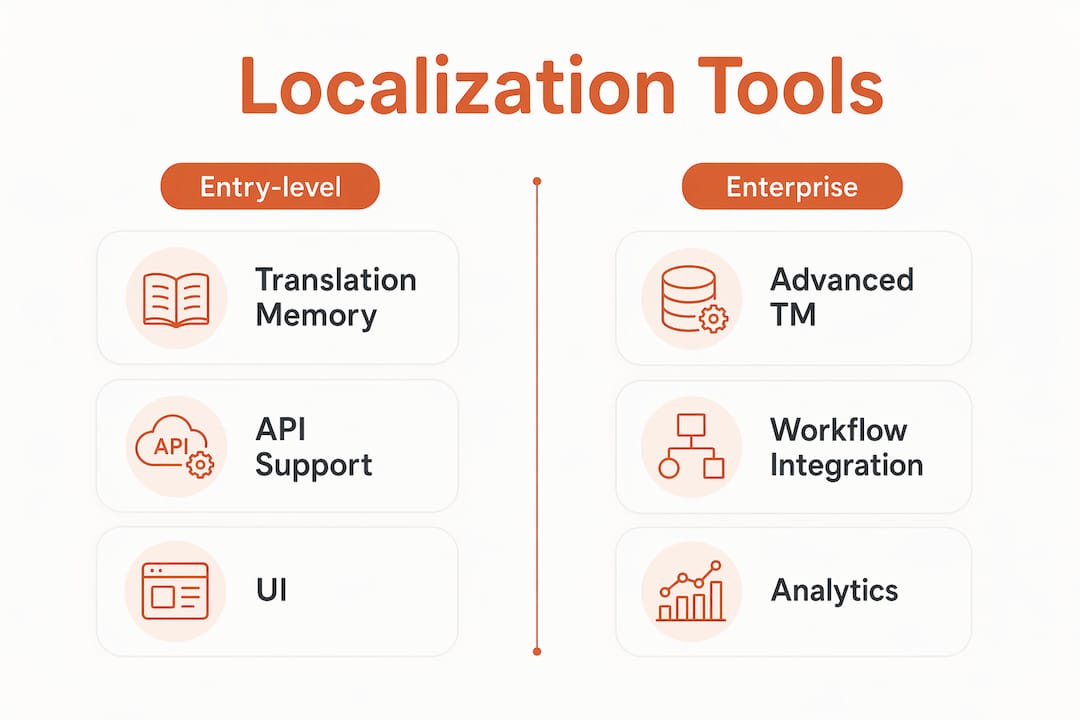
The table below compares feature categories you should evaluate when selecting localization tooling for your translation start site.
Feature category | Entry-level platforms | Enterprise platforms |
|---|---|---|
Translation memory | Basic, single project | Cross-project, shared memory |
API integration | Limited or manual export | Full CI/CD pipeline support |
In-context editing | Not available | Real-time, in-product editing |
Glossary enforcement | Manual reference | Automated terminology checks |
Collaboration | Single translator | Multi-role workflows with review |
Pro Tip: When you integrate localization early in the design phase, you catch text expansion problems before they reach engineering. A German string is often 30% longer than its English equivalent. Catching that in Figma costs minutes. Catching it in production costs days.
What common mistakes and troubleshooting steps occur when starting a translation site?
The most damaging mistake is treating localization as a post-development task. Late integration of translation management causes layout breakage, inconsistent strings, and release delays that compound with every sprint. Teams that hardcode UI strings directly into source code create a situation where every future update requires a developer to manually extract and re-submit content.
A second critical failure is relying on consumer browser extensions as a primary translation method. These tools are built for individual users who want to translate a webpage to English for personal reading. They are not built for product teams managing hundreds of strings across multiple locales with brand consistency requirements.
Common pitfalls to watch for include:
Hardcoded strings. Any text embedded directly in code rather than stored in resource files cannot be managed by a localization platform. This forces manual extraction later.
Missing string context. Translators who receive strings without knowing where they appear in the UI produce inaccurate translations. A word like “Save” means different things in different contexts.
No text expansion planning. Languages like Finnish or Arabic can expand or contract text significantly compared to English. Layouts that do not account for this break visually.
Skipping translation memory. Teams that do not build translation memory from the start pay to translate the same content repeatedly across product updates.
Late translator onboarding. Translators who join after strings are finalized cannot flag ambiguities or cultural issues that affect quality.
“Successful localization infrastructure relies on early extraction of strings and integration into the development pipeline. Late-stage translation creates bottlenecks and UI breakage that are expensive to fix and easy to avoid with upfront planning.”
When you encounter layout breakage after translation, the fix is almost always the same: go back to the design phase, add text expansion buffers, and retest with the longest target language. When you find inconsistent terminology across locales, audit your glossary and run a find-and-replace across the translation memory before the next release.
How to optimize and scale your translation start site over time
Scaling localization is not about translating more content faster. It is about building a system that handles ongoing updates without manual intervention at every step. Successful teams implement continuous localization workflows synchronized with product releases rather than treating translation as a one-time project.

The localization best practices that separate high-performing teams from struggling ones come down to three habits: automate string handoffs, measure quality continuously, and treat translators as product stakeholders.
Specific practices that drive scale:
Automate string pushes and pulls. Every new string should flow automatically from your codebase to your localization platform and back. Manual handoffs introduce delays and errors.
Track translation coverage by locale. Know what percentage of your product is translated in each language at any given time. Gaps in coverage create inconsistent user experiences.
Use quality metrics, not just delivery speed. Measure translation accuracy, consistency with the glossary, and native speaker approval rates. Speed without quality creates rework.
Run retrospectives after each release. Identify what slowed down translation in the last sprint and fix the process before the next one.
Expand locales incrementally. Add one or two new languages per quarter rather than launching ten at once. This keeps quality high and the team’s workload manageable.
For teams building on software development infrastructure, connecting localization tooling to existing CI/CD pipelines is the fastest path to continuous delivery of translated content.
Key Takeaways
A translation start site is the infrastructure, roles, and workflows that make software localization possible. Getting it right from the start prevents the layout breakage, inconsistent strings, and release delays that plague teams who treat localization as an afterthought.
Point | Details |
|---|---|
Define the term clearly | A translation start site in software is an infrastructure entry point, not a genetic sequence. |
Appoint a Translation Manager first | This role must be in place before any strings are extracted or submitted for translation. |
Externalize all strings early | Hardcoded strings are the leading cause of localization failure and expensive to fix late. |
Use professional platforms, not browser tools | Consumer extensions cannot replace translation memory, API integration, or workflow controls. |
Build for continuous localization | Synchronize translation workflows with product releases to avoid one-time bottlenecks. |
Why most teams get the translation start site wrong
I have watched product teams delay localization until two weeks before a global launch more times than I can count. The pattern is always the same. The team assumes translation is a simple task you hand off to a vendor at the end. Then they discover that half their strings are hardcoded, their UI breaks in German, and their brand voice sounds robotic in Japanese. The panic that follows is entirely avoidable.
The teams that get this right share one habit: they treat the translation manager role the same way they treat the engineering lead role. They hire for it early, give it authority over the roadmap, and fund it properly. The teams that struggle treat localization as a cost center rather than a product capability.
My practical suggestion is this: before you write a single line of UI copy, ask whether your localization platform is configured, your glossary is drafted, and your Translation Manager has reviewed the design. If the answer to any of those is no, you are already behind. The right localization workflow does not slow down product development. It removes the bottlenecks that would otherwise appear at the worst possible moment.
— Antoine
Gleef’s Figma plugin at your translation start site
The hardest part of setting up a localization entry point is getting design and translation to work together without constant context switching. Gleef’s AI-powered Figma plugin puts translation management directly inside the design tool your team already uses. Designers see translations in context, translation memory prevents duplicate work, and glossary rules enforce brand voice automatically.
Gleef fits naturally at the translation start site stage because it catches text expansion issues, missing strings, and terminology gaps before they reach engineering. Teams using Gleef report faster release cycles and measurably better translation consistency. If you are building your localization infrastructure now, starting inside Figma is the most efficient path to a production-ready translate site.
FAQ
What is a translation start site in software development?
A translation start site in software development is the infrastructure entry point where localization workflows, tools, and roles are first established. It includes string extraction, translation memory setup, and platform configuration.
How is a software translation start site different from the biological term?
In biology, the translation start site is the AUG codon that initiates protein synthesis. In software, it refers to the organizational and technical setup that begins a localization project, with no connection to genetics.
What does a Translation Manager do at the start of a localization project?
A Translation Manager sets up the CMS, onboards translators, enforces quality standards, and coordinates the full translation workflow from the first string to final approval.
Why are browser extensions not enough for product localization?
Browser extensions translate content on demand for individual users but lack translation memory, API integration, and workflow controls. Product teams need centralized platforms to maintain consistency across all locales.
When should a product team start building its translation infrastructure?
Translation infrastructure should be in place before UI copy is written. Late integration causes hardcoded strings, layout breakage, and release delays that are costly to fix.