
TL;DR:
Localization gap causes engagement drop in new markets due to cultural and contextual misalignment.
Effective UX localization requires comprehensive preparation, context-rich content, and cross-team collaboration.
Rigorous quality assurance combining automation and human review ensures localized UX clarity and cultural fit.
You’ve spent months building a product your team is proud of. The design is sharp, the flows are intuitive, and the copy feels just right. Then you launch in a new market and watch engagement crater. Users drop off at onboarding. Error messages confuse instead of guide. The experience that felt bulletproof in English crumbles the moment it meets a different language and culture. This is the localization gap, and it’s more common than most product teams admit. This guide walks you through every stage of UX writing localization, from initial assessment to quality assurance, so your product feels native everywhere it lands.
Key Takeaways
Point | Details |
|---|---|
Preparation matters | Clear requirements and stakeholder involvement are key to successful UX writing localization. |
Follow stepwise process | A structured workflow improves adaptation accuracy and reduces errors. |
Quality assurance is essential | Thorough review and testing ensure a seamless user experience across global markets. |
Solve localization challenges | Anticipating and troubleshooting common issues keeps your project on track and effective. |
Preparation: Assessing localization needs and gathering requirements
Before a single string gets translated, you need a clear picture of what you’re actually localizing. Many teams jump straight to handing off files to a translator, only to discover halfway through that they missed entire content categories, skipped compliance requirements, or forgot to loop in the right people. That’s an expensive mistake.
Start by defining the full scope of your UX content. This typically includes:
UI text: buttons, labels, tooltips, navigation items
Help content: FAQs, onboarding guides, in-app tutorials
Error messages and system notifications
Legal and compliance copy: terms of service, privacy notices, consent dialogs
Marketing-adjacent UX copy: empty states, success messages, upsell prompts
Each category has different sensitivity to tone, length, and cultural nuance. Error messages, for example, need to be direct and reassuring without sounding robotic. Onboarding copy needs to feel warm and locally appropriate.
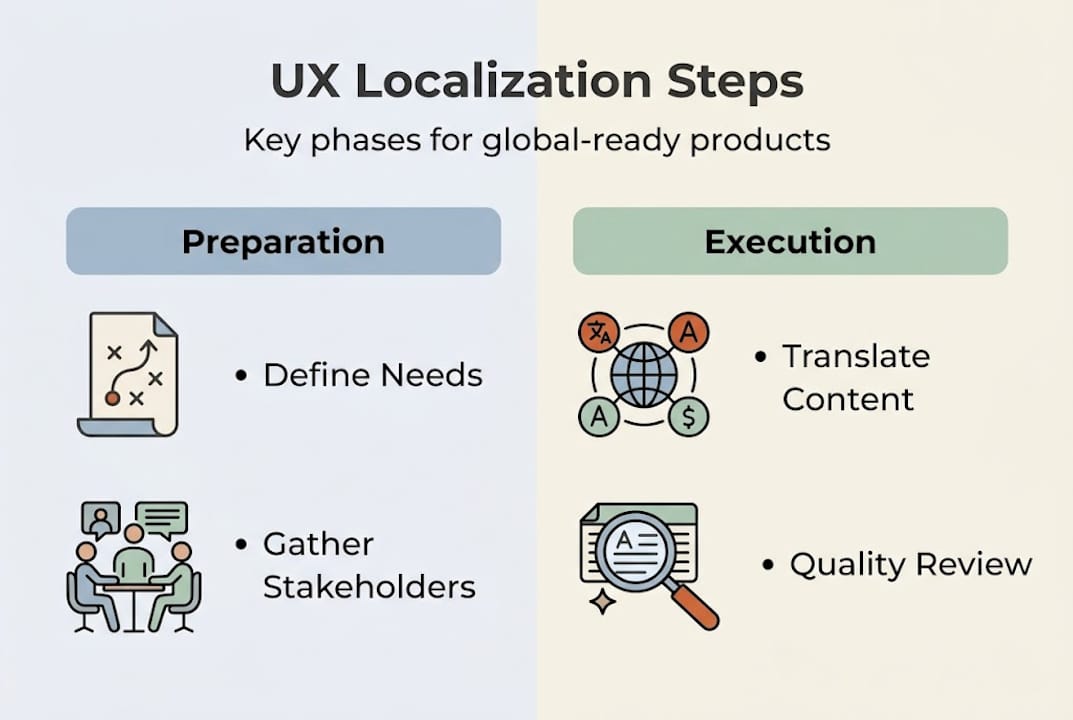
Next, define your core requirements. Which languages are you targeting? What platforms need to be supported (iOS, Android, web, desktop)? Are there regional compliance rules that affect how certain content must be phrased? A product localization strategy that answers these questions upfront saves weeks of rework later.
Then identify your stakeholders. A successful localization project needs translators with UX expertise, UX writers who can brief them properly, QA engineers who test in-context, and product managers who keep timelines realistic. As UX localization best practices make clear, effective UX localization requires a coordinated approach among product teams, not just a handoff to a language vendor.
Finally, choose your tools. Here’s a quick comparison of what to look for:
Feature | Basic translation tools | Specialized localization platforms |
|---|---|---|
In-context editing | No | Yes |
Glossary management | Limited | Full support |
Translation memory | Basic | Semantic, AI-powered |
Figma integration | No | Yes (e.g., Gleef) |
QA automation | No | Built-in |
Collaboration features | Email-based | Real-time, role-based |
The right platform makes every downstream step faster and more accurate. Don’t treat tool selection as an afterthought.
Step-by-step process: Executing UX writing localization
With your requirements locked in and your team assembled, it’s time to execute. A structured workflow keeps quality high and prevents the chaotic back-and-forth that derails most localization projects.
Here’s the workflow that works:
Extract all user-facing content from your product systematically. Use your platform’s export feature or a dedicated localization tool to pull every string. Never rely on manual copy-paste.
Organize content by context and priority. Group strings by screen, user journey stage, and content type. High-traffic screens and critical flows (onboarding, checkout, error states) go first.
Prepare context-rich briefing materials. Provide translators with screenshots, user flow diagrams, character limits, and notes on tone. Context is the single biggest factor in translation quality.
Translate and culturally adapt. This is where effective product localization separates itself from simple word-for-word translation. Idioms, humor, formality levels, and even button labels need cultural calibration.
Run a linguistic review. Have a native-speaking UX writer or editor review the translated content for naturalness, not just accuracy.
Implement and test in-context. Push translated strings into the actual product and review them in the UI before final sign-off.
Validate and iterate. As the UI localization step guide emphasizes, validation steps are crucial to ensure quality and accuracy in UX localization.
Here’s how automatic and manual approaches compare at each stage:
Stage | Automatic localization | Manual localization |
|---|---|---|
Speed | Fast | Slow |
Cultural nuance | Limited | High |
Consistency | High (with memory) | Variable |
Cost at scale | Low | High |
Best for | High-volume, structured strings | Marketing copy, nuanced UX text |
A hybrid approach, using AI for speed and human review for nuance, is almost always the winning strategy. Tools that streamline localization process for global teams make this hybrid model practical even for lean teams.

Pro Tip: Always give translators a screenshot of every string in context, along with the user’s goal at that moment in the flow. A “Submit” button on a payment screen carries different weight than one on a feedback form. That context changes the right word choice in many languages.
Verification and quality assurance: Ensuring localized UX excellence
Localization without QA is a gamble. You might get lucky, or you might ship a product that confuses users in ways your team can’t even read. Systematic quality assurance is what turns a localization project into a localization success.
Your QA process should cover three layers:
Linguistic accuracy: Is the translation correct, natural, and consistent with your glossary?
UI alignment: Do translated strings fit their containers? Text expansion is a real problem. German and Finnish strings, for example, can run 30 to 40 percent longer than their English equivalents.
Functional testing: Do all interactive elements work correctly in the localized build? Date pickers, number formats, currency symbols, and right-to-left layouts all need hands-on testing.
Beyond these three layers, involve local stakeholders in iterative review cycles. A native speaker on your team or a regional partner can catch cultural missteps that automated tools will never flag. Cross-functional localization ensures globally consistent UX, and that consistency depends on human judgment as much as tooling.
Common QA practices that high-performing teams use:
Pseudo-localization testing before real translations are ready (replace characters to simulate expansion and special characters)
Side-by-side comparison of source and target UI screenshots
User testing with native speakers in target markets
Automated string validation for missing translations, truncation, and placeholder errors
Glossary compliance checks to ensure brand terms are used consistently
One of the most persistent causes of localization errors is missing context. When translators work without seeing the UI, error rates spike. Studies on localization tool challenges consistently show that context deprivation is a root cause of quality failures in traditional workflows.
Pro Tip: AI-driven QA tools can flag inconsistencies, missing translations, and glossary violations at scale, in seconds. Pair them with a human linguistic review for a QA process that’s both fast and bulletproof.
Troubleshooting common issues in UX writing localization
Even well-prepared teams hit walls. Knowing what those walls look like before you hit them is a genuine competitive advantage. Product teams frequently encounter obstacles when localizing UX writing, and most of those obstacles fall into predictable categories.
Technical issues are often the first to surface. Character encoding problems can turn accented characters into garbled symbols. Platform limitations may restrict string length or prevent dynamic text rendering. Right-to-left language support requires layout changes that go far beyond swapping text.
Cultural missteps are subtler but more damaging. Idioms that work in English often land flat or offensive in other languages. Formal versus informal address (the “you” problem in French, German, Japanese, and many others) can make your product feel cold or inappropriately casual. Color symbolism, iconography, and even number formatting carry cultural weight that pure translation ignores.
Workflow snags slow everything down. Version control issues arise when developers update source strings without notifying the localization team. Reviewer delays create bottlenecks, especially when regional experts are in different time zones. Scope creep, adding new strings late in the cycle, breaks translation memory and forces expensive rework.
Common localization mistakes to watch for:
Translating strings without providing UI context
Hardcoding text that should be externalized for translation
Ignoring locale-specific formatting for dates, currencies, and units
Failing to test bidirectional text layouts
Using machine translation without human review for user-facing copy
Skipping glossary creation, leading to inconsistent brand terminology
How localization impacts UX is most visible when these mistakes compound. A single cultural misstep in an error message can erode trust in an entire market.
“The teams that succeed at global localization treat it as a product discipline, not a translation task. They build feedback loops with real users in each market, iterate on copy the same way they iterate on features, and never assume that linguistic accuracy equals user clarity.” — Gleef localization team
Our perspective: Why successful UX localization goes beyond translation
Here’s the uncomfortable truth most localization guides won’t tell you: translation is the easy part. The hard part is building a product that feels like it was made for a specific market, not just converted for it.
We’ve seen product teams invest heavily in translation quality only to see retention numbers disappoint in new markets. The culprit is almost always cultural fit, not linguistic accuracy. A perfectly translated onboarding flow can still feel foreign if it assumes cultural behaviors, references, or norms that don’t resonate locally.
The teams that win globally treat UX in localization as a design problem, not a language problem. They involve local users in feedback cycles early. They test copy with real people in target markets before launch, not after. They build glossaries that encode brand voice and cultural tone, not just terminology.
Our hard-won lesson: the most valuable input you can get isn’t from a professional translator. It’s from a real user in your target market who tells you that your success message feels awkward, or that your error copy sounds aggressive. That feedback is worth more than any QA checklist.
Unlock global product success with Gleef’s localization solutions
You now have a clear, actionable framework for taking UX writing localization from chaotic to controlled. But knowing the steps and having the right tools to execute them are two different things.

Gleef localization solutions are built specifically for product teams like yours. Gleef brings AI-powered translation, semantic translation memory, in-context editing, and Figma integration into one platform, so your UX writers, designers, and developers can collaborate without switching tools or losing context. Whether you’re launching in two new markets or twenty, Gleef gives your team the speed, accuracy, and consistency to ship localized products with confidence. Explore how Gleef can become your localization engine.
Frequently asked questions
What is UX writing localization?
UX writing localization means adapting user interface text and content for specific languages and cultures to ensure clarity and engagement. It goes beyond word-for-word translation to include cultural tone, formatting conventions, and UI content adaptation for each target market.
What are the essential steps in UX writing localization?
The key steps are preparing requirements, extracting content, translating and adapting, reviewing quality, and troubleshooting issues. Each step builds on the last, and skipping validation steps is one of the most common causes of localization failure.
How can product teams ensure quality in localized UX?
Teams should use linguistic review, local stakeholder feedback, and iterative QA testing to guarantee high-quality UX localization. Cross-functional quality assurance that combines automated checks with human review consistently produces the best results.
What are common mistakes in UX localization?
Typical mistakes include lack of cultural adaptation, missing context for translators, and inadequate QA processes. Addressing localization key challenges early, especially context gaps and workflow bottlenecks, prevents the most costly errors.