
TL;DR:
Internationalization (i18n) prepares software to support multiple languages and regions without additional code changes.
It involves designing architecture that separates language and cultural data from core code, enabling easier localization.
Internationalization, abbreviated as i18n, is defined as the software engineering process that prepares a codebase to support multiple languages and regions without requiring further code changes. The abbreviation itself is a numeronym for internationalization, counting the 18 letters between the initial “i” and the final “n.” Every product team building for global markets needs to understand what i18n means before writing a single line of locale-specific code. Get it right early, and localization becomes a predictable, repeatable process. Skip it, and you face expensive rework every time you enter a new market.
What does i18n mean in software development?
i18n means designing your software architecture so that language, region, and cultural formatting are fully separated from the core application logic. The W3C defines internationalization as enabling content to work across cultures, regions, and languages without structural changes to the underlying system. That separation is the entire point. When your strings, date formats, and currency symbols live outside your code, swapping them for a new locale costs hours, not weeks.
The numeronym style that gave us i18n originated in the 1970s and 1980s. Engineers needed shorthand for long compound words, and “internationalization” at 20 characters was a prime candidate. The same logic produced l10n for localization and a10y for accessibility. These abbreviations are now standard across the W3C, Unicode Consortium, and virtually every major software organization.
A product that skips i18n groundwork forces engineers to touch the codebase every time a new language is added. That is not a localization problem. It is an architecture problem. Teams that treat i18n as a checkbox at the end of a release cycle consistently pay more and ship slower than teams that build it in from day one.
What is the difference between i18n and l10n?
Internationalization and localization are related but distinct processes. i18n is the engineering foundation. l10n is the content and cultural work that runs on top of it.
Internationalization (i18n) prepares the system. Localization (l10n) fills it with locale-specific content. According to Oracle’s Java internationalization documentation, i18n enables adaptation to various languages and regions without engineering changes, while localization is the subsequent process of adapting the product for a specific locale.
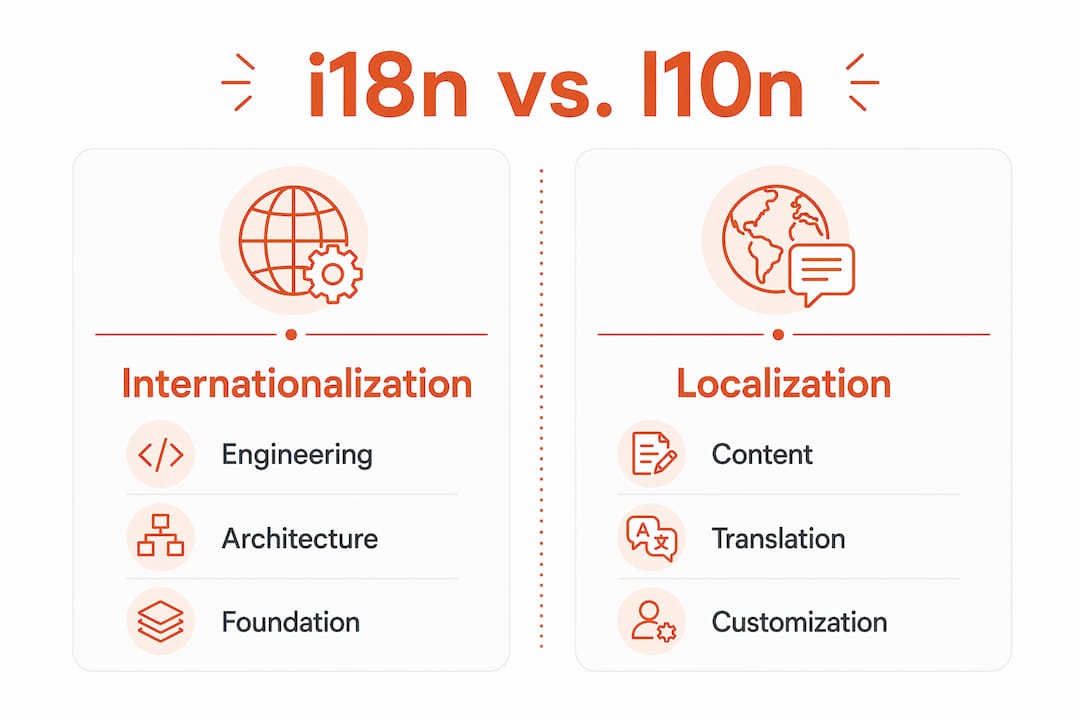
Dimension | i18n | l10n |
|---|---|---|
Who owns it | Engineering and architecture | Translators, UX writers, localization managers |
When it happens | During product design and build | After i18n groundwork is complete |
What it covers | Code structure, Unicode, string externalization | Text translation, UI layout, cultural content |
Output | A locale-ready codebase | A market-ready product |
Failure cost | High: requires code changes per locale | Medium: requires content rework per locale |
A common misconception is that translation alone equals localization. It does not. Localization includes adjusting UI layouts for text expansion, adapting imagery for cultural relevance, reformatting dates and currencies, and sometimes rewriting copy entirely for a different cultural register. None of that is possible without proper i18n underneath it.
Teams that conflate i18n with translation end up with brittle products. They translate strings but leave date formats hardcoded, currency symbols embedded in logic, and layouts that break when German text expands 30% beyond its English equivalent. Proper i18n prevents all of that.
Why does i18n involve more than just text translation?
The most dangerous assumption in software localization is that swapping strings is enough. True i18n manages a set of linguistic and formatting challenges that simple translation cannot address.
Here is what i18n must handle beyond text:
Pluralization rules. English has two plural forms: singular and plural. Arabic has six. Russian has three. A string like “You have 1 message” cannot be handled with a single translation. Pluralization rules differ dramatically across languages, and software must accommodate them automatically.
Gender variations. Many languages assign grammatical gender to nouns and adjectives. A UI string that works in English may require four different forms in French or Spanish depending on the subject.
Text direction. Arabic, Hebrew, and Persian read right to left. RTL support requires layout mirroring, not just text substitution.
Locale-sensitive formatting. Dates, times, numbers, and currencies all follow different conventions. January 5, 2026 is 05/01/2026 in the UK and 01/05/2026 in the US. A price of 1,000.50 in American English is 1.000,50 in German.
Interpolation and context. Dynamic strings like “Welcome back, {name}!” must handle variable placement that differs by language grammar.
Pro Tip: Use the Unicode CLDR (Common Locale Data Repository) as your reference for locale-specific formatting rules. It covers over 900 locales and is the data source behind most major i18n frameworks.
The Unicode standard is the non-negotiable foundation for all of this. Any codebase not built on Unicode will fail at the character encoding level before it even reaches pluralization or RTL layout. Separating translatable content from code is equally critical. Hardcoded strings are the single most common i18n failure mode in production software.
How do modern frameworks support i18n implementation?
Engineering teams do not need to build i18n systems from scratch. Established frameworks handle the hard parts reliably and reduce the risk of brittle custom solutions.

i18next is one of the most widely adopted i18n frameworks in the JavaScript ecosystem. It provides built-in support for plurals, context, interpolation, formatting, and a plugin architecture that extends to virtually any platform. Teams using i18next get a production-tested solution for complex linguistic data that would take months to replicate internally.
The table below shows the core capabilities product teams should evaluate in any i18n framework:
Feature | Why it matters |
|---|---|
Pluralization engine | Handles language-specific plural rules automatically |
Context support | Delivers different translations based on UI context |
Interpolation | Manages dynamic variables within translated strings |
Locale formatting | Formats dates, numbers, and currencies per locale |
Plugin ecosystem | Extends to backends, caches, and localization platforms |
Framework integrations | Works with React, Vue, Angular, and mobile stacks |
Beyond JavaScript, most major language ecosystems have mature i18n libraries. Java has built-in internationalization support through its java.util package. Python uses GNU gettext and Babel. iOS and Android each ship with native localization APIs. The cross-platform framework you choose for mobile development will also determine which i18n tools integrate most naturally.
Pro Tip: Integrate your i18n framework with a translation management system early. Connecting string extraction directly to your localization workflow eliminates the manual handoff that causes version drift between developers and translators.
The biggest mistake teams make is building a custom string management system because it “seems simpler.” Custom systems rarely handle pluralization edge cases, never support all locale formatting rules, and create a maintenance burden that grows with every new language. Established frameworks exist because the problem is genuinely hard. Use them.
What are best practices for implementing i18n in product development?
Early architectural decisions for i18n reduce costly rework and improve global user experience. The following practices give product teams the strongest foundation.
Adopt Unicode from the start. Use UTF-8 encoding across your entire stack, including databases, APIs, and file storage. Any encoding inconsistency will corrupt characters in production.
Externalize all user-facing strings. No hardcoded text in source code. Every string that a user sees belongs in a resource file or translation catalog. This is the single most impactful i18n decision you can make.
Design for text expansion. German and Finnish text routinely runs 30–40% longer than its English equivalent. UI components need flexible layouts, not fixed-width containers.
Build locale-aware data handling. Date pickers, number inputs, and currency fields must read locale settings and format output accordingly. Do not rely on the server’s default locale.
Plan for RTL from day one. If there is any chance your product will support Arabic, Hebrew, or Persian, build RTL layout support into your CSS architecture early. Retrofitting RTL into an existing codebase is one of the most painful engineering tasks in localization.
Test with real locale data. Use actual locale strings during QA, not placeholder text. Pseudo-localization tools can simulate text expansion and special characters before translations are ready.
Create a continuous collaboration loop. Developers, product managers, UX writers, and localization teams must share a single source of truth for strings. Siloed workflows produce version drift, missing keys, and inconsistent terminology. Platforms that support localization best practices make this collaboration visible and auditable.
Products that fail to internationalize early face higher costs and user frustration when expanding globally. The rework cost of retrofitting i18n into a mature codebase is consistently higher than building it in from the beginning. That is not a theory. It is the experience of every engineering team that has tried to localize a product that was never designed for it.
Key takeaways
Internationalization (i18n) is the engineering foundation that makes localization possible, and teams that build it in early ship to global markets faster and at lower cost.
Point | Details |
|---|---|
i18n is an architecture decision | Separating strings and locale data from code is the core i18n requirement, not an optional enhancement. |
i18n and l10n are distinct processes | i18n is engineering work done before localization; l10n is content and cultural adaptation that follows. |
Translation alone is not enough | Pluralization, RTL support, and locale formatting require dedicated i18n systems beyond string swapping. |
Use established frameworks | Tools like i18next handle plurals, context, and formatting reliably and reduce custom-build risk. |
Build i18n in early | Retrofitting internationalization into a mature codebase costs significantly more than designing for it upfront. |
Why most teams underestimate i18n until it’s too late
Every product team I have worked with that skipped proper i18n paid for it. Not in a vague, “this slowed us down” way. In a concrete, “we had to rewrite the data layer before we could ship in Japan” way. The pattern is almost always the same: the team treats i18n as a translation task, hands it to a localization vendor, and then discovers that the codebase has hardcoded strings, locale-insensitive date logic, and a UI that physically cannot accommodate Arabic.
The uncomfortable truth is that i18n is an engineering discipline, not a content task. It belongs in your architecture review, your design system, and your definition of done. The moment you treat it as something that happens after the product is built, you have already created a debt that will cost real time and real money to repay.
What I find most encouraging is that the tooling has never been better. Frameworks like i18next, mature Unicode standards, and platforms built specifically for localization workflows mean there is no excuse for starting from scratch. The hard problems are solved. Teams just need to use the solutions that exist rather than reinventing them under deadline pressure.
The teams that get this right share one trait: they treat localization as a product capability, not a one-time project. They build translation standards into their workflow, they test with real locale data, and they keep developers and localization experts in the same conversation. That cross-disciplinary collaboration is what turns i18n from a technical checkbox into a genuine competitive advantage.
— Antoine
Gleef CLI: built for developers who take i18n seriously
Knowing what i18n means is the first step. Having the right tooling to act on it is what separates teams that ship globally from teams that stall at the localization handoff.
Gleef CLI is built specifically for developers managing i18n localization workflows in modern product environments. It brings AI-powered translation directly into your development process, with semantic translation memory, glossary enforcement, and in-context editing that keeps your strings consistent across every locale. No more version drift between your codebase and your translation files. No more release blockers because a key was missing in production. Gleef CLI connects your engineering workflow to a localization process that actually keeps pace with your release cycle.
FAQ
What does i18n stand for?
i18n stands for internationalization. The abbreviation counts the 18 letters between the initial “i” and the final “n” in the word.
What is the difference between i18n and l10n?
i18n is the engineering process that prepares software to support multiple locales. l10n is the subsequent process of adapting content, UI, and cultural elements for a specific locale.
Is i18n the same as translation?
No. i18n is an architectural process covering Unicode support, string externalization, pluralization, and locale formatting. Translation is one small part of the broader localization (l10n) process that follows.
Why does i18n matter for product teams?
Products that skip i18n require code changes for every new language, which increases cost and slows global expansion. Building i18n in early makes localization a repeatable, low-friction process.
What frameworks support i18n in JavaScript?
i18next is one of the most widely used JavaScript i18n frameworks. It supports plurals, context, interpolation, and locale-sensitive formatting through a plugin-based architecture.