
TL;DR:
Translation memory stores approved source and target segments for reuse, reducing costs and maintaining consistency across projects. It categorizes matches into exact and fuzzy, with fuzzy matches offering significant discount benefits. Managing TMs with discipline ensures long-term value, and integrating them with terminology databases enhances localization quality.
A translation memory ™ is a database that stores pairs of source and target language segments, called translation units, so approved translations can be reused across future projects. Every localization team working at scale depends on TMs to maintain consistency, cut costs, and protect brand voice across languages. A mature TM can reduce new translation volume by 30% to 70%, directly shrinking both project budgets and turnaround times. That kind of efficiency is not a bonus. It is the foundation of any serious multilingual content operation.
What is a translation memory and how does it work?

A translation memory stores source and target text as paired segments called translation units. Each unit captures one sentence, phrase, or UI string alongside its approved translation. When a translator opens a new document, the TM software scans each incoming segment and compares it against stored units, then surfaces the closest match.
The matching process produces two categories of results:
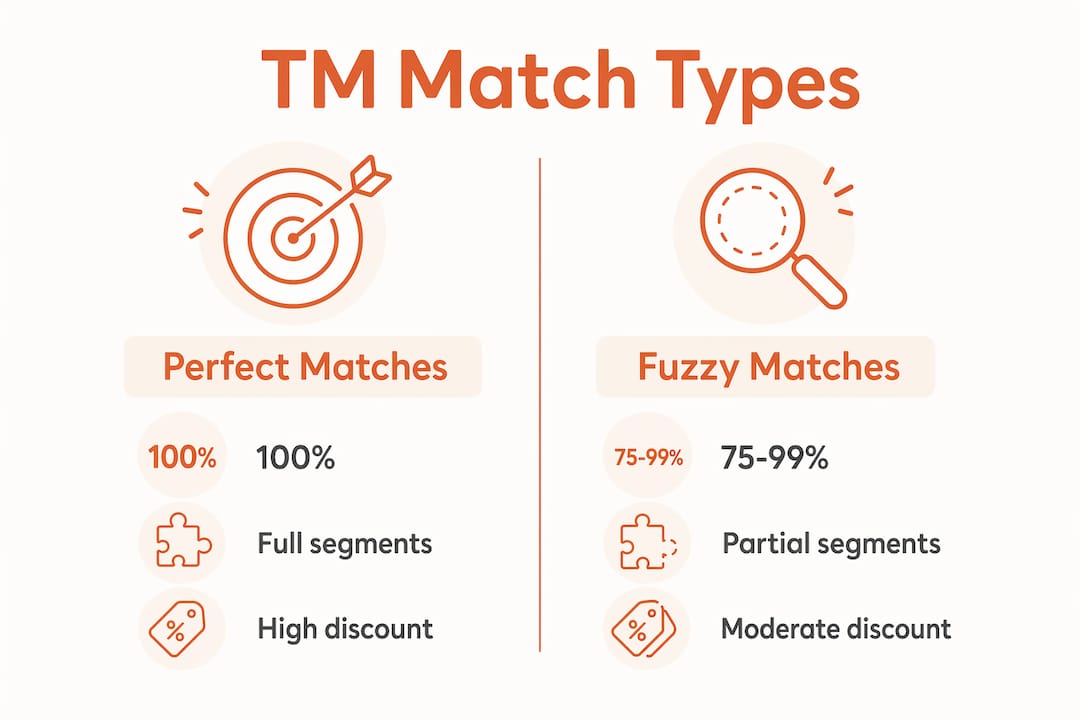
Exact matches (100%): The incoming segment is identical to a stored unit. The TM supplies the translation automatically, and the translator confirms or accepts it with minimal effort.
Fuzzy matches (75%–99%): The incoming segment is similar but not identical. The TM suggests the closest stored translation, and the translator edits it to fit the new context.
TM systems categorize matches as 100% perfect matches and fuzzy matches in the 75%–99% similarity range, with human review required for fuzzy results. Pricing models reflect this distinction directly.
Match type | Similarity range | Typical discount applied |
|---|---|---|
Perfect match | 100% | 75%–100% off standard rate |
High fuzzy match | 85%–99% | 30%–50% off standard rate |
Low fuzzy match | 75%–84% | 15%–30% off standard rate |
No match | Below 75% | Full rate, no discount |
In a 5,000-word document update, TM leverage yields roughly 37% cost savings through discounts on exact and fuzzy matches. That figure compounds across a product with hundreds of recurring UI strings or a technical manual updated quarterly.
Pro Tip: Set your TM match threshold at 75% minimum. Accepting suggestions below that threshold often creates more editing work than starting from scratch.
What content types benefit most from translation memory?
Translation memory delivers the highest return on content with high repetition, recurring updates, or strict terminology requirements. Not every project type qualifies, but the ones that do see dramatic efficiency gains.
The strongest use cases include:
Software UI strings: Button labels, error messages, and menu items repeat across versions. A TM prevents re-translating “Save changes” or “Access denied” every release cycle.
Technical documentation: User manuals and API references reuse standard phrases across chapters and product versions. TM stores those approved phrasings and surfaces them instantly.
Product catalogs: Descriptions for similar SKUs share sentence structures. TM matches those patterns and reduces translator effort on each new product entry.
Marketing content with recurring brand language: Taglines, disclaimers, and value propositions appear across campaigns. TM locks in approved language so brand voice stays consistent across markets.
Multiyear projects: Long-running engagements accumulate institutional knowledge inside the TM. Each new phase builds on previously approved language rather than starting fresh.
Translation memory stores source and target text in translation units, preserving terminology and brand voice over years for consistent localization. That preservation is especially valuable for regulated industries where legal and compliance language cannot vary between documents or markets.
A product team shipping quarterly updates to a SaaS platform, for example, will find that most of its UI strings already exist in the TM after the first two releases. By the third release, the team is largely confirming matches rather than translating from scratch.
How do translation memory and terminology databases differ?
Translation memory and terminology databases, called termbases, solve different problems. Confusing the two is one of the most common mistakes in localization workflow design.
TM stores full sentence or paragraph segments, while termbases store individual terms and controlled vocabulary. A TM answers the question: “Has this sentence been translated before?” A termbase answers the question: “What is the approved translation for this specific word or phrase?”
Here is how they complement each other in practice:
Feature | Translation memory | Termbase |
|---|---|---|
Unit stored | Full segments (sentences, phrases) | Individual terms and definitions |
Primary function | Reuse approved translations | Enforce terminology consistency |
Scope | Project or client level | Brand or domain level |
Typical content | UI strings, documentation, marketing copy | Product names, legal terms, technical vocabulary |
Update frequency | Grows with each project | Maintained as a controlled reference |
A medical device company, for example, keeps a termbase with approved translations for “contraindication,” “adverse event,” and “sterile field” across all target languages. The TM then stores full sentences that use those terms correctly. When a new document arrives, the TM suggests the sentence, and the termbase flags any term that deviates from the approved vocabulary. The two systems work together, but practitioners manage TMs separately from termbases because they serve different consistency needs: sentence-level versus terminology-level control.
For a deeper look at how these two assets interact in real localization stacks, the TM vs. glossary breakdown from Gleef covers the practical differences with concrete examples.
Pro Tip: Build your termbase before you populate your TM. Approved terminology locked in early prevents inconsistent segments from entering the TM and compounding errors across future projects.
How to manage translation memory for long-term value
A TM is only as good as the discipline behind it. Poorly maintained memories fill with outdated segments, inconsistent terminology, and cross-project noise that slows translators down rather than speeding them up.
Keep TMs client-specific and project-specific. Generic or cross-industry TMs risk low accuracy and inefficient editing time. A TM built for a fintech client should never be applied to a healthcare project. The vocabulary, tone, and regulatory language are too different.
Run regular quality checks. Schedule quarterly reviews to identify and remove outdated segments. A segment approved three years ago may reflect a discontinued product name or a superseded legal requirement. Stale segments mislead translators and introduce errors.
Audit fuzzy match quality. Not all 80% matches are useful. Review accepted fuzzy matches periodically to confirm that translators are improving them rather than accepting them uncritically. Poor fuzzy match acceptance is the fastest way to degrade TM quality.
Integrate TM with your CAT tool and localization workflow. A TM sitting in isolation delivers no value. It must connect to the tools your translators use daily so suggestions surface automatically during translation. Translation memories increase efficiency by suggesting previously approved translations, speeding delivery and maintaining terminology consistency.
Treat your TM as institutional knowledge. Institutional knowledge in TMs safeguards critical compliance and legal language, reducing liability and brand risk. When a key translator leaves a project, the TM preserves their approved work. That continuity is irreplaceable on long-running or regulated projects.
Separate write access from read access. Not every team member should be able to add segments to the TM. Restrict write access to senior translators or project managers who have reviewed the output for quality. Open write access is the primary cause of TM pollution.
For teams managing complex multilingual pipelines, translation process optimization at the workflow level compounds the gains from a well-maintained TM.
Pro Tip: Create a “gold” TM layer for your highest-confidence segments. Flag these as locked so they are never overwritten by fuzzy match acceptance or machine translation output.
Key Takeaways
Translation memory is the single most effective tool for reducing translation costs and maintaining linguistic consistency across multilingual product releases.
Point | Details |
|---|---|
Core definition | A TM stores source-target segment pairs called translation units for reuse across projects. |
Match categories matter | Exact matches cut costs by up to 100%; fuzzy matches (75%–99%) still yield 30%–50% discounts. |
Best content types | Software UI, technical documentation, and product catalogs deliver the highest TM return. |
TM vs. termbase | TMs store full segments; termbases store individual terms. Manage both separately for full consistency control. |
Maintenance is non-negotiable | Client-specific, regularly audited TMs outperform generic or neglected memories every time. |
Why translation memory is your localization team’s most undervalued asset
Most localization teams treat translation memory as a cost-saving tool. I think that framing undersells it by a wide margin. The real value of a mature TM is institutional knowledge, and that is something no machine translation engine can replicate on its own.
I have seen product teams lose months of approved linguistic work because they never formalized their TM strategy. A translator leaves, a vendor relationship ends, or a platform migration wipes the database. Without a disciplined TM, all of that approved language is gone. With one, it survives every personnel change and every tool switch.
The other misconception I encounter regularly is that TM and AI translation are interchangeable. They are not. A TM complements but does not replace AI or machine translation. TM stores approved, human-reviewed segments. AI generates new translations. The two serve different functions, and the strongest localization workflows use both in combination, with TM acting as the quality anchor.
My honest advice to any localization professional building a TM strategy: start narrow. Build one client-specific TM with strict write access controls before you think about scaling. A small, clean TM outperforms a large, polluted one every single time. The teams I have seen get the most from their TMs are the ones who treat it like a legal document: nothing goes in without review, and nothing comes out without a reason.
— Antoine
How Gleef brings translation memory into your design workflow
Product teams often hit a painful gap: their TM lives in a translation tool while their design work lives in Figma. Every update means switching platforms, exporting strings, and hoping nothing breaks in transit.
Gleef closes that gap. The Gleef Figma Plugin integrates AI-powered translation memory directly into your design environment, so your team manages translations in context without leaving Figma. Gleef’s semantic translation memory surfaces approved segments as you work, enforces terminology consistency, and keeps brand voice intact across every language and every release. For product teams shipping globally on tight timelines, that kind of integration is not a convenience. It is a release blocker removed.
FAQ
What is a translation memory in simple terms?
A translation memory is a database that stores pairs of source and target language text segments. When a new document contains a sentence that matches a stored segment, the TM suggests the approved translation automatically.
How does fuzzy matching work in a TM?
Fuzzy matching identifies segments that are similar but not identical to stored translation units, typically in the 75%–99% similarity range. The TM surfaces the closest match, and a translator edits it to fit the new context.
What is the difference between a translation memory and a glossary?
A translation memory stores full translated segments at the sentence or phrase level. A glossary, or termbase, stores individual approved terms. Both tools work together but serve different consistency functions in a localization workflow.
Why use translation memory for software localization?
Software UI strings repeat heavily across product versions, making them ideal for TM reuse. Teams avoid re-translating identical strings each release and maintain consistent terminology across every language.
How should localization teams manage translation memory quality?
Teams should keep TMs client-specific, run quarterly quality audits, restrict write access to reviewed translators, and remove outdated segments regularly. Following translation project management best practices prevents TM pollution and preserves long-term accuracy.