
TL;DR:
Translation simulation uncovers UI issues before real translations are added, saving time and costs.
It involves replacing source strings with modified text to test layout, encoding, and RTL support.
Integrating pseudo-localization into development workflows improves global readiness and reduces localization delays.
Most product teams assume localization begins the moment they hand off strings to a translator. That assumption is expensive. Before a single real translation lands in your codebase, your UI can already be broken, your layouts can already be collapsing, and your encoding can already be failing silently. Translation simulation, commonly known as pseudo-localization or pseudo-translation, is a software testing technique used in internationalization (i18n) to simulate the effects of real translations without actual translation work. This guide will show you exactly what it is, how it works, and why your product team needs it before your next global release.
Key Takeaways
Point | Details |
|---|---|
Simulation defined | Translation simulation (pseudo-localization) mimics real translations to catch UI and text problems early. |
Early problem detection | By simulating translations, teams can fix bugs before the costly localization and launch stages. |
Business impact | Simulation accelerates go-to-market and creates a better user experience for global products. |
Best practices | Integrate simulation into every release cycle and automate reporting for maximum ROI. |
What is translation simulation?
Now that we’ve challenged a common assumption about when localization really begins, let’s clearly define what translation simulation actually means and why it matters.
Translation simulation is the practice of replacing source language strings with modified, visually distinct text that mimics the characteristics of translated content. It doesn’t require real translated words. Instead, it uses altered characters, extended string lengths, and special symbols to stress-test your UI before a single human translator gets involved. You may also hear it called pseudo-localization or pseudo-translation. These terms are used interchangeably across product and engineering teams.
“Translation simulation is a software testing technique used in internationalization (i18n) to simulate the effects of real translations without actual translation work.”
The primary goal is simple: catch problems early. When you simulate translation, you expose your product to conditions it will face in real markets without waiting for actual localized content. This is the difference between proactive and reactive localization. Understanding the distinction between translation vs localization helps clarify why simulation belongs at the i18n layer, not the translation layer.
Here’s what translation simulation is specifically designed to expose:
String overflow: Text that expands beyond UI containers when translated into verbose languages like German or Finnish
Encoding errors: Characters that fail to render correctly due to missing Unicode support
Layout breakage: Buttons, labels, and navigation elements that collapse or overlap under longer strings
Hardcoded strings: Text baked directly into the code that never gets sent to translators
Missing placeholders: Variables or dynamic content that breaks when string formatting changes
Right-to-left (RTL) issues: Layout failures that appear when mirrored text simulates Arabic or Hebrew
Each of these issues, if left undetected, becomes a defect that surfaces during actual localization. That means rework, delayed releases, and frustrated engineers. Translation simulation is your first line of defense.

How translation simulation works: The process step by step
With a strong understanding of what translation simulation is, let’s see how the actual process unfolds for modern product teams.
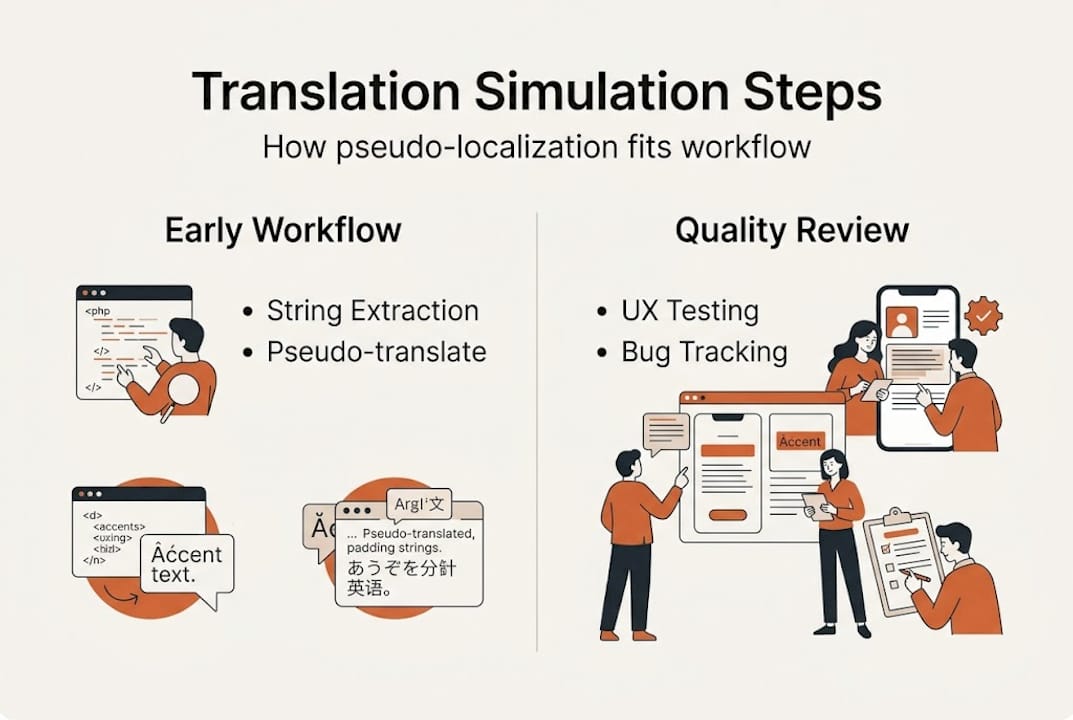
The workflow is straightforward, but it needs to be deliberate. Here’s how it typically runs inside an agile sprint cycle:
Extract all strings. Pull every localizable string from your codebase, including UI labels, error messages, tooltips, and notifications. Use your i18n framework’s extraction tool to create a source file (usually JSON, XLIFF, or PO format).
Apply pseudo-localization transformations. Run the extracted strings through a pseudo-localization tool. Common transformations include adding accents to Latin characters (e.g., “Hello” becomes “Héllö”), expanding string length by 30 to 50 percent to simulate verbose languages, and wrapping strings in brackets to spot untranslated content at a glance.
Inject pseudo-localized strings into a test build. Replace the source strings in a staging or QA build with the pseudo-localized versions. This creates a pseudo-localized build that your team can interact with and test.
Run functional and visual QA. Navigate every screen, flow, and edge case. Look for broken layouts, clipped text, missing strings, and encoding failures. Document every defect with screenshots and string references.
Mirror the layout for RTL simulation. Apply character mirroring to simulate right-to-left languages. This reveals RTL-specific layout bugs that standard LTR testing completely misses.
Log findings and fix before translation begins. Feed every defect back into your sprint backlog. Resolve i18n issues while the code is still fresh, before real translators are blocked by broken contexts.
Translation simulation can be automated within development workflows to catch linguistic and UI issues early. Integrating pseudo-localization into your CI/CD pipeline means every build gets tested automatically. Tools like i18n-ally, Pseudolocalization.js, or custom scripts can run transformations on every pull request. This keeps your i18n health visible without adding manual overhead. The same way personalization and localization work best when built into the product from the start, simulation works best when it’s wired into your pipeline, not bolted on at the end.
Pro Tip: Involve your UX writers and QA engineers from the very first pseudo-localized build. UX writers catch context issues (strings that make no sense when expanded), while QA catches layout failures. Their combined input creates a much tighter feedback loop than engineering alone.
Why translation simulation matters for global-ready products
Understanding the mechanics is essential, but let’s dig into why simulation is a game-changer for product teams aiming at seamless global rollouts.
Translation simulation prevents launch delays by uncovering problems that are hard to see in monolingual builds. The impact on your team’s efficiency and your product’s quality is significant. Here’s a side-by-side comparison:
Factor | With translation simulation | Without translation simulation |
|---|---|---|
Bug detection timing | Early, during development | Late, during or after localization |
Engineering rework cost | Low (fix in source code) | High (fix across all locales) |
Translator productivity | High (clean, complete strings) | Low (broken context, missing strings) |
Launch timeline risk | Minimal | High (localization blockers common) |
UX consistency across markets | Strong | Inconsistent, locale-dependent |
The business case is clear. Consider this: if a single i18n bug discovered post-localization requires fixes across 10 language versions, you’re multiplying engineering effort by 10. Catch it with simulation before translation starts, and you fix it once.
Key benefits your team gains from translation simulation:
Earlier bug detection that costs a fraction of post-localization fixes
Saved engineering hours by eliminating last-minute localization firefighting
Improved UX consistency across every market you enter
Faster go-to-market because your localization pipeline isn’t blocked by avoidable defects
Better translator experience because clean, complete strings produce better translations
Understanding how localization impacts UX makes it clear why simulation is a UX investment, not just a QA task. And when you consider the real impact of software localization, the ROI of catching bugs early becomes undeniable.
Pro Tip: Run a quick ROI estimate before your next release. Count the number of i18n bugs found in your last localization cycle, multiply by the average fix time per bug, then multiply by the number of target locales. That number, often measured in days of engineering time, is what simulation can save you.
So why do teams still skip it? Usually because it feels like extra work upfront, or because teams assume their existing QA process covers it. It doesn’t. Monolingual QA is blind to the conditions that only appear under translation.
Industry best practices for effective pseudo-translation
Having seen the value, here’s how top product and localization teams put simulation into action with repeatable practices.
Adopting best practices in translation simulation reduces technical debt and accelerates global releases. Here’s what separates teams that get results from teams that treat it as a checkbox:
Do’s and don’ts for implementing simulation:
Do run pseudo-localization on every release candidate, not just major versions
Do assign clear ownership: developers own string extraction and build injection, QA owns defect logging, UX writers own context review
Do document all findings in a shared QA tool (Jira, Linear, or similar) with string keys and screenshots
Do test RTL simulation separately from text expansion, as they surface different bug classes
Don’t treat pseudo-localization as a one-time setup task. It needs to run continuously
Don’t skip simulation for minor UI updates. Small changes can introduce new string overflow issues
Don’t rely on manual pseudo-localization when automation is available
Pitfall | Why it happens | How to avoid it |
|---|---|---|
Skipping RTL simulation | Teams only target LTR markets initially | Always include RTL even if launch is LTR-only |
Hardcoded strings missed | Developers bypass i18n framework | Lint rules to enforce i18n function usage |
No ownership assigned | Simulation seen as shared responsibility | Assign explicit roles per sprint |
Findings not tracked | Verbal QA feedback lost in standup | Mandatory ticket creation for every defect |
Automation not set up | Perceived as complex to configure | Use lightweight scripts in CI/CD from day one |
For collaborative translation tips that complement simulation, align your QA findings with your translation quality metrics so your entire localization pipeline stays consistent. If you’re building a full localization strategy, the digital product translation guide is a strong companion resource.
Pro Tip: Automate string extraction and pseudo-localization as a single CI/CD step triggered on every pull request. Use a lightweight Node.js script or a dedicated i18n testing library. This makes simulation invisible to developers while keeping your i18n health continuously monitored.
What most teams miss: The hidden value of simulation-driven localization
Best practices are powerful, but there’s a perspective on simulation that can reshape entire team cultures for better product outcomes.
Here’s the uncomfortable truth: most teams that skip translation simulation aren’t lazy. They’re just thinking about it wrong. They see simulation as a QA task, something that belongs in a checklist between code freeze and release. That framing keeps it marginal and easy to cut when timelines get tight.
The teams that win in global markets treat simulation as a design principle. They build it into how they think about UI components, string design, and layout flexibility from the very first sprint. When simulation is a design principle, your product is architected to be globally ready, not retrofitted for it.
True global readiness comes not from last-minute translation, but from simulating the journey long before real users arrive.
This shift also transforms team collaboration. When UX writers, developers, QA, and product managers all engage with pseudo-localized builds regularly, they develop shared intuition about what a globally resilient product looks like. That shared intuition is a competitive advantage. Addressing localization key challenges becomes far easier when your whole team has already stress-tested the product through simulation. The ROI isn’t just in bugs prevented. It’s in the alignment, speed, and confidence your team gains every single release cycle.
Accelerate your localization workflow with Gleef
If you’re ready to bring best-in-class simulation to your workflow, here’s how to take the next step.
Gleef is built for exactly this kind of work. As a platform designed for product teams, Gleef makes it possible to visualize, manage, and iterate on translations directly within your existing design and development environment. The Gleef Figma Plugin lets your team preview how translated strings look inside real UI components before a single line of production code changes, giving you simulation-level insight without the manual overhead.

With the Gleef platform, you get AI-powered translation memory, in-context editing, and seamless collaboration across product managers, UX writers, and developers. Everything your team needs to make translation simulation a natural, repeatable part of every sprint. Stop discovering localization bugs after the fact. Start simulating, start shipping globally with confidence.
Frequently asked questions
What is the main goal of translation simulation?
Translation simulation aims to catch text and UI issues early by mimicking real translation effects before localization begins, so your team fixes problems while they’re still cheap to fix.
How is pseudo-localization different from actual translation?
Pseudo-localization uses modified source strings to simulate translation visually, while actual translation replaces content with real target language text produced by human or AI translators.
What issues can translation simulation uncover?
Simulation can reveal string overflow, encoding errors, missing placeholders, hardcoded strings, and RTL layout failures that are completely invisible in standard monolingual builds.
When should product teams use translation simulation?
Teams should integrate pseudo-localization into early development cycles and run it on every release candidate, not just at major version milestones.
Does translation simulation slow down development?
No. Simulation reduces launch risks and delivers earlier fixes, saving far more time than it costs, especially when automated inside your CI/CD pipeline.