
TL;DR:
Maintaining translation consistency across global markets is crucial for user trust, brand integrity, and compliance.
Implementing shared glossaries, translation memories, and custom machine translation models enables scalable, high-quality localization.
Inconsistent translations are more than an editorial headache. They erode user trust, undermine brand identity, and can even create compliance problems in regulated markets. For product teams scaling into global markets, maintaining translation consistency across dozens of languages, hundreds of components, and rapid release cycles is genuinely hard. This guide walks you through the full arc: from understanding what’s at stake, to building the right resources, to executing bulletproof workflows and continuously measuring your results. Every step is practical, every recommendation is battle-tested, and the payoff is a localized product that feels native everywhere it lands.
Key Takeaways
Point | Details |
|---|---|
Invest in core resources | Glossaries and translation memory are the foundation for scalable, consistent localization. |
Automate early and often | Workflow integration and automated checks boost efficiency and reduce human error. |
Continuously measure success | Test suites and benchmark-driven reviews validate consistency and inform improvements. |
Foster culture, not just tech | Lasting translation consistency depends on shared ownership and clear communication across teams. |
Translation consistency: What’s at stake and what you’ll need
Translation consistency means that identical or equivalent source content is always rendered the same way in the target language, regardless of who translated it or when. That sounds straightforward. In practice, though, it breaks down fast as teams grow, tools fragment, and release pressure mounts.
Why it matters beyond just “sounding right”
Inconsistent terminology confuses users and increases support volume. Imagine a product that labels the same action “Sign out” in one screen and “Log off” in another, translated into three different equivalents across a Spanish app. Users lose confidence. Worse, in medical, financial, or legal software, inconsistent translations can create genuine regulatory risk. The importance of app localisation for user retention and compliance is growing, not shrinking, as more global markets demand native-language experiences.
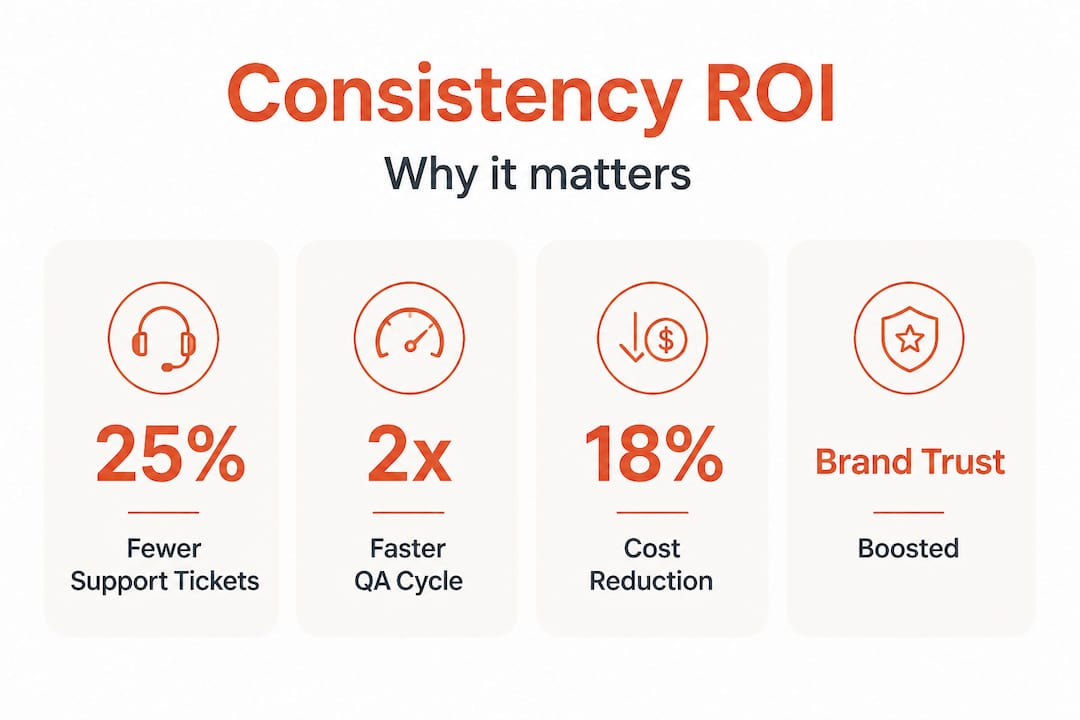
There’s also a direct ROI case. Translation quality metrics consistently show that inconsistency adds rework cycles, which compounds costs across every release. And if you’re wondering whether automation can really move the needle: WMT25 benchmarks show 93.1% accuracy in top-performing machine translation systems, with consistency improving 38.5% when comparative judgment methods (side-by-side MQM review) are applied. That’s not a marginal gain. That’s a transformation.
What every team needs before starting
Before you execute, make sure your foundation is solid. Here’s what should be in place:
A shared, versioned glossary covering brand terms, product names, and UI labels
A translation memory ™ system connected to your localization pipeline
Defined translation quality standards documented and accessible to every contributor
Clear role assignments: who owns terminology, who approves, who flags anomalies
Tooling that supports in-context review so translators see strings in their real UI context
Core tools and requirements at a glance
Tool or resource | Purpose | Priority |
|---|---|---|
Glossary | Enforce brand and product terms | Critical |
Translation memory ™ | Reuse approved segments | Critical |
Style guide | Define tone, formality, and register | High |
Automated QA tool | Catch consistency errors at scale | High |
In-context editor | Reduce translator ambiguity | Medium |
Custom MT model | Align machine output to domain/style | Medium |
With the stakes clear, now let’s set your team up for success with the right tools and principles.
Set up for success: Glossaries, translation memories, and custom MT
With your prerequisites and tools mapped out, the next step is putting them to work effectively.
Build a glossary that actually gets used
A glossary is only powerful if it’s alive. That means it needs to be maintained, versioned, and accessible inside the tools your team already uses. The most effective glossaries cover three layers: brand terms (product names, trademarks), UI vocabulary (button labels, menu items, status messages), and domain-specific terminology (industry jargon your users will recognize). Glossary management best practices point to a consistent failure mode: teams build glossaries at project kickoff and never update them as the product evolves. Don’t let that be you.
Your glossary should flag which terms are forbidden (terms you’ve explicitly retired), which are preferred (your canonical translations), and which are context-dependent. For example, “account” might translate differently in a banking app versus a social platform, even within the same language. Building that nuance into your glossary from the start saves painful reconciliation later.
Translation memory: the consistency engine
Translation memory works by storing previously approved translation segments and automatically suggesting them when the same or similar source content appears again. When configured well, TM systems eliminate the single biggest cause of inconsistency: multiple translators independently rendering the same string differently over time.

The key is keeping your TM clean. Outdated segments that reflect old UI copy or retired terminology will actively hurt consistency if they’re not flagged or removed. Translation memory systems work best when they’re integrated directly into your CI/CD pipeline, so translations are pulled and validated automatically rather than managed as a separate, manual step.
Custom machine translation for domain and style alignment
Off-the-shelf machine translation engines are powerful, but they’re generic. They don’t know your brand voice, your audience’s register expectations, or your product’s specific domain vocabulary. Adaptive MT uses example pairs for style consistency, meaning you can train a custom model on your own approved translations to dramatically improve style and terminology alignment right out of the gate.
“The shift from generic MT to domain-tuned adaptive models is where teams stop fighting their translation tools and start scaling with them. Style alignment isn’t a luxury, it’s the foundation of consistent localization at speed.”
This matters most for teams releasing frequently. When you’re shipping weekly or bi-weekly, you need machine output you can trust as a starting point, not a source of new inconsistencies to clean up. Combine custom MT with your glossary and TM for a system where every output is already anchored to your standards before a human reviewer touches it.
Pro Tip: Set a quarterly review cycle for all three resources: your glossary, your TM, and your custom MT training data. Product language evolves faster than most teams realize, and even a single outdated “preferred” term in your glossary can propagate inconsistency across thousands of strings. Schedule the review before your major release cycles, not after.
For a deeper look at how this fits into your broader product translation process, make sure your localization workflows are documented end to end.
Execute consistently: Integrate workflows and automate checks
With solid resources in hand, it’s time to turn process into practical workflow.
A standard workflow for consistent translations
Consistency doesn’t happen by accident. It happens because every team member knows exactly what step they’re responsible for and what “done” looks like. Here’s a proven workflow sequence:
Extract and prepare strings using your localization platform, tagging context for each string (screen name, component type, character limits).
Run glossary and TM matching automatically before any human or machine translation begins, so every string starts with approved terminology pre-applied.
Apply custom MT for first-pass translation on new or fuzzy-matched segments, using your domain-tuned model.
Run pseudo-localization in your CI/CD pipeline to catch layout and UI issues before human review. Pseudolocalization and CI pipeline integration catches expansion and RTL rendering problems early, when they’re cheapest to fix.
Human review with in-context editing for linguist approval and style refinement, with direct access to the live UI or a pixel-accurate prototype.
Automated QA checks to flag missing translations, inconsistent terminology, placeholder errors, and formatting anomalies.
Final approval and deployment, with TM updated to include any newly approved segments.
This sequence treats consistency as a process output rather than a hoped-for result. Every step either enforces or verifies it. Check out developer localization best practices for tips on embedding steps 4 and 6 directly into your build pipeline.
Manual QA vs. automated checks: know when to use each
Check type | Best for | Limitations |
|---|---|---|
Manual QA | Nuanced style, cultural accuracy, tone | Slow, expensive, not scalable |
Automated QA | Terminology, placeholders, formatting, completeness | Misses contextual or cultural nuance |
Side-by-side MQM review | Consistency scoring, benchmarking quality | Requires trained reviewers |
Pseudo-localization | Layout, expansion, RTL, encoding issues | Not a substitute for linguistic QA |
The reality is that manual and automated checks are complementary, not competing. Use automation to handle volume and catch structural errors. Use human review to validate what machines can’t fully assess: tone, cultural resonance, and subtle register mismatches.
Pro Tip: Configure your automated QA tool to flag anomalies in real time as new strings are translated, not just at end-of-sprint review. AI and content consistency tools can detect terminology drift instantly, giving your team feedback while context is still fresh and corrections are cheap.
Measure, adapt, and improve: Consistency evaluation and iteration
You’ve implemented best-in-class processes. Now make sure you’re actually delivering the consistency you expect.
How to measure translation consistency in practice
Measurement should be baked into your localization workflow, not bolted on at the end. The most reliable approach combines automated test suites with human evaluation at key intervals. Linguistic test suites work by running a standardized set of source strings through your translation pipeline and comparing output against validated reference translations. They give you a quantitative consistency score you can track over time.
Comparative judgment methods, specifically side-by-side MQM (Multidimensional Quality Metrics) review, add another layer. Reviewers compare two translation variants of the same source segment and score which is more consistent with your standards. WMT25 benchmarks show consistency improves 38.5% with this approach compared to single-sample evaluation. That gap is significant enough to make comparative review a standard part of your quality cycle, especially for high-visibility product areas.
When user feedback should override automated scores
Automated metrics are powerful, but they can give you false confidence. A string can pass every automated check and still feel unnatural to native speakers. Build a lightweight feedback loop: in-app translation feedback buttons, localization-specific user testing at launch, and regular review with in-market linguistic consultants. When user feedback consistently flags a particular type of inconsistency that your automated tools are missing, treat that as a signal to update your QA rules, not just fix the individual strings.
Actionable practices for continuous consistency improvement
Review TM and glossary updates at every major product milestone, not just annually
Score new releases against your baseline consistency benchmark, tracking trend over time rather than absolute numbers
Conduct post-release audits for any language market where support tickets spike, treating translation inconsistency as a likely contributing factor
Run comparative review sprints before entering a new market, applying side-by-side MQM to your highest-traffic strings first
Document edge cases that reveal gaps in your glossary or TM, and route them through a formal update process within 48 hours of discovery
Pair these practices with robust translation quality metrics tracking to see exactly where your pipeline is performing and where it needs reinforcement.
Why translation consistency is more mindset than toolset
Here’s an uncomfortable truth that years of watching localization programs succeed and fail makes unavoidable: most consistency failures aren’t tool failures. They’re ownership failures.
Teams invest in glossaries, deploy translation memories, configure custom MT models, and still ship inconsistent localization. Why? Because no one agreed on who owns terminology decisions. Because the linguist doesn’t know the product manager changed the UI label last sprint. Because the developer integrated a new component and no one thought to flag it for the localization team. Technology just amplifies whatever coordination culture already exists. If that culture is siloed and reactive, even the best tooling will produce inconsistent results.
The teams that consistently deliver high-quality, consistent localization at scale share one trait: they treat translation as a cross-functional discipline, not a downstream task. Product managers, UX writers, developers, and linguists share responsibility for the localization pipeline. They communicate proactively about changes that affect translations. They review cross-functional localization strategies not as a compliance exercise but as a genuine commitment to their global users.
This also means being honest about why traditional localization tools fail. Many teams inherit legacy workflows that were never designed for agile product development. Bolting modern automation onto a fundamentally fragmented process produces marginal gains at best. Real improvement requires rethinking who owns what, how changes are communicated, and how consistency is defined and enforced as a shared team value. The mindset shift is harder than the tooling upgrade. And it’s far more consequential.
Supercharge your localization consistency with Gleef
Ready to raise your standard for translation consistency? Here’s where to start.
Gleef is purpose-built for product teams who need localization to work at the speed of modern product development. The platform combines semantic translation memory, AI-powered glossary enforcement, and in-context editing in one connected workspace, so your team stops chasing consistency manually and starts building it structurally.

With Gleef, your glossaries and translation memories are active inside the tools your team already uses, including a native Figma localization plugin that lets designers and UX writers manage translations without ever leaving their design environment. Automated consistency checks, rules-based standards, and real-time QA feedback mean problems get caught before they reach production. Explore the full Gleef localization platform to see how teams are cutting rework cycles, accelerating releases, and delivering native-quality experiences in every market they serve.
Frequently asked questions
What is the fastest way to improve translation consistency in a product team?
Implementing standardized glossaries and translation memories is the most effective quick win, as Adaptive MT uses example pairs for style consistency and these resources immediately anchor every translation to approved standards. Getting these tools connected to your active translation pipeline delivers measurable consistency gains within your first release cycle.
How do you check for consistency automatically?
Automated QA tools and linguistic test suites measure translation consistency reliably at scale, with top MT systems reaching 93.1% accuracy and comparative judgment methods boosting consistency scores significantly. Configure these tools to flag anomalies in real time rather than waiting for end-of-sprint batch reviews.
Why does translation consistency break down in agile releases?
Rapid iteration introduces new strings and UI changes faster than glossaries and translation memories can be updated, creating gaps where new content falls outside approved standards. Insufficient communication between product and localization teams compounds the problem, especially when feature changes aren’t flagged before strings are extracted.
What is pseudolocalization and how does it help?
Pseudolocalization replaces real source text with simulated translated content to expose layout, encoding, and UI logic issues before actual translation begins, as CI pipeline integration catches expansion and RTL rendering problems at the earliest possible stage. Running it automatically in your build pipeline means translation-breaking bugs are discovered and fixed before any linguist time is spent on the affected strings.