
TL;DR:
Product localization involves adapting digital products to feel native in specific regions by addressing UI, content, payments, and support. Successful implementation requires cross-functional teams, integrated tools, and an eight-step workflow to ensure quality and timely releases. Viewing localization as a product decision, not just translation, enables faster global deployment and more authentic user experiences.
Product localization is defined as the process of adapting a digital product’s interface, content, and overall experience so it feels native to users in a specific region or culture. The industry term for the technical groundwork is internationalization (i18n), while localization (l10n) is the market-facing execution layer built on top of it. Done right, localization acts as downside-control that lets you launch in new markets with a ready experience rather than retrofitting one later. This guide covers every layer of the process: the surfaces you must adapt, the teams and tools required, the eight-step workflow that keeps releases on schedule, and the technical traps that sink otherwise solid global launches.
What core elements make product localization work?
Successful localization covers five market-facing surfaces: the user interface, content, payment and compliance layer, support experience, and go-to-market approach. Each surface requires a different skill set and a different toolchain. Treating them as one undifferentiated task is the fastest way to ship a product that feels foreign even after translation.
The cross-functional team behind a strong localization program typically includes:
Product managers who own market scope, prioritization, and release timelines
Engineers who build locale-aware architecture and integrate APIs
UX writers and translators who produce source and target copy
Bilingual reviewers who validate translations in real UI context
Localization managers who coordinate files, vendors, and quality gates
Tools tie these roles together. A translation management system (TMS) centralizes files, translators, reviewers, terminology resources, and quality checks in one platform. Design tools like Figma, when connected to a localization platform, let UX writers and translators work in context without exporting and reimporting assets. Standards like Unicode CLDR MessageFormat provide the data backbone that makes plural forms, gender agreements, and culture-aware formatting work correctly at scale.
Pro Tip: Build a shared glossary before your first translation sprint. Terminology drift across markets is one of the most expensive problems to fix after launch, and a glossary managed inside your TMS prevents it from the start. Gleef’s glossary feature enforces these standards automatically across every translation.

How to run an eight-step localization workflow
A repeatable workflow is what separates teams that ship localized products on schedule from teams that treat translation as a last-minute fire drill. The eight steps below form a complete localization lifecycle, from initial scoping through post-launch iteration.
Scope the market. Define target locales, required surfaces, and compliance requirements before any content moves.
Prepare source files. Extract strings into a standard format (JSON, XLIFF, or PO) and tag them with context metadata.
Share context. Provide translators with screenshots, component descriptions, and character limits for every string.
Translate. Run strings through your TMS, applying translation memory and glossary rules to maintain consistency.
Review. A bilingual reviewer validates translations against the live UI, catching text expansion, truncation, and placeholder errors that a translator working in isolation cannot see.
QA. Run automated linguistic and functional checks: broken variables, missing plurals, layout overflow.
Build and deploy. Merge localized files into the product build and run a locale-specific smoke test.
Monitor post-release. Track locale-specific support tickets, error logs, and user feedback to identify translation gaps.
The table below maps each step to its primary owner and the tool category that supports it.
Step | Primary Owner | Tool Category |
|---|---|---|
Scope | Product Manager | Market research, roadmap tools |
File prep | Engineer | i18n libraries, string extraction |
Context sharing | UX Writer | Design tools, screenshot capture |
Translation | Translator | TMS, translation memory |
Review | Bilingual Reviewer | In-context editing platform |
QA | QA Engineer | Automated linguistic QA tools |
Build | Engineer | CI/CD pipeline, locale config |
Post-release | Product Manager | Analytics, support dashboards |
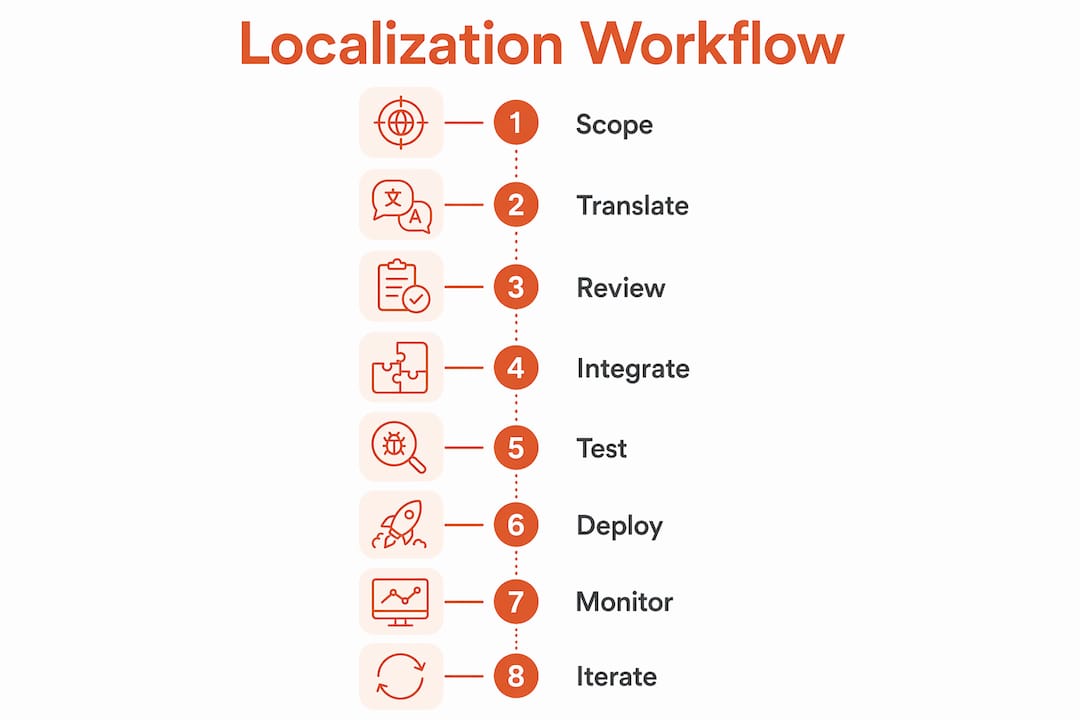
Continuous localization integrated with CMS and design tools is the mechanism that scales this workflow beyond a single launch. When your TMS connects directly to your repository and design environment, new strings route automatically to translators the moment they are created. That removes the manual handoff that causes most release delays.
Pro Tip: Set up a locale-specific staging environment before step seven. Catching layout breaks in staging costs a fraction of what a hotfix costs in production, especially for right-to-left languages where the entire UI mirrors.
What technical considerations matter for UI and engineering teams?
Engineering is where many localization programs quietly break down. The code compiles, the strings are translated, and the product still feels wrong because the locale-specific formatting logic was never built in. UI localization requires handling pluralization, date formats, currency, number formats, and bidirectional text for languages like Arabic and Hebrew. These are not edge cases. They are standard requirements for any product targeting more than one region.
The JavaScript Intl API provides locale-aware formatting of dates, numbers, currencies, and plural rules with no additional bundle size or performance penalty. It is built into every modern browser. Most engineering teams underuse it, relying instead on custom formatting logic that breaks the moment a new locale is added.
Key technical requirements to build into your product architecture:
Pluralization rules via
Intl.PluralRules, which handles the six plural categories defined by Unicode CLDRNumber and currency formatting via
Intl.NumberFormat, which automatically applies locale-correct separators and symbolsDate and time formatting via
Intl.DateTimeFormat, which respects calendar systems and regional conventionsBidirectional text support using CSS logical properties and the HTML
dirattribute, not hardcoded left-to-right layoutString externalization so no user-facing text is hardcoded in components
The comparison below shows the difference between a locale-naive and a locale-aware implementation for a single number.
Locale | Locale-Naive Output | Locale-Aware Output (Intl API) |
|---|---|---|
en-US | 1234567.89 | 1,234,567.89 |
de-DE | 1234567.89 | 1.234.567,89 |
ar-SA | 1234567.89 | ١٬٢٣٤٬٥٦٧٫٨٩ |
fr-FR | 1234567.89 | 1 234 567,89 |
The difference is not cosmetic. A German user reading a period as a decimal separator will misread a price by three orders of magnitude. Getting this right is a trust issue, not just a formatting issue.
How to troubleshoot common localization quality problems
The most damaging localization failures do not come from bad translations. They come from standardizing market-facing logic that should actually adapt locally. Pricing structures, onboarding flows, and support workflows that work in your home market often feel alien when applied unchanged to a new region. The product reads as translated but not adapted, which is the definition of a foreign-feeling experience.
Three failure patterns appear repeatedly across global product launches:
Workflow mismatch: The product’s onboarding assumes a payment method or identity verification flow that does not exist in the target market.
Brand structure errors: Local brand elements are translated literally rather than adapted to regional naming conventions and tone.
UI-specific translation errors: Strings are correct in isolation but break in context due to text expansion, truncated labels, or mismatched placeholder grammar.
Bilingual in-context review is the quality gate that catches the third category. A reviewer working inside the live UI sees truncated buttons, overflowing tooltips, and grammatically awkward placeholder interpolations that a translator reviewing a spreadsheet never encounters. This review step is distinct from translation and cannot be skipped without accepting quality risk.
“Localization is not a translation problem. It is a product architecture problem that translation makes visible.” This framing, drawn from practitioners at Metheus Consultancy, captures why quality fixes must start upstream in product decisions, not downstream in string files.
Post-launch monitoring closes the loop. Locale-specific support ticket volume, app store reviews filtered by region, and in-product error rates by locale are the signals that tell you where the next iteration should focus. Build these dashboards before launch, not after your first bad review cycle.
Which product localization platforms should product teams evaluate?
The product localization software comparison question comes down to four capability areas: automation, translation memory, design tool integration, and glossary management. Every serious platform covers these to some degree. The differences show up in how deeply each capability integrates with your existing product stack.
Capability | Traditional TMS | Modern AI-Powered Platform |
|---|---|---|
Translation memory | File-based, manual sync | Semantic, auto-applied |
Design integration | Export/import workflow | Native Figma plugin, in-context |
Glossary enforcement | Manual review | Automated rules-based enforcement |
Continuous localization | Batch releases | CI/CD connected, string-level triggers |
In-context editing | Separate review environment | Embedded in design or staging |
For SaaS and digital product teams, the most important differentiator is design-localization integration. When translators and UX writers work inside the same design environment your product team uses, the review cycle compresses from days to hours. Context is visible, character limits are enforced automatically, and the back-and-forth between design and localization collapses.
Automating language workflows for faster global deployment is the other major lever. Platforms that connect directly to your Git repository or CMS trigger translation jobs the moment new strings are committed. That removes the manual handoff step that causes most release delays in batch-based workflows.
When evaluating platforms, prioritize these criteria in order: API access for CI/CD integration, native design tool support, semantic translation memory, and glossary enforcement. Team scale matters too. A five-person startup needs a different configuration than a 200-person product organization running releases across 15 locales simultaneously.
Key takeaways
Effective product localization requires treating adaptation as a product discipline, not a translation task, with integrated tooling, cross-functional ownership, and continuous iteration.
Point | Details |
|---|---|
Localize all five surfaces | Adapt UI, content, payments, support, and go-to-market approach for each target market. |
Build locale-aware engineering | Use the Intl API and Unicode CLDR to handle plurals, currencies, and bidirectional text correctly. |
Run in-context review | Bilingual review inside the live UI catches truncation, overflow, and placeholder errors translation alone misses. |
Integrate your toolchain | Connect your TMS to your CMS, design tools, and CI/CD pipeline to enable continuous localization. |
Monitor post-launch by locale | Track support tickets and error rates per locale to drive iterative quality improvements after release. |
Localization is a product decision, not a translation task
I have worked with product teams that spent months building a technically flawless localization pipeline and still shipped products that felt wrong in their target markets. The strings were accurate. The formatting was correct. But the onboarding flow assumed a credit card as the default payment method in a market where bank transfers dominate. The support experience was routed through a time zone that made same-day responses impossible. These are product decisions, and no translation tool fixes them.
The teams that get global localization right treat it the way they treat accessibility: as a constraint that shapes architecture from the start, not a layer applied at the end. That means product managers own locale requirements in the same sprint where features are scoped. It means engineers build string externalization and Intl API support before the first string is written. It means UX writers create source copy with translation in mind, keeping sentences short and avoiding idioms that collapse under literal translation.
The silos between product, engineering, and localization are the real release blockers. When those three functions share a single environment, as platforms like Gleef make possible with their Figma integration and in-context editing, the feedback loop that normally takes a week compresses to an afternoon. That speed compounds. Teams that build localization into their global strategy early ship faster, iterate faster, and spend far less on rework than teams that bolt it on after launch.
The mindset shift is simple to describe and hard to execute: localization is not what happens after you build the product. It is part of how you build it.
— Antoine
How Gleef accelerates your global product localization
Gleef is built for product teams that cannot afford to treat localization as a separate workstream. Its AI-powered translation engine, semantic translation memory, and native Figma integration let your designers, UX writers, and translators work in the same environment without switching tools or exporting files.

For SaaS teams managing global product deployment across multiple locales, Gleef’s glossary enforcement and rules-based translation standards keep brand voice consistent whether you are shipping in French, Japanese, or Arabic. The platform connects to your CI/CD pipeline so new strings trigger translation jobs automatically, removing the manual handoff that delays releases. If you are ready to make localization a core part of your product workflow rather than a launch-week scramble, explore Gleef and see how fast your next global release can move.
FAQ
What is product localization?
Product localization is the process of adapting a digital product’s interface, content, payments, and support experience to feel native in a specific regional market. It goes beyond translation to include cultural adaptation, compliance, and locale-specific UX decisions.
How is localization different from internationalization?
Internationalization (i18n) is the engineering work that makes a product capable of supporting multiple locales, such as externalizing strings and using the Intl API. Localization (l10n) is the market-facing execution that fills that framework with region-specific content and adaptations.
What are the most common localization failures?
The most common failures come from standardizing market-facing logic that should adapt locally, such as payment flows and onboarding, while also making translation errors visible through missing in-context review.
Which teams should own the localization process?
Product managers, engineers, UX writers, bilingual reviewers, and localization managers each own a distinct layer. No single team can deliver quality localization alone because the surfaces span product architecture, content, and cultural adaptation simultaneously.
How do i choose the right localization platform?
Prioritize API access for CI/CD integration, native design tool support, semantic translation memory, and automated glossary enforcement. The right platform for a five-person team differs significantly from what a 200-person organization needs across 15 simultaneous locales.