
What is XML translation and how do you do it effectively?
XML translation means converting the human-readable text inside an XML file into another language while leaving every tag, attribute, and structural element exactly where it belongs. Get that wrong, and the file breaks. Get it right, and your application, product, or content platform works flawlessly in any market you target.
The core principle is simple: translate content, never markup. A tag like <title> or <description> is structural scaffolding. The text sitting between those tags is what needs to translate. Mixing the two up is the fastest way to produce a malformed file that no parser will accept.
Effective XML file translation relies on three pillars:
Markup-aware tooling: Use tools that understand XML syntax and isolate translatable strings automatically, rather than treating the file as plain text.
Standardized interchange formats: XLIFF (XML Localization Interchange File Format) extracts translatable content into a bilingual container, so translators never touch the raw markup.
Automation and AI: Modern platforms apply AI-driven suggestions and translation memory to accelerate throughput without sacrificing accuracy.
Teams that treat XML translation as structured data integration, rather than basic text substitution, avoid the most common and costly mistakes.

Challenges and best practices when translating XML files
The real risks in XML translation
Tag corruption is the most common failure mode. A translator working in a plain text editor can accidentally delete a closing tag, alter an attribute value, or insert a character that breaks the schema. The result is a file that imports cleanly on the surface but throws errors at runtime.
Encoding issues are a close second. XML files must declare their character encoding (typically UTF-8 or UTF-16), and that declaration must match the actual content. Mixing encodings when handling multilingual output, especially for languages with non-Latin scripts, produces garbled text that is difficult to trace back to its source.
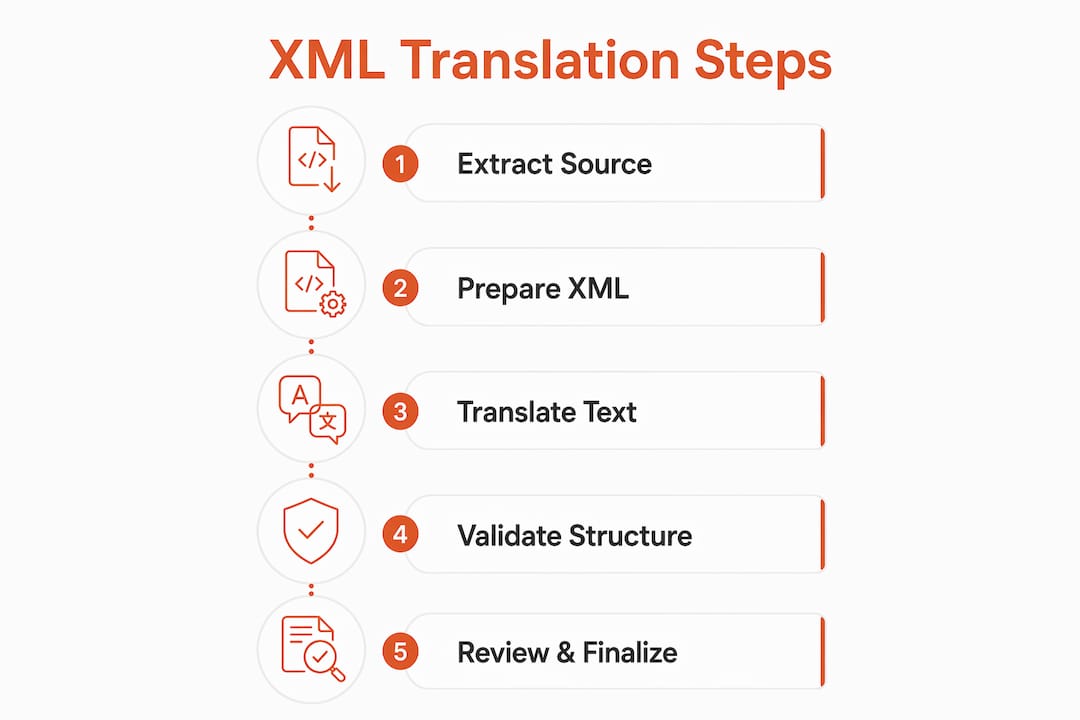
Sentence boundary splitting across tags is a subtler problem. When a sentence spans multiple XML elements, an automated tool may split it at the tag boundary and translate each fragment independently. The result is grammatically broken output that reads as nonsense in the target language.
Best practices that protect your files
Before you translate:
Validate your XML against its schema (XSD or DTD) before sending it anywhere. A malformed source file guarantees a malformed translation.
Declare encoding explicitly at the top of every file. Do not rely on defaults.
Mark non-translatable nodes with
translate="no"where your schema supports it, or maintain an exclusion list for your translation tool.Strip or lock attributes that carry functional values (IDs, URLs, class names) so they cannot be accidentally overwritten.
During automated translation:
Use APIs that support tag handling parameters to exclude markup from the translation engine entirely.
Configure
non_splitting_tagsto prevent the engine from breaking sentences that span multiple elements, which otherwise produces broken translations.
After translation:
Validate the output against the original schema before importing it into any system.
Run a diff against the source to confirm tag counts and attribute values are identical.
Pro Tip: Set up a pre-translation validation script that checks well-formedness and schema compliance automatically. Catching errors at the source costs minutes; catching them post-deployment costs days.
Top XML translation software and tools in 2026
Five tools consistently appear at the top of localization teams’ shortlists for XML work. Each takes a meaningfully different approach.
Tool | Ease of Use | Format Support | AI Features | Collaboration | Pricing | Best For |
|---|---|---|---|---|---|---|
Smartcat | High | XML, XLIFF, DOCX, and more | AI agents, translation memory, auto-QA | Real-time team editing, review workflows | Free tier; paid plans available | Teams needing automation with collaboration |
Very High | XLIFF, XML, IDML, DOCX | AI suggestions, translation memory | Cloud-based team review | Subscription tiers | Teams wanting simple XLIFF/XML cloud workflows | |
Across Translator Edition | Moderate | XML, XLIFF, TTX, and more | TM integration, terminology management | Project management, multi-user review | License-based | Localization professionals needing workflow control |
Very High | XML only | None | None | Free | Simple XML viewing and manual edits | |
High | XML | Basic translation facilitation | None | Free | Structure-preserving translation without heavy features |
Smartcat is the strongest choice for teams that need speed and collaboration in the same platform. Its AI agents handle XML tag preservation automatically, and the real-time editing environment means translators, reviewers, and project managers work in the same space without version-control chaos. The free tier makes it accessible for smaller teams testing the waters.
Redokun wins on simplicity. Its interface is genuinely approachable for translators who are not localization engineers, and its native support for XLIFF means XML-based content moves through the pipeline cleanly. If your team’s biggest bottleneck is onboarding non-technical translators, Redokun removes that friction fast.
Across Translator Edition suits organizations running complex, multi-project localization operations. Its project management layer gives localization managers granular control over workflows, terminology, and file formats, including XML schemas that other tools handle poorly. The learning curve is steeper, but the control it offers is hard to match.
XML Notepad is a free Microsoft tool. It visualizes XML structure clearly and lets you edit nodes manually, which makes it useful for spot-checking translations or making quick fixes. It has no automation, no AI, and no collaboration features. Think of it as a scalpel, not a production line.
XML Content Translator by Nikse.dk is a lightweight free option focused specifically on keeping XML structure intact during translation. It suits individual developers or content managers who need to translate a handful of files without committing to a full platform.
How to review and edit XML translations effectively
Quality assurance on translated XML files requires more than reading the output. You need to verify the structure, not just the words.

Side-by-side review is the most reliable method. Open the source and translated files in parallel, either in a dedicated CAT tool or in a diff viewer, and walk through each segment. This catches tag mismatches, missing segments, and encoding anomalies that a linguistic review alone would miss. Tools like Smartcat and Across Translator Edition have built-in side-by-side views that make this process faster.
A structured QA checklist covers the gaps that visual review misses:
Tag balance: Confirm every opening tag has a matching closing tag in the translated file.
Attribute integrity: Verify that functional attributes (IDs, hrefs, class names) are unchanged.
Encoding consistency: Check that the target file’s declared encoding matches its actual content, especially for right-to-left languages or scripts outside the Latin alphabet.
Segment completeness: Confirm no source segments were skipped or left untranslated.
Schema validation: Run the translated file through an XML validator before it goes anywhere near production.
Automated validation tools catch structural errors faster than any human reviewer. Integrate schema validation into your CI/CD pipeline so that a malformed translated file never reaches a staging environment. As noted in the best practices section, strict tag handling during translation reduces the number of errors that reach the review stage in the first place.
Pro Tip: Assign a dedicated XML-aware reviewer for your first few translation cycles with any new tool. The patterns of errors they catch will tell you exactly which validation rules to automate going forward.
Why XLIFF is the backbone of structured localization workflows
XLIFF (XML Localization Interchange File Format) is the standard that makes professional XML translation manageable at scale. Created by the OASIS consortium, it defines a bilingual XML structure that holds source text, target translations, and metadata in a single file, so content moves between tools without loss of context or structure.
The practical benefit is separation of concerns. Your developers maintain the original XML files. XLIFF extraction pulls only the translatable strings into a clean bilingual container. Translators work in that container, never touching the source markup. When translation is complete, the content reinserts into the original structure automatically. Nothing breaks because nothing structural was ever exposed to the translation process.
XLIFF files track segment status states, which map directly to translation workflow stages: new, translated, reviewed, approved. That metadata lets project managers see exactly where every string sits in the pipeline without chasing status updates manually. Organizations that automate language workflows with XLIFF report meaningful reductions in manual file-handling effort.
One important caveat: not all XLIFF files are the same. Tools like memoQ and SDL Trados generate proprietary XLIFF variants with custom metadata extensions that generic XML translators cannot read correctly. If you receive an XLIFF file from a partner using a different tool, open it in a compatible native application rather than assuming it will parse cleanly in your own stack.
The best practice for integrating XLIFF into your pipeline is to treat it as the single source of truth for translation state. Extract once, translate in XLIFF, validate in XLIFF, and reinsert once. Every additional file conversion step introduces a new opportunity for data loss or structural corruption.
Gleef offers a faster path for product teams translating at scale
The tools compared above are purpose-built for XML and XLIFF workflows, and each does its job well. But if your team builds digital products and needs translation woven directly into your development and design process, rather than bolted on afterward, Gleef offers a different kind of solution.
Gleef is a SaaS localization platform built for product teams: developers, UX writers, designers, and product managers working together in the same environment. Its AI-powered Figma plugin lets designers translate and review strings in context, inside the design tool they already use, without exporting files or switching platforms. Its semantic translation memory and glossary enforcement mean your brand voice stays consistent across every language, every release.
For developers handling XML-adjacent localization at the code level, Gleef’s CLI tool integrates directly into development workflows, so translation stops being a release blocker and becomes part of the build process. Teams that have moved to Gleef report faster release cycles and fewer last-minute localization fires.
If you’re managing XML translation as part of a broader product localization effort, Gleef is worth a close look.
Key Takeaways
Effective XML translation requires markup-aware tools, validated source files, and a structured workflow built around XLIFF as the interchange standard.
Point | Details |
|---|---|
Translate content, not markup | Always isolate translatable strings from XML tags before any translation begins. |
Validate before and after | Schema validation at both ends of the workflow prevents malformed files from reaching production. |
Use XLIFF as your interchange format | XLIFF, defined by the OASIS consortium, separates translatable content from structure for lossless localization. |
Match the tool to the team | Smartcat suits collaborative teams; Redokun suits non-technical translators; Across suits complex enterprise workflows. |
Gleef for product teams | Gleef integrates AI localization directly into design and development workflows, reducing release delays caused by translation gaps. |