
TL;DR:
True localization adapts software culturally and technically, not just translating text.
Internationalization prepares code infrastructure for scalable, efficient localization processes.
Best practices include integrating localization into CI/CD, using in-context tools, and fostering a cultural mindset.
Most product teams assume localization is just translation with a few extra steps. It isn’t. When you ship software into a new market without true cultural and technical adaptation, you’re not just missing nuance—you’re handing users an experience that feels foreign, clunky, and untrustworthy. Software localization is the full process of adapting software for specific locales, covering everything from UI layout to regulatory compliance. This guide breaks down what localization actually means, how to structure the process, which best practices separate good teams from great ones, and how to build a workflow that scales globally without sacrificing quality or speed.
Key Takeaways
Point | Details |
|---|---|
Localization vs translation | Localization adapts software for cultural and technical fit, not just language. |
Internationalization comes first | Properly set up your code so localization later is efficient and cost-effective. |
Workflow and tools matter | Using TMS, context tools, and early QA testing streamlines global launches. |
Best practices save time | Early planning, shift-left tactics, and hybrid workflows reduce errors and resource waste. |
Foundations: What software localization really means
Software localization is often confused with translation. Translation converts words. Localization transforms the entire product experience so it feels built for a specific market—not just available in it. The difference is enormous. A French user shouldn’t just see French text. They should see date formats that match French convention, currency displayed in euros, and compliance language aligned with GDPR. That’s the localization bar you’re aiming for.
Cultural, functional, and technical adaptation make applications feel native rather than imported. This distinction matters because user trust is built on familiarity. When software feels foreign, adoption drops. When it feels native, engagement climbs.
Here’s what true localization actually covers:
UI text and strings: All visible copy adapted for tone, idiom, and length
Date, time, and number formatting: Region-specific conventions (MM/DD/YYYY vs. DD/MM/YYYY)
Currency and measurement units: Localized symbols, decimal separators, and units
Right-to-left (RTL) layout support: For Arabic, Hebrew, and other RTL languages
Regulatory compliance: Privacy notices, consent language, and legal requirements per region
Cultural imagery and color conventions: Symbols and visuals that resonate locally
“Localization is what makes software feel made for you—not just available to you.”
If your team only handles the text layer, you’re leaving a massive gap. Products that go beyond basic translation consistently outperform those that treat localization as a final-step word swap. The teams that understand this early are the ones who build genuinely global products. And the teams that don’t? They watch engagement metrics disappoint in market after market. Understanding how personalization and localization intersect is the next frontier for product teams serious about global growth.

With a clear definition in mind, let’s explore what actually happens under the hood to enable localization.
Internationalization (i18n): Preparing your code for localization
Internationalization, commonly abbreviated as i18n, is the engineering practice of designing software so it can be easily adapted for different languages and regions without requiring core code changes. Think of i18n as building the scaffolding that makes localization possible at scale. Without it, every new market becomes a painful, expensive retrofit.
Efficient localization depends on externalizing strings, supporting Unicode, and designing flexible UI layouts from day one. Here’s what that looks like in practice for your dev team:
Extract all user-facing strings into resource files (JSON, XLIFF, PO formats)
Support Unicode (UTF-8) to handle all character sets, including CJK and Arabic
Build plural and gender-aware string handling so grammar rules work across languages
Set up UI mirroring for RTL language support
Automate locale detection to serve the right format based on user settings
Avoid hardcoded UI dimensions so text expansion (German text is often 30% longer than English) doesn’t break your layout
Pro Tip: Implement i18n during initial development, not after your product ships. Retrofitting internationalization into existing code costs 2 to 3 times more than building it in from the start, and it creates technical debt that slows every future release.
Common pitfalls to watch for: hardcoded strings buried in components, fixed-width containers that break when text expands, and completely ignoring RTL until a Middle Eastern launch is imminent. These aren’t edge cases—they’re the norm in teams that treat localization as someone else’s problem.
Modern localization platform features are designed to integrate directly with i18n workflows, pulling strings automatically and pushing translations back into your codebase without manual file management. Understanding localization terminology and workflow early helps developers and PMs stay aligned throughout the process.
Laying the groundwork with i18n is essential—but how do the pieces come together in a real localization process?
The software localization process: From planning to QA
A well-run localization process has four distinct phases: preparation, localization, testing, and release. Each phase involves specific roles, tools, and handoffs. When these are clearly defined, teams move faster and produce higher-quality output. When they’re not, you get missed strings, broken layouts, and last-minute release blockers.
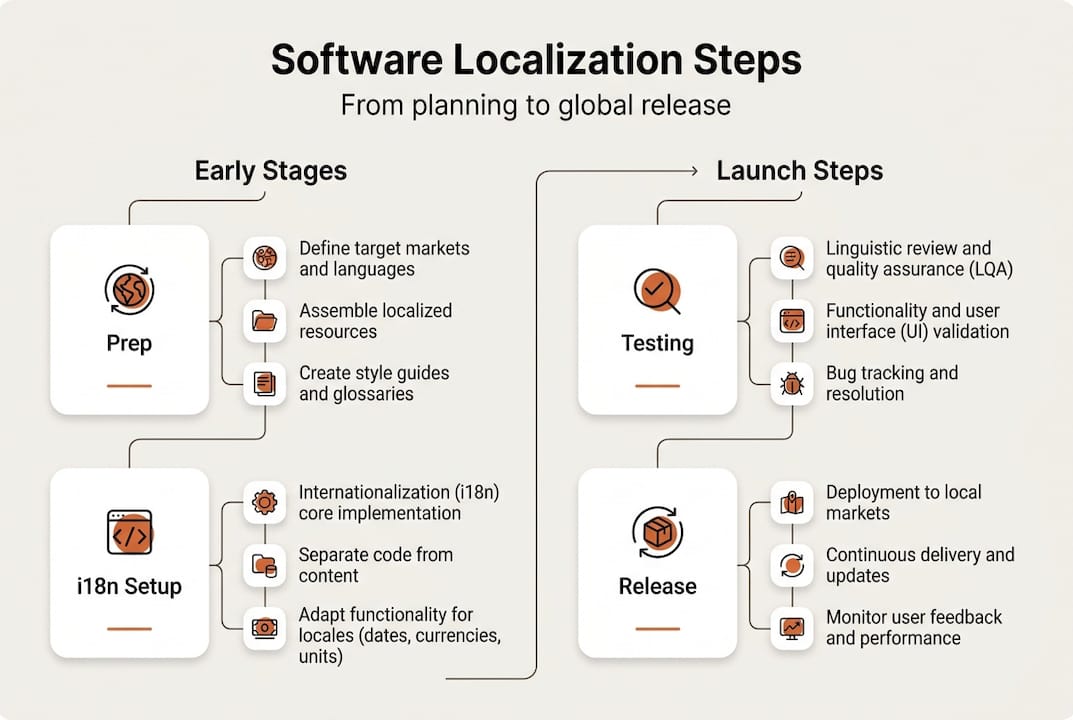
Phase | Key Roles | Activities | Tools |
|---|---|---|---|
Preparation | PM, UX Writer | Define scope, create glossary, set style guide | Confluence, Notion |
Localization | Translator, UX Writer | Translate strings, apply glossary, in-context review | Lokalise, Phrase, Gleef |
Testing | Developer, QA | Pseudo-localization, layout checks, RTL testing | Browser DevTools, Applanga |
Release | PM, Developer | Final review, deploy locale, monitor feedback | CI/CD pipelines |
Using resource files, translation management systems, and native QA is the foundation of effective localization at scale. Here’s the end-to-end lifecycle your team should follow:
Define target locales and scope based on market priority and revenue potential
Prepare source content with clear context, screenshots, and character limits
Run pseudo-localization to catch layout and encoding issues before real translation begins
Translate using a TMS with glossaries and translation memory for consistency
Conduct in-context review with native speakers or regional UX writers
Run linguistic QA to validate tone, terminology, and cultural appropriateness
Automate final deployment through CI/CD pipelines tied to your localization platform
Style guides and glossaries aren’t optional extras—they’re the difference between a brand that sounds consistent across 12 markets and one that sounds like 12 different companies. For a deeper look at optimizing the localization workflow, and for collaborative translation tips that keep your whole team aligned, the investment in structured processes pays off fast. Software localization best practices from the field confirm that native QA is non-negotiable for markets where cultural nuance carries significant weight.
Mastering the process is only part of the challenge—let’s unpack the crucial best practices and expert tactics that drive real localization wins.
Best practices and expert tips for effective localization
Knowing the process is one thing. Executing it efficiently, consistently, and at scale is another. The teams that get localization right don’t just follow a checklist—they build a culture and a pipeline that treats localization as a first-class product concern.
Here are the practices that separate high-performing localization teams from the rest:
Integrate localization into CI/CD: Automate string extraction and translation pushes so localization runs in parallel with development, not after it
Design for cultural flexibility: Choose UI patterns that adapt to different reading directions, text lengths, and cultural expectations
Maintain living style guides: Document tone, terminology, and brand voice per locale so every contributor works from the same foundation
Use in-context editing tools: Give translators access to the actual product UI so they translate with full visual context
Adopt an AI-human hybrid model: Use AI for speed and volume, human reviewers for cultural accuracy and brand alignment
Continuous localization workflows, early pseudo-localization, and hybrid AI-human translation are now standard in teams shipping to multiple markets simultaneously. This isn’t optional—it’s the competitive baseline.
Pro Tip: Track localization pipeline health by monitoring string completeness rates and translation staleness. If more than 5% of your strings are outdated or untranslated in any active locale, you have a process gap that will show up as a user experience problem.
The shift-left approach is the most impactful change most teams can make. Involving localization from the earliest product design stages—not just before release—cuts rework dramatically and produces more culturally resonant results. Explore localization best practices for 2026 for a current view of what leading teams are doing, and see how streamlining for product teams changes the economics of going global. Understanding cultural nuance in localization is what transforms a technically correct translation into a genuinely native experience.
Having seen what works, it’s important to step back and consider how the real-world localization landscape often differs from theory.
Perspective: Why most teams underestimate localization complexity
Here’s the uncomfortable truth: most teams that believe they’re doing localization well are actually doing just enough to check a box. They hit their language targets, ship the strings, and call it done. Then they wonder why engagement in new markets underperforms.
The hardest part of localization isn’t the code. It’s the culture. Layout challenges, resource file management, and stakeholder communication are all solvable with the right tools. But building software that genuinely resonates with users who have different expectations, humor, trust signals, and interaction norms? That takes deep cultural empathy baked into your product process from day one.
The teams we’ve seen succeed treat localization the way elite engineering teams treat security—as a design principle, not a deployment step. They start with localization thinking, not bolt it on afterward. Personalization-localization integration is where the next generation of global products will be won or lost. User expectations evolve. Markets change. The teams that build flexible, learning-focused localization cultures will stay ahead. The ones that don’t will keep retrofitting.
With this perspective in mind, here’s how you can take the next step toward localization excellence with the right partners.
Take the next step: Streamline your localization journey
Localization done right is a competitive advantage—and the right platform makes all the difference between a painful manual process and a streamlined, scalable workflow. Gleef is built specifically for product teams who need speed, accuracy, and seamless integration with their existing tools.

Whether you’re managing translations inside Figma, syncing strings through your CI/CD pipeline, or enforcing brand-consistent terminology across 10 locales, Gleef’s platform brings it all together. For developers who want command-line power, Gleef CLI gives you fast, scriptable localization control without leaving your terminal. Explore how Gleef can eliminate your release blockers and help your team ship globally with confidence.
Frequently asked questions
What is the main difference between localization and translation?
Localization adapts software for cultural and regulatory needs, not just language, while translation only converts text from one language to another. Localization covers UI, formats, compliance, and cultural context across every touchpoint.
How can developers avoid common localization pitfalls?
Internationalization and RTL testing prevent the late, costly refactors that slow global releases. Developers should externalize strings, support Unicode, and run pseudo-localization checks early in every sprint.
What tools help streamline software localization?
TMS and context provision tools like Lokalise, Phrase, and Gleef are key for efficient localization at scale. Pair them with style guides and glossaries to maintain consistency across every locale.
Why is localization important for UX?
Localization creates native-feeling experiences that directly impact user engagement and satisfaction in every target market. When software feels built for a user’s context, trust and retention follow naturally.