
TL;DR:
Apple’s String Catalogs streamline iOS app localization by consolidating languages into auditable files and supporting accurate plural rules.
Xcode 27’s AI coding agents enhance translation quality through context-aware suggestions, comments, and vocabulary learning.
iOS app translation is the process of adapting your app’s user interface strings and content into multiple languages using Apple’s localization technologies to reach global audiences. The industry term for this work is app localization, and in 2026 it has never been more powerful. Apple’s String Catalogs (.xcstrings format) are now the recommended standard for managing multilingual iOS apps. Xcode 27 adds AI-powered coding agents that read string context to generate accurate translations, and the TranslationSession API delivers on-device translation without a single network call. Together, these tools give product teams and developers a production-ready localization pipeline that was impossible just two years ago.
What are String Catalogs and why are they the standard for iOS localization?
String Catalogs are JSON-backed files that consolidate every language, key, and translation state into one auditable file per build target. That single-file design is what makes them superior to the old .strings and .stringsdict approach, where each language lived in a separate folder and tracking completion required manual counting.
The practical benefits are immediate. Xcode reads the catalog and shows you a completion percentage per language, so you know at a glance which locales are ready to ship. String Catalogs also support CLDR plural categories per locale and positional interpolation tokens, which means plural rules for Polish or Arabic work correctly without custom code.
Migrating from legacy formats takes three steps:
Open your Xcode project and select Editor > Convert to String Catalog for each
.stringsfile.Review the generated
.xcstringsfile to confirm all keys migrated without duplication.Update your CI pipeline to export
.xclocbundles instead of raw.stringsfolders for translator handoff.
Pro Tip: After migration, run a completeness audit script before every release. Missing keys default to the base language silently, and users in your target markets will see English strings with no warning.
One advanced pattern worth knowing is the runtime Bundle override. You swap the app’s bundle at runtime to force a language regardless of the device setting. This gives you full dynamic language switching inside the app, which is critical for apps that let users pick their language from a settings screen rather than relying on the system locale.
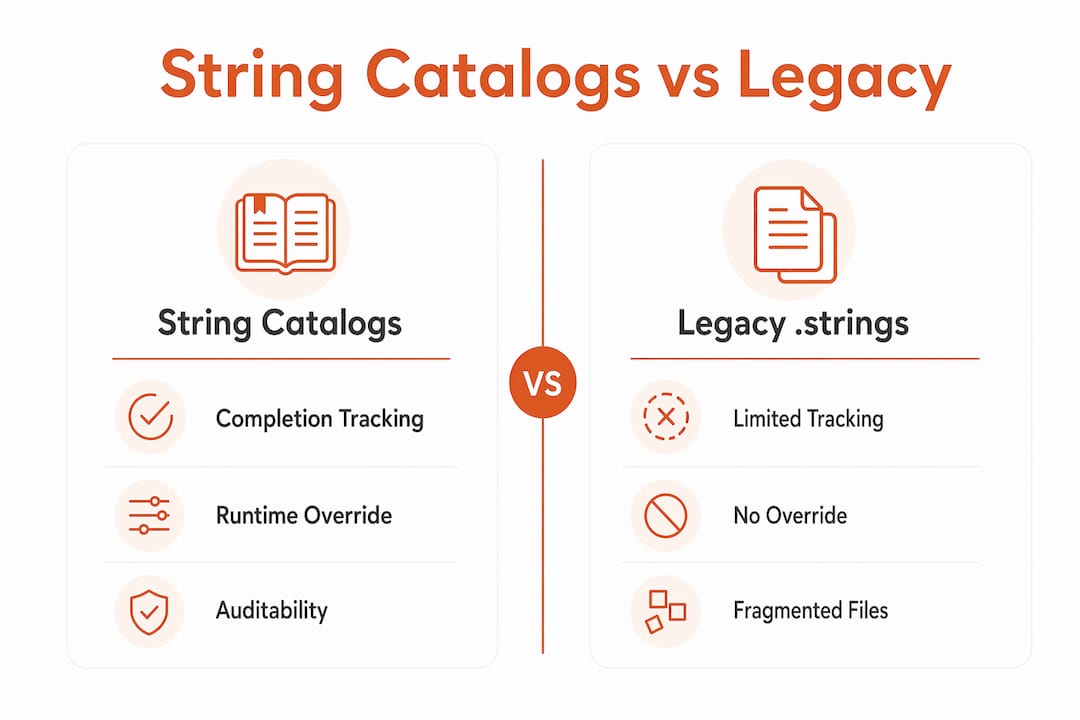
Feature | String Catalogs | Legacy .strings |
|---|---|---|
Completion tracking | Per-language percentage in Xcode | Manual, error-prone |
Plural support | CLDR categories built in | Requires separate .stringsdict |
Translator handoff | .xcloc bundle export | Folder-per-language ZIP |
Auditability | Single JSON file per target | Scattered across directories |
How does Xcode 27’s AI-powered coding agents improve translation quality?
Translation errors rarely come from bad dictionaries. They come from missing context. A string like “Save” means something different on a photo editor than on a banking screen, and traditional automated tools have no way to tell the difference. Xcode 27 fixes this by giving AI coding agents access to the string’s usage location, its relationships to nearby strings, and the history of prior translations in the project.

The workflow is direct. You open the Xcode AI agent panel using the New Conversation button, describe the translation task, and the agent generates translations with descriptive comments attached to each key. Those comments travel with the string into the .xcloc bundle, so human translators who review the output have the same context the AI used.
The quality gains are real:
Context tracking prevents the agent from translating “Back” as a body part when it clearly means a navigation button.
String relationship analysis keeps related UI labels consistent. If “Cancel Order” and “Order Cancelled” share a root, the agent uses the same word for “order” in both.
Prior translation memory means the agent learns your product’s vocabulary over time, reducing terminology drift across releases.
Auto-generated comments replace the manual comment-writing burden that most teams skip under deadline pressure.
Xcode 27 agents also integrate with CAT (computer-assisted translation) tools and glossaries. You can define brand terms, product names, and do-not-translate strings in a glossary file, and the agent respects those rules automatically.
Pro Tip: Before running the translation agent on a new language, seed your glossary with at least 20 product-specific terms. The agent’s output quality jumps noticeably when it has a vocabulary anchor to work from.
For teams managing AI-driven localization key translation, this context-aware approach is the difference between translations that sound native and translations that sound like a dictionary was consulted in isolation.
What is the TranslationSession API and how do you implement it?
The TranslationSession API, available since iOS 18, lets your app translate text on the device using Core ML models, with no network call and no API cost. That matters for two reasons: user privacy stays intact, and you pay nothing per translation request.
The primary integration path uses the translationTask SwiftUI modifier. Here is the sequence:
Add the
Translationframework import to your Swift file.Attach
.translationTask(source:target:action:)to the view that triggers translation.Inside the action closure, call
session.translate(_:)and bind the result to your view state.Handle the
LanguageModelDownloadstate to show a progress indicator while the language pack downloads.Test on a physical device. Simulators cannot download Core ML language models.
On-device translation runs asynchronously. Your UI must handle three states cleanly: loading (model download in progress), ready (translation available), and error (unsupported language pair or download failure). Skipping error handling is the most common integration mistake, and users on older devices or restricted networks will hit it.
The API supports two UI patterns. The system popover pattern uses Apple’s built-in translation sheet, which requires minimal code and handles model downloads automatically. The custom UI pattern gives you full control over how translated text appears, which is the right choice when your design requires inline translation or branded presentation.
On-device language model downloads require network access on first use, so your app must handle potential download delays gracefully. A user who taps “Translate” and sees a frozen screen will not tap again. Build a clear loading state and a retry path.
On-device translations run asynchronously, which means UI state management is non-negotiable. Use @State variables to track session readiness and display appropriate feedback at every step.
What common challenges should product teams avoid when translating iOS apps?
The biggest translation quality failures come from ignoring string context. When a translator sees “Done” with no surrounding information, they guess. Sometimes they guess wrong, and the result is a UI that confuses native speakers of the target language.
Beyond context, product teams run into these specific pitfalls:
Legacy pipeline breakage during migration. Most CAT tools support .xcloc bundles, but some require manual extraction of the inner
.xlifffile. Confirm your translator’s tool chain before you migrate.Corrupted entity encoding. HTML entities like
&can survive the export-import cycle in corrupted form. Always validate.xlifffiles after import.Missing plural categories. If your String Catalog defines only “one” and “other” for a language that requires “few” and “many,” those forms fall back silently. Audit plural coverage for every new locale.
SwiftUI enum caching. SwiftUI caches localized enum display names, which breaks language switching at runtime. Replace computed properties with functions to force re-evaluation on language change.
Simulator-only testing. On-device translation features simply do not work on simulators. Build physical device testing into your QA checklist before any release that includes new language support.
Pro Tip: Run a batch key audit after every sprint that touches UI strings. A missing key discovered in QA costs minutes to fix. The same key discovered in a one-star App Store review costs you a rating.
Teams that avoid critical localization mistakes early in the product cycle ship faster and spend less time on emergency hotfixes after launch. The root causes of localization failures are almost always process gaps, not language gaps.
What tools and workflows can product teams use to translate iOS apps efficiently?
A production-grade mobile app localization workflow combines Apple’s native tooling with professional translation infrastructure. No single tool covers every step.
The core stack for most teams looks like this:
Xcode String Catalogs for key management, completion tracking, and
.xclocexport.Xcode 27 AI coding agents for context-aware first-pass translations and auto-generated comments.
CAT tools with XLIFF support for professional translator review and terminology management.
Automation scripts for auditing key completeness, detecting encoding errors, and validating plural coverage before each build.
The workflow sequence matters as much as the tools. Export localizations from Xcode as .xcloc bundles, hand them to translators or run the AI agent first, import the reviewed files back, then run your audit script before merging. Skipping the audit step is where most teams accumulate technical debt in their localization files.
For teams managing multilingual content generation alongside app strings, integrating AI-assisted tools at the content layer reduces the total translation surface area before strings even reach Xcode.
Ongoing updates require a consistent process. When a new feature adds strings, run the AI agent on only the new keys rather than re-translating the entire catalog. Translation memory in your CAT tool handles consistency for strings that appeared in prior releases. This incremental approach keeps turnaround times short without sacrificing quality.
Key Takeaways
Effective iOS app localization in 2026 requires combining Apple’s String Catalogs, Xcode 27 AI agents, and the TranslationSession API into one auditable, context-aware workflow.
Point | Details |
|---|---|
Adopt String Catalogs now | They consolidate all languages into one auditable file and track completion percentages automatically. |
Use Xcode 27 AI agents for context | Agents read string usage location and relationships to generate accurate, comment-annotated translations. |
Implement TranslationSession for on-device use | The API delivers free, private translation via Core ML with no network dependency after model download. |
Test on physical devices | Simulator environments cannot run on-device translation models, making real-device QA non-negotiable. |
Audit keys every sprint | Missing or miscategorized keys discovered late cost far more time than a routine batch check. |
What I’ve learned from watching teams get iOS localization wrong
Most product teams treat localization as a final step before release. That single decision causes more delays than any technical limitation I’ve seen. By the time strings reach a translator, the UI has been rebuilt twice, keys have been renamed without notice, and the context that made a string meaningful is long gone.
Apple’s 2026 tooling genuinely changes the calculus. Xcode 27’s AI agents generate descriptive comments automatically, which means context travels with the string even when the developer who wrote it has moved on. That is not a small improvement. It is the fix for the most persistent quality problem in app localization.
My honest observation after watching many product cycles: teams that plan localization in the first sprint, not the last, ship to new markets in weeks rather than months. The step-by-step localization process is not complicated. The discipline to start it early is the hard part.
AI-assisted translation will keep improving. But the teams winning in global markets right now are the ones pairing Apple’s new tooling with rigorous human review, not replacing one with the other. Automation handles volume. Humans handle nuance. The best workflows use both.
— Antoine
How Gleef fits into your iOS localization workflow
Product teams that move fast on iOS localization need tools that work where design happens, not just where code lives.

Gleef’s Figma plugin brings AI-powered translation directly into your design environment. It reads your localization keys in context, applies semantic translation memory and glossary rules, and generates native-sounding translations without requiring a context switch to Xcode or a spreadsheet. For teams managing String Catalog workflows, Gleef’s context-aware approach means your design strings and your app strings stay consistent from the first mockup to the final build. Product managers, UX writers, and developers all work from the same translation layer. Explore the Gleef Figma plugin to see how AI-assisted localization fits your iOS release cycle.
FAQ
What is iOS app translation?
iOS app translation, formally called app localization, is the process of adapting an app’s UI strings and content into multiple languages using Apple’s localization tools, including String Catalogs and Xcode’s export workflows.
What are String Catalogs in Xcode?
String Catalogs are JSON-backed .xcstrings files that consolidate all languages, keys, and translation states into one file per target, with built-in completion tracking and CLDR plural support.
How does the TranslationSession API work?
The TranslationSession API, available since iOS 18, translates text on-device using Core ML models with no network calls or API fees, integrated via the translationTask SwiftUI modifier.
Can I test on-device translation in the Xcode Simulator?
No. On-device translation requires Core ML language model downloads that simulators cannot process. Physical device testing is required for any feature using the TranslationSession API.
How do Xcode 27 AI agents improve translation accuracy?
Xcode 27 AI agents track each string’s usage location and relationships to nearby strings, then generate translations with descriptive comments attached, reducing context-loss errors that traditional automated tools produce.