
TL;DR:
Effective translation management uses integrated tools, workflows, and human review to produce consistent, brand-aligned content across languages. It requires centralizing string management, dynamic glossaries, context metadata, and tailored translation styles to prevent costly errors. Building a system-driven approach improves global product releases and enhances translation quality over time.
Translation management is the systematic approach to organizing, automating, and monitoring translation tasks to deliver accurate, contextually fitting content across languages in digital products. Product managers and localization specialists who treat it as a core discipline, not an afterthought, ship faster and break into new markets with far fewer release blockers. The field now combines Translation Management Systems (TMS), AI-driven workflows, terminology standardization, and human review into a single coordinated process. Getting that coordination right is the difference between a product that feels native and one that reads like a word-for-word dictionary output.
What are the core components of translation management?
Translation management is the recognized industry term for what many teams informally call “management translate.” It covers every tool, workflow, and decision that moves content from one language to another at product scale. Understanding its components is the fastest way to build a process that holds up under pressure.
Translation Management Systems
A TMS combines editing, translation pipelines, and delivery into one platform. For multiple languages and translators, a TMS provides automation that simple JSON file workflows cannot match. It routes content to the right translator, tracks version history, and flags inconsistencies before they reach production. Teams that skip a TMS often discover the cost later, in duplicated work and missed terminology standards.

CAT tools and translation memory
Computer-Assisted Translation (CAT) tools store previously approved translations in a translation memory. Translation memory and glossaries improve accuracy in complex projects by surfacing approved phrasing every time a similar string appears. This prevents translators from reinventing the wheel on repeated UI copy like button labels, error messages, and onboarding flows. The time savings compound quickly across large string libraries.
Glossaries and AI workflows
Glossaries define the approved terminology for your product. They are the single source of truth for brand names, feature labels, and technical terms. High-quality AI translations require multi-layered strategies including context-aware prompting and strict glossary enforcement. Without that infrastructure, AI outputs drift toward generic phrasing that erodes brand voice. Gleef enforces glossary rules directly inside the translation workflow, so approved terms travel with every string automatically.
TMS: Automates routing, versioning, and delivery for multilingual projects
CAT tools: Surface translation memory to prevent repeated manual work
Glossaries: Lock approved terminology across all languages and channels
AI workflows: Generate first drafts at speed, guided by context and glossary rules
Human review: Catches cultural and tonal issues that AI misses
Pro Tip: Tailor your toolset to project size. A two-language app needs a glossary and a CAT tool. A 15-language platform needs a full TMS with API integrations and automated QA checks.
How do you develop effective translation strategies for different content types?
Translation should be viewed as a functional service adapted to communicative needs, not a literal word-for-word conversion. That principle shapes every strategic decision your team makes about how to handle different content types.
Choosing the right translation style
Product managers must define translation style based on content risk and audience. Three styles cover most product contexts:
Faithful: Preserves the source text structure as closely as possible. Use this for legal disclaimers, terms of service, and compliance copy where precision is non-negotiable.
Fluid: Prioritizes natural expression in the target language. Use this for UI copy, help documentation, and onboarding flows where readability drives completion rates.
Creative (transcreation): Reimagines the message for the target culture. Use this for marketing headlines, campaign copy, and brand taglines where emotional resonance matters more than literal accuracy.
Mapping style to risk level is the core skill here. A legal notice translated with a Creative style creates liability. A marketing headline translated with a Faithful style kills conversion. The choice is not subjective; it follows from the content’s function.
Adding context metadata
Context metadata including audience persona and emotional goals differentiates high-converting localized products from literal translations. Before sending any string to translation, attach metadata that answers three questions: Who is reading this? On which channel? What should they feel after reading it? A push notification for a fintech app targeting first-time investors in Japan needs different tone guidance than the same message for experienced traders in Germany. That metadata travels with the string and guides both AI and human translators toward the right output.
Pro Tip: Build a structured style guide for each content channel, not one master document. A style guide for in-app microcopy will look nothing like the one for your marketing site. Keeping them separate prevents translators from applying the wrong rules.
What workflows and best practices optimize translation management?
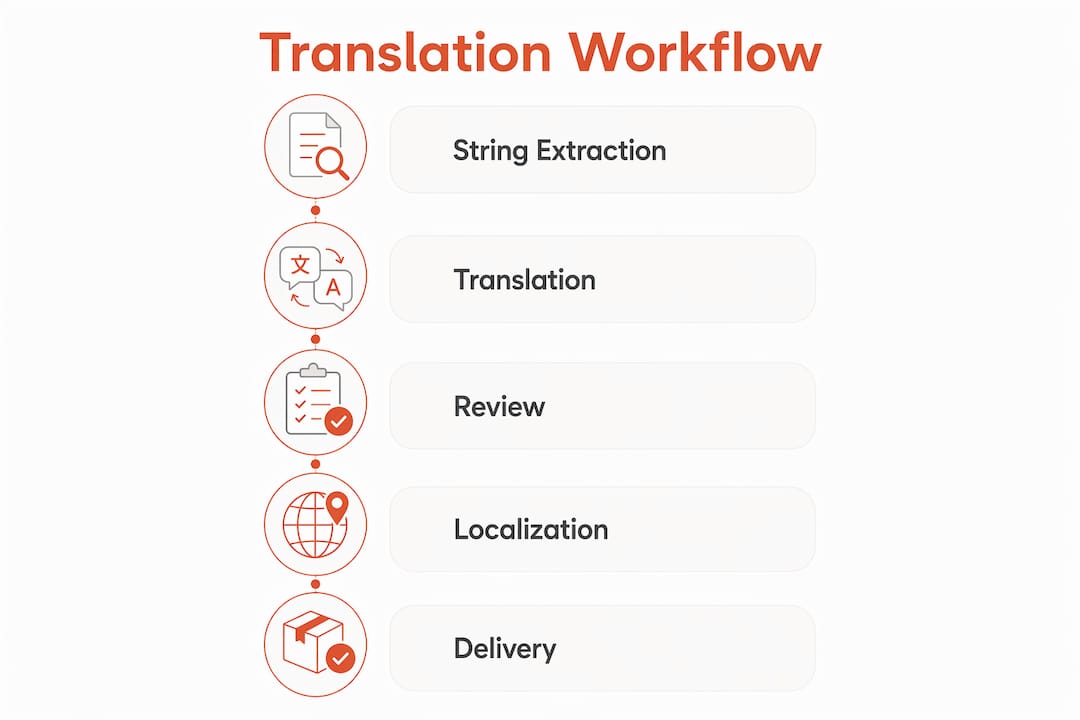
Efficient translation management in product teams follows a repeatable process. The steps below reflect centralized translation management practices that improve workflow coordination and consistency across large projects.
Centralize string management. Store all translation keys in one repository. Fragmented string files across multiple repos create version conflicts and missed updates.
Implement closed-loop key creation. Use runtime features like i18next’s
saveMissingto automatically flag untranslated strings at runtime. This prevents silent gaps from reaching users.Engineer context-aware prompts. AI is only as effective as the contextual infrastructure provided by product teams. Every AI translation prompt should include the content type, target audience, tone, and relevant glossary terms.
Maintain dynamic glossaries. Glossaries must handle grammatical variations dynamically, including plurals and verb conjugations, to prevent broken AI output. A static glossary that only maps singular nouns will produce unnatural results in languages with complex morphology.
Run continuous feedback loops. Collect in-market feedback from native speakers after each release. Feed corrections back into the translation memory and glossary before the next sprint.
Pro Tip: Assign a dedicated project manager to own translation coordination. That person harmonizes communication between developers, designers, UX writers, and translators, and catches handoff gaps before they become release blockers.
The table below maps workflow stages to the tools and roles responsible for each:
Workflow stage | Primary tool | Responsible role |
|---|---|---|
String extraction | TMS or i18n library | Developer |
Context and metadata tagging | Style guide, TMS | Product manager |
AI first draft | AI translation engine | Localization specialist |
Glossary and QA check | Glossary, TMS | Localization specialist |
Human review | CAT tool | Translator or linguist |
Feedback and glossary update | Translation memory | Localization specialist |
Knowing how to choose the right translator app for each stage of this workflow matters as much as the process itself. The wrong tool at the AI draft stage, for example, produces output that costs more to fix than to retranslate from scratch.
What common challenges arise in managing translation for digital products?
Translation management breaks down in predictable ways. Knowing the failure patterns lets you build defenses before they cost you a release.
The most dangerous assumption in localization is that AI will figure out the context on its own. It will not. Failing to provide AI sufficient behavioral instructions and context leads to ineffective translations that erode user trust and brand credibility.
Literal machine translation without context. AI without prompt engineering produces technically correct but culturally flat output. Users in the target market notice immediately, even if they cannot articulate why.
Static or incomplete glossaries. A glossary that maps only singular nouns breaks when AI encounters plurals or verb forms. Dynamic glossary management requires mapping terminology to grammatical variations to prevent unnatural output.
Ignoring content risk levels. Applying a Fluid style to legal copy or a Faithful style to a campaign headline are both costly mistakes. Risk mapping must happen before translation begins, not after review.
One-style-fits-all translation. A single style guide for all content types forces translators to make judgment calls that should be policy decisions. The result is inconsistency across channels.
Scaling without infrastructure. Adding a fifth or tenth language to a product with no TMS, no translation memory, and no centralized glossary creates exponential rework. Language management services that scale require infrastructure decisions made at language two, not language ten.
The common thread across all these challenges is the same: teams treat translation as a task rather than a system. Building the system first, even at small scale, prevents the compounding failures that stall global launches.
Key Takeaways
Effective translation management combines TMS infrastructure, dynamic glossaries, context-aware AI prompting, and human review to deliver consistent, brand-aligned content across every language and channel.
Point | Details |
|---|---|
Match style to content risk | Use Faithful for legal copy, Fluid for UI, and Creative for marketing to prevent costly errors. |
Build dynamic glossaries | Map terminology to grammatical variations so AI outputs stay natural across all target languages. |
Attach context metadata | Tag every string with audience, channel, and tone before sending it to translation. |
Centralize string management | Store all translation keys in one repository to prevent version conflicts and silent gaps. |
Assign a translation owner | A dedicated project manager prevents handoff failures between developers, designers, and translators. |
What I’ve learned about translation management after years in product localization
The teams that struggle most with translation management are not the ones with the worst tools. They are the ones where no single person owns the process. Translation sits at the intersection of product, engineering, design, and marketing, and when everyone assumes someone else is handling it, strings fall through the cracks, glossaries go stale, and AI outputs drift.
The shift that changes everything is treating translation management the way you treat your CI/CD pipeline. You build it once, you maintain it continuously, and you automate the parts that do not require human judgment. Context-aware prompting and dynamic glossary enforcement are the equivalent of automated tests. They catch problems before they reach users.
I have also seen teams over-invest in AI and under-invest in the feedback loop. AI gets you to a strong first draft fast. But the quality ceiling is set by how well you feed corrections back into your translation memory and glossary after each release. Teams that run that feedback loop consistently produce noticeably better translations with every sprint. Teams that skip it plateau quickly and wonder why their AI output never improves.
The other thing worth saying plainly: translation technology trends in 2026 are moving fast, but the fundamentals have not changed. Context, terminology, and human judgment still determine quality. AI accelerates the process. It does not replace the thinking.
— Antoine
How Gleef makes translation management work inside Figma
Product teams that manage translations outside their design environment lose time on every handoff. Gleef’s Figma Plugin puts AI localization, glossary enforcement, and in-context editing directly inside the tool your designers already use.
With Gleef, you attach context metadata to strings before they leave the design file, enforce approved terminology automatically, and preview translations in the actual UI layout before a single line of code ships. That means fewer revision cycles, fewer release blockers, and translations that sound native from day one. The Gleef Figma Plugin is built for product managers and localization specialists who need speed and quality without switching platforms. If your team is ready to stop losing releases to translation issues, Gleef is where to start.
FAQ
What is translation management in product development?
Translation management is the systematic coordination of tools, workflows, and people that move product content from one language to another accurately and consistently. It includes TMS platforms, glossaries, AI workflows, and human review.
What is the difference between a TMS and a CAT tool?
A TMS manages the full translation pipeline, including routing, versioning, and delivery. A CAT tool assists individual translators by surfacing translation memory and glossary suggestions during the translation task itself.
How does context metadata improve translation quality?
Context metadata tells translators and AI systems who the audience is, which channel the content appears on, and what emotional response it should trigger. That information produces translations that feel native rather than technically correct but culturally flat.
When should product teams use AI translation vs. human translation?
AI translation handles high-volume, lower-risk content like UI strings and help documentation at speed. Human translators handle high-risk content like legal copy and creative campaigns where cultural nuance and liability are both in play.
What makes a glossary effective for AI-driven translation?
An effective glossary maps approved terms to their grammatical variations, including plurals and verb forms, so AI outputs stay natural across all target languages. A static list of singular nouns is not enough for languages with complex morphology.