
TL;DR:
Effective global UX writing prioritizes clear, goal-oriented copy that is culturally neutral and easily translatable. Establishing consistent terminology, considering cultural nuances, and embedding localization workflows early prevent delays and miscommunication. Continuous testing and ownership ensure that localized content remains effective, adaptable, and aligned with user expectations worldwide.
Mastering UX writing for global audiences means far more than handing your English copy to a translator and calling it done. The words on your buttons, error messages, and onboarding screens carry cultural weight that translation alone cannot address. A phrase that sounds friendly and direct to users in San Francisco might read as blunt or even rude in Tokyo. Get it wrong and your pixel-perfect product falls apart the moment it crosses a border. This guide gives product managers, UX writers, and designers a clear framework for writing UI copy that works everywhere, not just at home.
Key Takeaways
Point | Details |
|---|---|
Writing clarity drives translation quality | Plain, direct language without idioms or slang translates more accurately and reduces localization errors. |
Cultural tone is not optional | Formality, directness, and humor must be adapted per market while keeping your core brand voice intact. |
Workflow ownership prevents bottlenecks | Assigning clear roles to UX writers, developers, and localization teams cuts handoff friction significantly. |
Test with native speakers | Automated translation alone misses cultural misalignments that only real users can identify. |
Tools that embed in design reduce errors | Localization plugins integrated directly into design platforms speed up deployment and improve consistency. |
Core principles of UX writing for global audiences
Great global UX writing starts with one clear priority: help users accomplish their goals. Google Material’s guidelines make this explicit, noting that UX copy should support user journeys with goal-oriented content and anticipate F-shaped scanning patterns rather than chasing grammatically perfect prose.
That means writing for comprehension, not style. Users in every market scan screens before they read. They look for buttons, labels, and short phrases that confirm they are on the right path. If your copy is dense, clever, or abstract, it fails the scan test and it will fail the translation test too.
Here are the non-negotiable principles every UX writer should anchor their global content to:
Write goal-first. Every word on screen should move the user toward completing a task. Remove anything decorative.
Avoid idioms, slang, and jargon. “Hit the ground running” means nothing to a non-native speaker and creates a translation nightmare. SAP’s UX writing guidelines explicitly require content to be idiom-free and translation-ready.
Use inclusive language as a design principle. Inclusive, culturally neutral writing means actively avoiding shaming, blaming, microaggressions, and patronizing phrasing. This applies to error messages just as much as marketing copy.
Maintain a consistent voice that can flex. Your brand voice is a foundation, not a straitjacket. Consistency gives users confidence. Flexibility makes it culturally appropriate.
Keep sentences short and structure parallel. Parallel structures translate more predictably. “Save, share, and export your file” works globally. “You can save your file, and sharing it is also possible” does not.
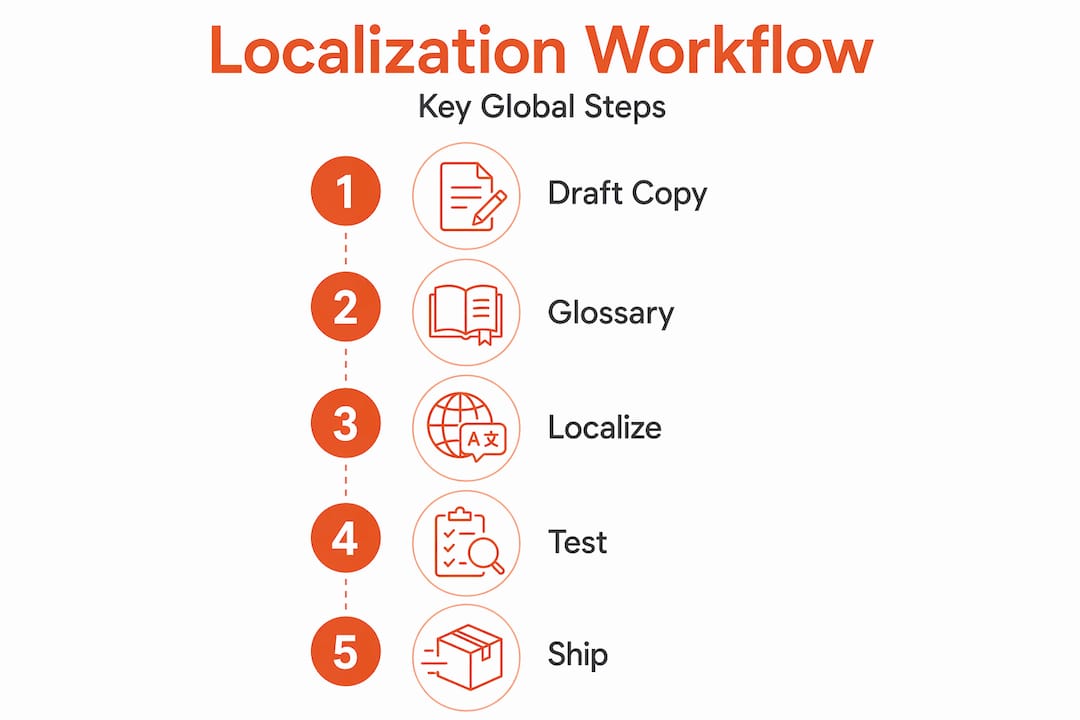
Pro Tip: Build a terminology glossary before your first localization sprint. Locking down how you refer to core product concepts like “workspace,” “project,” or “account” prevents translators from making different choices in different markets and breaking the user experience.
The UX writing localization guide for product teams from Gleef reinforces this point: terminology consistency across languages is one of the highest-leverage investments a product team can make early in the writing process.
Cultural nuances in cross-cultural UX strategies
You can write perfectly plain English and still alienate half your global audience if you do not account for cultural context. This is where international UX writing gets genuinely complex, and where most product teams underinvest.

Cross-cultural UX research from Uxcel shows a pattern that plays out across markets: Western users tend to prefer direct, action-oriented language, while many Asian markets favor polite, indirect phrasing. Neither preference is wrong. Both must be respected in your copy system.
Here is what that looks like in practice:
Tone calibration per market. A CTA that says “Get it now” converts well in the US. In Japanese markets, a softer framing like “Try it at your own pace” aligns better with user expectations around pressure and choice.
Formality levels in UI copy. German-speaking users in business software contexts expect formal address (“Sie” rather than “du”). Defaulting to a casual tone because your English copy is casual will damage trust.
Humor is a localization landmine. Duolingo’s playful, self-aware tone works brilliantly in English-speaking markets. But translating that same wit into Arabic or Korean requires native writers who understand local comedic sensibility. Word-for-word translation of humor almost always fails.
Airbnb and Netflix localize more than words. Both companies invest heavily in adapting not just copy but the emotional framing of their UI. Airbnb’s “Belong Anywhere” campaign was reframed per market to reflect local concepts of belonging rather than direct translation.
Symbols and icons carry cultural meaning too. A thumbs-up icon is positive in the US but offensive in parts of the Middle East. Your UX copy and your visual language must align culturally.
“Brand voice must balance consistency with cultural sensitivity. The goal is not a different brand in every market but a brand that feels native in every market.” — Uxcel, Cross-Cultural UX Writing
Testing localized content with native speakers is not a nice-to-have. A/B testing and user interviews consistently catch cultural misalignments that even skilled translators miss because the issue is not linguistic, it is experiential. Read more about cultural nuance in UX and how it directly affects product growth metrics.
Integrating UX writing into localization workflows
Writing great global copy is half the battle. The other half is getting that copy into your product accurately, quickly, and without blocking your engineering team’s release schedule. This is where most teams feel the friction most acutely.
The core problem is ownership ambiguity. When no one is clearly responsible for moving copy from design to translation to code, content sits in review limbo. Releases get delayed. Quality degrades as people make ad hoc decisions under pressure.
Workflow stage | Common problem | Better approach |
|---|---|---|
Copy creation | UX writer works in isolation from localization | Embed copy in design files with localization context from day one |
Extraction | Manual export from Figma creates version errors | Use automated API-driven extraction pipelines owned by dev |
Translation | Translators lack context for UI strings | Provide screenshots, component names, and character limits |
Review | No native speaker review before release | Build a review gate with local market contacts |
Deployment | Translation delays block code pushes | Centralize translations in a single source of truth synced to codebase |
The Figma API-driven i18n automation workflow offers a compelling model here. By assigning extraction pipeline ownership to developers and using naming conventions in Figma layers as prefix triggers for automated export, teams eliminate the “waiting on UX” bottleneck that stalls so many global releases. Ownership clarity between UX writers, developers, and localization teams directly reduces friction and accelerates deployment.
Gleef’s approach to this challenge is worth understanding. Its Figma plugin lets teams manage translations directly inside Figma without switching platforms, with semantic translation memory and glossary enforcement built in. That keeps UX writers in their design environment while giving localization teams the consistency controls they need.
Pro Tip: Use namespace prefixes in your Figma layer naming conventions (for example, “onboarding.welcome_title” instead of “Layer 1”) from the moment you create a component. This single habit makes automated extraction accurate and removes the need for manual string identification later.
Explore Gleef’s step-by-step localization workflow guide for a detailed breakdown of how to structure each stage of this process for your team.
Practical strategies for localization-ready UX content
Good intentions are not enough. You need a repeatable system that makes every piece of copy you write ready to travel globally without rework. These are the strategies that actually hold up at scale.
Create a forbidden phrases list. An explicit list of banned phrases tied to localization workflows is one of the most practical tools a UX writing team can maintain. Include idioms, humor constructs, culture-specific references, and any phrase that relies on implied meaning. Review and update it each quarter.
Design for text expansion. German text runs roughly 30% longer than English. Finnish can run 50% longer. If your button is sized for “Submit,” it will break when it becomes “Enviar solicitud” in Spanish. Build 40% text expansion room into every UI element from the start.
Write placeholder content that communicates. Dynamic strings like “Hello, [name]!” work fine in English but can create grammar errors in languages where word order changes based on the noun. Coordinate with developers to use format libraries that handle variable interpolation correctly for each target language.
Standardize date, number, and unit formats. “04/05/26” means April 5 in the US and May 4 in much of Europe. Never embed formatted dates in your UX copy. Always use a localization-aware formatting function.
Set character limits on all UI strings. Define maximum character counts for every label, button, tooltip, and notification. Share these limits with your translation team. This prevents layout-breaking surprises at the review stage.
Localization effectiveness is measurable. Watch for task completion rate drops in specific markets, higher error rates on localized flows, and increased support tickets from non-English users. These are the early signals that your multilingual UX content writing is not performing as intended and needs iteration.
The UX localization best practices guide from Gleef goes deeper on building measurement systems around global content quality, including how to structure feedback loops with local market teams.
My honest take on what most teams get wrong
I have watched product teams invest heavily in translation quality and still ship experiences that frustrate users in target markets. The writing was technically correct. The cultural fit was not.
The pattern I see most often: teams treat localization as a finish line rather than a continuous process. They translate once, ship, and move on. But a phrase that tests well in market research can fail in a live product context. Users interact with copy differently under real conditions, with real stakes, and real time pressure. That gap only closes with ongoing testing and iteration.
What I find underestimated most is ownership. When I ask teams who owns the quality of translated copy six months after launch, the answer is almost always unclear. UX writers have moved to new features. Developers think it’s a content problem. Localization managers think the copy team approved it. Nobody is watching the live product in each market. This is how your German error messages end up using the wrong formality register for a year before anyone notices.
The other thing most teams miss: writing for global audiences is not about making your copy “simpler.” Simplification without cultural intentionality still produces copy that misses the mark. The best global UX writing is deliberate about every word choice, knowing that each choice will be interpreted through a different cultural lens.
Start embedding cultural nuance thinking into your writing process from the first draft, not the last review. It is far cheaper to write globally-aware copy on day one than to retrofit it after an international launch.
— Antoine
How Gleef helps your team write and ship globally
Writing great global UX copy is only half the challenge. Getting it into your product accurately, at speed, without blocking your release cycle is where teams lose the most time.

Gleef is built for exactly this problem. Its AI-powered localization platform integrates directly with Figma, letting UX writers manage translations in context without leaving their design environment. Semantic translation memory, enforced glossaries, and in-context editing work together to keep your copy consistent across every market and every release. Product managers get fewer release blockers. Designers see translations in real time. Developers own automated extraction pipelines that actually work. If you want to automate your language workflows and ship to global markets faster, Gleef gives your team the infrastructure to make it happen.
FAQ
What makes UX writing different from translation?
UX writing is about crafting goal-oriented copy that guides users through a product. Translation converts that copy into another language, but cultural adaptation, tone calibration, and context-aware editing require additional work beyond direct translation.
How do you handle tone differences across global markets?
Cross-cultural research shows that directness, formality, and humor vary significantly by region. The best practice is to establish a flexible brand voice framework that sets core values while allowing market-specific tone guidelines to sit on top.
What is text expansion and why does it matter for UX copy?
Text expansion refers to the increase in string length when English copy is translated into other languages. German, Finnish, and Spanish often run 30 to 50% longer, which breaks layouts that were only designed for English character counts.
How early should localization be considered in the writing process?
From day one. Writing clear, idiom-free copy with consistent terminology from the start dramatically reduces rework during the localization phase and speeds up global deployment.
What metrics signal that localized UX content is underperforming?
Watch for drops in task completion rates, higher error frequencies, and increased support volume in specific markets. These signals indicate cultural or linguistic misalignment that needs to be addressed at the copy level.