
TL;DR:
XML translation involves converting text inside files while keeping tags and structure intact to ensure functional localization builds. Specialized tools lock tags before translation, support multiple formats, and ensure security standards like SOC 2 and GDPR compliance. Automating batch processing and embedding translation into CI/CD pipelines help teams ship faster and maintain data integrity across global products.
XML translation is defined as the process of converting textual content inside XML files into target languages while keeping the original tags, attributes, and schema structure completely intact. For digital product teams, this dual requirement — linguistic accuracy plus structural preservation — is what separates a working localization build from a broken one. Standards like XLIFF and DITA exist specifically to support this process at scale. Platforms like Gleef bring AI-powered automation to these workflows, helping teams ship globally without sacrificing speed or quality.
What is XML translation and how do tools protect structure?
Maintaining XML schema integrity is the primary challenge in localization. Standard translation tools that ignore tag structure corrupt builds, causing cascading failures across mobile apps, web platforms, and enterprise software. A misplaced closing tag or a translated attribute value can break an entire Android strings.xml file or a DITA-based documentation system.

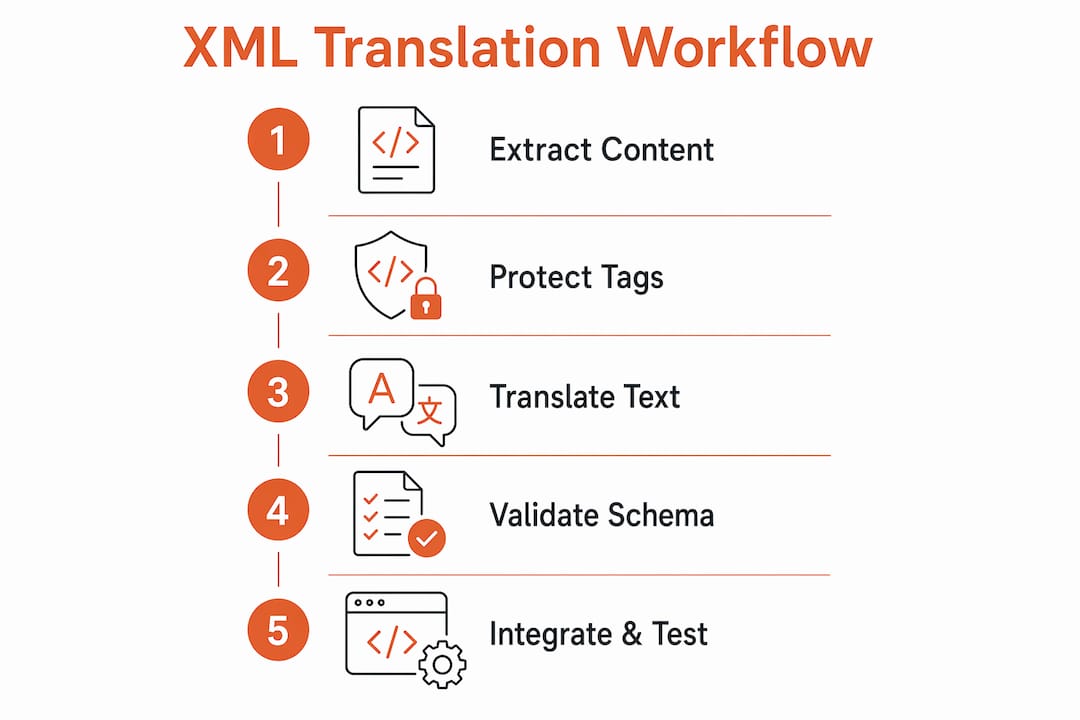
Specialized XML translators solve this by locking tags and attributes before any linguistic processing begins. The tool identifies translatable text nodes, extracts them, sends only those strings for translation, and then reinserts the translated text into the original structure. This approach means your <string name="login_button"> tag stays untouched while only “Log In” becomes “Connexion” or “Iniciar sesión.”
Top XML translators support XLIFF and DITA formats, along with Android strings.xml, iOS .strings, and other XML derivatives common in software development. Batch processing is a core capability in professional-grade tools. Without it, teams manually upload and download individual files, which creates version drift and human error at scale.
Security is a non-negotiable requirement for enterprise teams. Enterprise solutions support 120+ languages and automatically delete uploaded files after 24 hours. That deletion policy matters when your XML files contain product strings, pricing data, or user-facing content that should not persist on third-party servers. Look for tools that meet SOC 2 and ISO 27001 standards, and confirm GDPR compliance before integrating any external translation service into your pipeline.
Key capabilities to evaluate in any XML translation tool:
Tag protection: The tool must lock all XML tags, attributes, and namespaces before translation begins.
Format support: Native handling of XLIFF, DITA, Android strings.xml, and SVG localization files.
Batch processing: Ability to translate hundreds of files in a single API call.
Security compliance: SOC 2, ISO 27001, GDPR, and automatic file deletion policies.
API integration: RESTful API access for embedding translation directly into CI/CD pipelines.
Pro Tip: Always run a schema validation check on translated XML files before merging into your main branch. A single malformed tag can block your entire release.
What are the best practices for secure XML translation?
Effective XML localization requires more than picking the right tool. The workflow around the tool determines whether your team ships clean, consistent translations or spends hours debugging broken builds.
Use format-aware tools with strict tag locking. Generic machine translation APIs treat XML as plain text. That approach translates tag names, corrupts attribute values, and produces files that fail schema validation. Use tools built specifically for structured file formats.
Implement batch translation via API. Batch APIs cut translation costs by over 90% and increase throughput by up to 10x compared to single-entry workflows. That speed gain compounds across release cycles. A team shipping monthly updates to 10 languages sees the difference immediately.
Validate tag structures before and after translation. Pre-translation validation catches malformed source files. Post-translation validation confirms the tool did not introduce structural errors. Automate both checks in your CI/CD pipeline using XML schema validators like Xerces or Saxon.
Maintain a translation memory and glossary. Translation memory caches previously approved strings and reuses them automatically. This keeps terminology consistent across product versions and reduces the cost of re-translating unchanged strings. Gleef’s semantic translation memory does this at the string level, not just the segment level.
Require security certifications from your translation service. Any external service that touches your XML files should hold SOC 2 Type II and ISO 27001 certifications. GDPR compliance is mandatory for teams serving European users. Verify these credentials before signing any service agreement.
Integrate translation into your CI/CD pipeline. Manual file handoffs create bottlenecks and version mismatches. API-driven automated localization workflows eliminate those gaps by triggering translation jobs automatically when source strings change.
Pro Tip: Set rate limits on your translation API calls and implement retry logic. AI translation APIs occasionally throttle under heavy load, and unhandled errors will silently drop strings from your output files.
When and why should you convert XML to other formats?
XML was designed for document-centric data exchange, and it shows its age in API-first architectures. JSON and YAML are preferred in modern DevOps and microservices environments because they are lighter, easier to parse, and natively supported by most container orchestration tools. When your localization strings live in XML but your app runtime expects JSON, conversion becomes a workflow requirement, not an option.
XML to JSON conversion
Browser-based XML to JSON converters offer up to 1,000 free conversions per month, with file size limited only by client memory. This makes them practical for small teams doing occasional format migrations. For production pipelines, a server-side conversion script using libraries like xml2js in Node.js or lxml in Python gives you more control over how nested elements map to JSON objects.
XML to CSV conversion
Flattening XML to CSV works cleanly only when your XML elements are consistent and shallow. Deeper XML hierarchies produce ineffective tables because CSV cannot represent nested relationships without data loss. If your XML has two or three levels of nesting and consistent element names, CSV conversion suits reporting and spreadsheet-based review workflows well. Anything deeper requires a relational database or a JSON intermediate format.
When XML to format conversion makes sense:
Migrating localization strings from a legacy CMS to a modern React or Vue app that expects JSON.
Exporting translation data to a spreadsheet for non-technical reviewers or translators.
Feeding XML localization data into a YAML-based configuration system for Kubernetes deployments.
Converting Android strings.xml to a flat JSON format for a cross-platform React Native project.
The critical rule during any conversion: preserve data fidelity by mapping every XML element explicitly. Automated converters make assumptions about element-to-key mapping that may not match your schema. Always review the output against the source before committing it to your repository.
How do you integrate XML translation into your development workflow?
Unified localization workflows that combine translation editing, glossary management, and project tracking in one system reduce manual errors and eliminate the fragmentation that plagues teams using separate tools for each task. The practical goal is a pipeline where a developer commits a source string change and the translated versions appear in the target language files before the next build runs.
The foundation of that pipeline is a translation management system with API access. The system watches your source XML files for changes, extracts new or modified strings, sends them for translation, and writes the results back to the correct file paths. Gleef’s API supports this pattern directly, with AI-powered localization that applies semantic translation memory to keep terminology consistent across every file in your project.
Rate limiting and model selection matter more than most teams realize. AI translation APIs have throughput limits, and choosing a faster but less accurate model for high-volume batch jobs while reserving a higher-quality model for user-facing strings is a practical way to balance speed and accuracy. Build this logic into your pipeline configuration, not as an afterthought.
Gleef also generates auxiliary localization assets, including helper code and preview simulations, that let designers and developers see translated strings in context before shipping. That in-context review step catches layout breaks caused by text expansion in German or Finnish, which can be 30–40% longer than the English source. Catching those issues before release is far cheaper than fixing them after.
For teams exploring AI’s real role in localization, the honest answer is that AI handles high-volume, repetitive translation well but still needs human review for brand voice and culturally sensitive content. Build your workflow to automate the volume and flag the exceptions.
Key Takeaways
XML translation requires both linguistic accuracy and structural preservation to produce localization builds that actually work.
Point | Details |
|---|---|
Tag protection is non-negotiable | Use tools that lock XML tags and attributes before any translation processing begins. |
Batch APIs multiply efficiency | Batch translation cuts costs by over 90% and speeds throughput by up to 10x versus single-file workflows. |
Security certifications matter | Require SOC 2, ISO 27001, and GDPR compliance from any external translation service handling your files. |
Format conversion needs care | XML to JSON or CSV conversion works best on shallow, consistent XML hierarchies. Deeper nests require extra handling. |
Pipeline integration removes bottlenecks | API-driven workflows that trigger translation on commit eliminate manual handoffs and version drift. |
Why I think most teams underestimate the structural problem
Antoine here. After years of watching localization projects go sideways, the pattern is almost always the same. Teams treat XML translation as a language problem and ignore the structural one. They run strings through a generic translation API, get back what looks like correct text, and then spend two days debugging why their Android build fails or their DITA documentation renders broken.
The structural problem is the harder one. Language errors are visible. A broken tag is invisible until the build explodes. I have seen teams with excellent translators and terrible tools ship broken localization files repeatedly because nobody validated the XML output before merging. That is a process failure, not a translation failure.
The shift I find most interesting right now is the move away from XML toward JSON and YAML in modern stacks. It is not that XML is wrong. It is that most new development environments do not need its complexity. Teams building on React, Vue, or Flutter are already using JSON for localization. The XML question often becomes a legacy migration question. Knowing when to translate within XML and when to convert out of it entirely is a judgment call that separates experienced localization engineers from everyone else.
The tools have genuinely improved. AI-powered translation memory, automatic tag protection, and API-first workflows have made what used to take days take hours. But the teams that get the most out of these tools are the ones who treat localization as an engineering discipline, not an afterthought. Build the validation, automate the pipeline, and review in context. The technology will do the rest.
— Antoine
Gleef makes XML localization a first-class workflow
XML localization does not have to be a release blocker. Gleef brings AI-powered translation, semantic memory, and in-context editing into a single platform built for product teams. Your developers, designers, and UX writers work from the same source of truth, with no manual file handoffs and no version drift.
Gleef’s API integrates directly into your CI/CD pipeline, triggering automated translation jobs the moment source strings change. Translation memory reuses approved strings across every file, keeping terminology consistent at scale. Security is built in, with compliance standards that meet enterprise requirements. Visit Gleef to see how your team can ship localized products faster without sacrificing quality.
FAQ
What is XML translation?
XML translation is the process of converting text content inside XML files into other languages while keeping all tags, attributes, and schema structure intact. Preserving structure is as critical as linguistic accuracy because broken tags cause build failures.
Why do standard translation tools fail with XML files?
Standard translation tools process XML as plain text, which means they translate tag names and attribute values alongside content strings. That corrupts the file structure and produces output that fails schema validation.
What XML formats do professional translation tools support?
Professional XML translators support XLIFF, DITA, Android strings.xml, and SVG localization files, along with batch processing and API integration for scalable workflows.
When should you convert XML to JSON or YAML?
Convert XML to JSON or YAML when your target runtime environment expects those formats natively, particularly in API-first, microservices, or containerized architectures where XML verbosity creates unnecessary overhead.
How does batch translation improve XML localization efficiency?
Batch translation via API reduces translation costs by over 90% and increases throughput by up to 10x compared to processing files one at a time, making it the standard approach for any team managing multiple languages or frequent releases.