
TL;DR:
API-driven workflows enable fast, precise, and automated translation processes for product teams.
They improve speed, consistency, and reduce manual errors by automating content routing and quality checks.
Ongoing maintenance and regular audits are essential for effective, scalable API-based localization pipelines.
Most product teams assume that automating translation means accepting lower quality. That assumption costs them time, market share, and brand trust. The reality is that well-designed API-driven workflows can give you speed and precision without compromise. Whether you’re shipping a mobile app to five countries or localizing a SaaS platform for enterprise clients, your translation infrastructure is either an accelerator or a bottleneck. This guide breaks down how APIs transform localization pipelines for product teams, covering foundational concepts, concrete benefits, step-by-step implementation, and real-world problem-solving you can apply immediately.
Key Takeaways
Point | Details |
|---|---|
APIs automate translation tasks | They connect systems to eliminate manual handoff and reduce errors in localization workflows. |
Hybrid routing boosts quality | Content is routed to the best translation method—machine or human—on demand for consistent results. |
Ongoing monitoring is vital | APIs need regular review and updates to maintain localization quality and compliance with standards. |
Integration brings efficiency gains | Well-implemented APIs cut costs and speed up go-to-market times for global products. |
Why APIs matter in modern translation workflows
An API (Application Programming Interface) is essentially a digital bridge. In the context of translation, it connects your source content, translation engines, quality review tools, and delivery systems into one unified flow. Without APIs, your team is manually exporting files, emailing them to translators, waiting, importing them back, and hoping nothing breaks the UI in the process. That’s not a workflow. That’s a relay race with no finish line.
API-driven localization changes this entirely. When your systems talk to each other directly, content moves automatically from creation to translation to review to deployment. No one has to manage handoffs. No one has to remember to send the latest version. The pipeline does it for you, consistently, every time.
Here’s what APIs actually do inside a modern translation pipeline:
Connect source systems to translation engines so new content triggers translation automatically when it’s published or updated
Eliminate manual file handling by replacing export/import cycles with direct data exchange between platforms
Route content intelligently based on defined rules, sending legal disclaimers to human translators and UI microcopy to machine translation
Enforce quality gates by integrating automated checks before content reaches end users
Log everything for audit trails, compliance documentation, and performance reporting
One of the most powerful concepts in API-driven localization is the hybrid workflow. Hybrid human-AI workflows route content by type: machine translation handles drafts and bulk content, post-editing applies human judgment to customer-facing copy, and certified human translators handle legal or regulated materials. Industry standards like ISO 17100 and ISO 18587 provide classification frameworks that help teams define which content needs which level of treatment.
“The most resilient translation pipelines aren’t fully automated or fully human. They’re intelligent hybrids that route each piece of content to exactly the right resource at the right time.”
This matters enormously for product teams working under release pressure. When you build a routing logic that matches content sensitivity to translation method, you protect quality where it counts most while still moving fast on the content that doesn’t require deep human review. That balance is the foundation of a mature, scalable localization strategy.
Key benefits of API integration for localization
Once you understand the foundational role APIs play, the practical benefits become very clear, and they stack up quickly. Let’s look at what product teams actually gain when they integrate APIs into their translation process optimization.
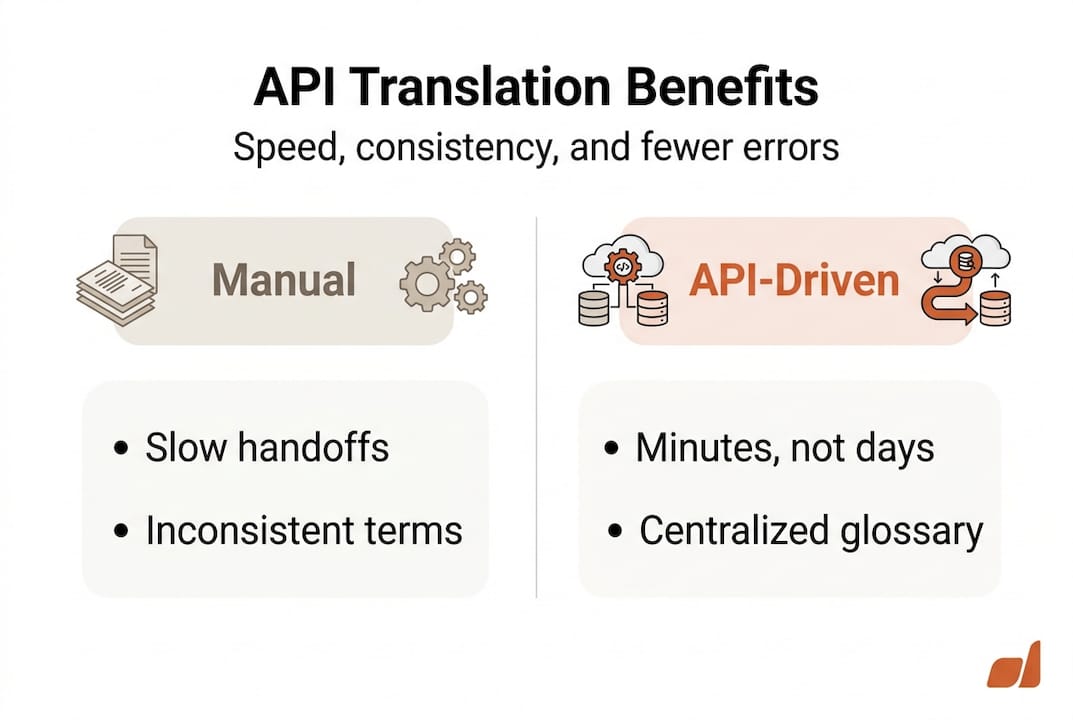
Speed at scale. Manual translation handoffs can take days. API-driven pipelines reduce that to minutes. When a developer pushes a new string to a repository, the API can detect the change, send it to the appropriate translation engine, and return a translated version before the next build cycle. This is especially valuable for agile teams shipping updates frequently.
Terminology and brand consistency. Centralized glossaries and translation memories that live inside your API-connected system ensure that “onboarding” is always “onboarding” in every language, and never an inconsistent synonym. Your brand voice survives the translation process intact. That’s not a small thing. Inconsistencies in localized products erode user trust faster than you’d expect.
Reduced manual errors and compliance risk. Humans make mistakes when they’re doing repetitive work. Automating routing based on content characteristics removes the possibility of someone accidentally sending a regulated document through machine translation without review. The rules are enforced automatically, every time.
Cost efficiency through smart routing. Not everything needs premium human translation. APIs let you define cost tiers based on content type, urgency, and risk level. The result is a leaner budget with higher returns.
Here’s a quick look at how API integration impacts common localization scenarios:
Scenario | Manual workflow | API-driven workflow |
|---|---|---|
UI string updates | 2 to 3 days per release | Under 1 hour, automated |
Legal document translation | Inconsistent routing | Always routed to certified human |
Marketing copy review | Ad hoc, often skipped | Automated post-edit queue |
Glossary enforcement | Relies on human memory | Enforced at the API level |
Audit trail creation | Manual logging | Automatic, timestamped |
The time savings alone justify integration. But the real win is reliability. When your localization pipeline is automated and rule-driven, you stop discovering translation errors after deployment and start preventing them before they ship.
Pro Tip: Schedule quarterly audits of your API integrations. Content types evolve, product voice guidelines change, and compliance requirements shift. An integration that worked perfectly 18 months ago may now be routing content incorrectly or missing new string categories entirely. Regular audits keep the pipeline aligned with your actual needs.
How to implement API-driven translation workflows
Knowing the benefits is one thing. Building the pipeline is another. Here’s a practical roadmap for product teams ready to move from manual chaos to API-powered localization.
Assess your current workflow and content types. Before you touch a single API, map out what you’re translating, how often, in how many languages, and what quality standards apply to each content type. Marketing copy, legal terms, UX microcopy, and support documentation all have different requirements. This mapping becomes your routing logic foundation.
Choose an API that supports hybrid routing. Not all translation APIs are built the same. You need one that can route content based on rules, connect to multiple translation engines (both machine and human), and integrate with your existing tech stack. Look for APIs that support both machine translation providers and professional language service providers in one unified interface.
Integrate with your content sources. Connect the API to wherever your content lives: your code repository, CMS, design tool, or product database. The goal is zero-touch handoff. When content changes, the API detects it and acts automatically. Tools that support workflow efficiency unlocking can dramatically reduce the setup time here.
Build and test your routing rules. Define which content goes where. Legal content follows ISO 17100 standards and routes to certified human translators. Customer-facing copy requires post-editing per ISO 18587. Hybrid workflows classify content by type and match each piece to the right translation method. Test every rule with sample content before going live.
Run a pilot with one content stream. Don’t flip the switch on your entire product at once. Choose one language pair and one content type for your pilot. Measure turnaround time, error rates, and reviewer feedback. Adjust the routing rules and quality gates based on what you learn.
Scale, monitor, and iterate. Once the pilot validates your approach, expand to additional languages and content types. Set up monitoring dashboards that track throughput, error rates, and translation quality scores. Review them weekly during rollout and monthly once stable.
Pro Tip: Align your API configuration with your company’s content security policies before you integrate. Some organizations restrict which translation engines can handle sensitive data. Know the rules in advance so you’re not reengineering the pipeline after deployment. Good collaborative translation practices also mean involving legal, security, and compliance teams early in the API selection process, not as an afterthought.
A real-world example: a fintech product team managing a mobile banking app in eight languages used an API-driven pipeline to separate their regulatory disclosures from their in-app notifications. Disclosures routed automatically to certified translators with a mandatory review step. Notifications went through machine translation with a lightweight post-edit pass. The result was a 60% reduction in translation turnaround time and zero compliance violations across three consecutive release cycles.
Common challenges and real-world solutions
Even the best-designed API workflows hit friction points. Knowing what they are before you build saves you from painful surprises after launch. Here’s what product teams most commonly encounter and how to handle each one.
Challenge | Manual approach | API-driven solution |
|---|---|---|
Legacy system compatibility | Custom scripts, manual exports | API adapters and middleware connectors |
Data privacy compliance | Inconsistent, document-by-document | Rule-based routing with data residency controls |
User access management | Spreadsheet-tracked permissions | Role-based API access with token management |
Error handling and failures | Discovered days later | Real-time alerts and automatic retry logic |
Glossary drift | Relies on human memory | Centralized, API-enforced terminology database |
Legacy system compatibility is the most common first obstacle. Many product teams inherit CMS platforms or content repositories that weren’t designed with modern APIs in mind. The fix is usually middleware: a lightweight connector layer that translates between your legacy system’s output format and the API’s expected input. This adds a setup cost but pays off quickly.

Data privacy and localization is a growing concern, especially for teams serving European or regulated markets. Not all machine translation providers offer the same data residency guarantees. Your API routing rules must include data classification logic so that personally identifiable information or sensitive financial content never routes through providers that don’t meet your compliance standards. Hybrid workflows that classify content by sensitivity are your strongest defense here.
Here are practical troubleshooting principles your team should operationalize from day one:
Monitor error rates at the API level, not just at the translation output level. Catching a routing failure early prevents a cascade of missing translations.
Set threshold alerts for response time and failure rate. If your translation API takes longer than expected to respond, you want to know before it blocks a release.
Maintain living documentation of your routing rules and integration configurations. Teams change, memories fade, and undocumented systems become liabilities.
Version control your API configurations just like you version control your code. Rolling back a bad configuration change should take minutes, not hours of detective work.
Build fallback logic for every automated step. If the primary translation engine is unavailable, the pipeline should automatically route to a backup or flag the content for manual review.
For future-proofing, staying current with translation technology trends is not optional. AI translation capabilities are evolving fast, and the best API-driven workflows today are built to adapt as new models emerge. Similarly, following localization best practices for 2026 ensures your pipeline stays aligned with where the industry is heading, not just where it’s been.
Why “set-and-forget” doesn’t work for API localization
Here’s the uncomfortable truth most implementation guides won’t tell you: your translation API is not an appliance you install and forget. It’s a living system that needs active stewardship. Teams that treat integration as a one-time project consistently end up with pipelines that drift out of alignment with their actual content, brand voice, and compliance needs.
We’ve seen this pattern repeatedly. A team builds a smart, well-designed API workflow, ships it, celebrates the efficiency gains, and then stops looking at it. Six months later, a new content category emerges (say, AI-generated feature descriptions) and it routes through the wrong translation method because no one updated the rules. Or a glossary gets updated in the brand guidelines but never synced to the API-connected translation memory. Small drifts compound into significant quality problems.
Real longevity in localization comes from building feedback loops into the process. Empowering product teams means giving them the visibility and control to catch these drifts before they reach users. Schedule regular reviews. Treat your routing rules like product requirements: revisit them every quarter and update them when the product evolves. The teams that win at global localization aren’t the ones with the most sophisticated initial setup. They’re the ones who keep showing up to maintain and improve what they built.
Streamline your localization with advanced API solutions
You’ve seen the blueprint. Now it’s time to build. If your team is ready to move beyond spreadsheet handoffs and manual file management, Gleef offers the API infrastructure and tooling to make that shift fast and durable.

Gleef’s platform connects your content sources, translation engines, and quality workflows into a single, intelligent pipeline. The Figma Plugin for AI Localization lets your designers manage translations directly inside Figma, so localization happens in context without switching tools or waiting for developer handoffs. Combined with Gleef’s semantic translation memory, glossary enforcement, and rules-based routing, your team can ship localized product updates with confidence. Explore the full Gleef localization platform and see how quickly your team can go from manual chaos to automated precision.
Frequently asked questions
What is an API in translation workflows?
An API in translation workflows is a tool that connects different systems to automate content routing, translation, and quality management, enabling product teams to move content from source to translated output without manual handoffs. Hybrid workflows classify content by type and route each piece to the right translation method automatically.
How do APIs improve translation quality?
APIs improve quality by enforcing routing rules that match content type to the appropriate translation process, so customer-facing copy gets post-edited while bulk drafts use machine translation. Automating routing by content characteristics eliminates the inconsistency that comes from manual, case-by-case decisions.
Are there risks in automating translation workflows with APIs?
Yes, the most common risks include legacy system incompatibility, data privacy compliance gaps, and routing rules that drift out of alignment with current content needs. Hybrid classification frameworks following ISO 17100 and ISO 18587 standards help teams manage these risks systematically.
How can product teams start implementing API-driven translations?
Start by mapping your content types and quality requirements, then select an API that supports both machine and human translation routing. Automate routing decisions by content characteristics from day one, and pilot the integration on a single language pair before expanding to your full product.