
TL;DR:
Translation memory stores verified source and translation segments to improve localization efficiency. Regular management and quality thresholds are essential to maintain high-quality, consistent translations. Gleef offers an in-context platform that simplifies integrating memory translation into fast-paced product workflows.
Translation memory ™ is defined as a database that stores paired source text segments and their verified translations, allowing teams to memory translate new content by reusing approved matches instead of starting from scratch. For product managers and localization specialists, this technology is the difference between a localization pipeline that scales and one that breaks under release pressure. TM systems can reduce repetitive translation work by 80–90% for recurring content, which means faster releases, lower costs, and consistent terminology across every language your product ships in. Tools like MyMemory, Phrase, and Gleef each approach memory translation differently, and choosing the right fit depends on your team’s workflow, language pairs, and quality standards.
How does translation memory work in software localization?
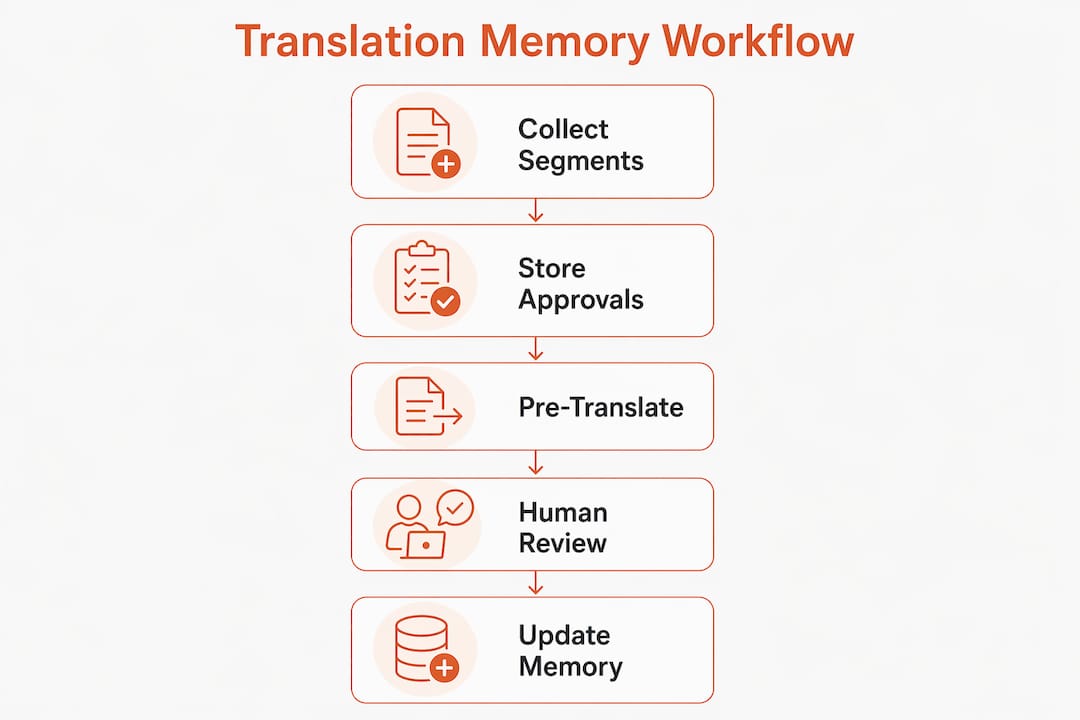
Translation memory works by splitting your source content into segments, typically sentences or UI strings, and storing each one alongside its approved translation in a database. When new content arrives, the TM engine scans for matches against stored segments and surfaces them for the translator or the system to apply.
Two match types drive every TM workflow:
Exact matches: The new source segment is identical to a stored one. The system retrieves the stored translation automatically. This is deterministic and fast, ideal for repeated UI labels like “Save,” “Cancel,” or error messages that appear across dozens of screens.
Fuzzy matches: The new segment is similar but not identical to a stored one. The system flags it with a similarity score. A translator reviews the suggestion and edits as needed. Fuzzy match quality degrades when thresholds are set too low or matches are auto-inserted without human review.
The practical impact on software localization is significant. If your app has 500 UI strings and 60% of them repeat across versions, your translators only handle 200 genuinely new segments per release. The rest come from the TM database, pre-populated and ready for review. That compression of effort is what makes TM indispensable for agile product teams shipping in 10 or more languages.
Pro Tip: Set your TM to flag fuzzy matches below 85% similarity for mandatory human review rather than auto-insertion. This single configuration choice protects your translation quality without slowing down the workflow.
The TM engine does not replace your translators. TM functions as a “perfect memory” for approved translations, freeing linguists to focus on nuanced, context-sensitive content rather than re-translating strings they have already handled.
What are the best memory translate tools and APIs for product teams?
The right memory translator depends on your team’s size, technical capacity, and integration requirements. Here is a comparison of the most relevant options for software localization teams.

Tool | Type | Language pairs | Free tier | API available | Best for |
|---|---|---|---|---|---|
MyMemory | Public TM API | 200+ | Yes (5,000 chars/day) | Yes | Prototyping, small projects |
Phrase (TMS) | Commercial TMS | 500+ | No | Yes | Enterprise localization |
Gleef | AI-powered SaaS | 50+ | Trial available | Yes | Product teams, Figma workflows |
Weblate | Open source | 100+ | Self-hosted | Yes | Developer-led teams |
Lokalise | Commercial TMS | 600+ | No | Yes | Agile software teams |
MyMemory is the most accessible entry point for teams exploring memory translation. MyMemory claims the world’s largest TM with over one billion translated segment pairs, sourced from the EU, UN, and community contributions. It merges machine translation with verified human translations to improve accuracy for common phrases. The free tier allows 5,000 characters per day, but adding an email parameter to your API call increases that limit to 50,000 characters per day with no formal registration required. That 10x increase costs nothing and takes about 30 seconds to implement.
For teams building on top of MyMemory or similar APIs, lightweight TM tools enable early localization automation in agile development cycles, making them a strong fit for prototyping before committing to a full TMS platform.
Pro Tip: Before paying for a commercial TMS, run your most common UI strings through the MyMemory API. If your hit rate on exact matches is above 40%, a lightweight integration may handle your early localization needs at zero cost.
Commercial platforms like Phrase and Lokalise offer deeper CAT tool integration, workflow automation, and enterprise-grade data privacy controls. These matter when you are managing TM data across multiple product lines or handling content in regulated industries where data residency requirements apply.
Gleef sits in a distinct position. It combines AI translation with semantic TM and integrates directly into Figma, letting product teams manage translations in context without switching platforms. For product managers who need their designers, developers, and UX writers working from the same translation source of truth, that in-context approach eliminates a category of errors that traditional TMS platforms cannot prevent.
Best practices for managing translation memory for high-quality localization
A TM database is only as good as the content inside it. Most teams treat TM as infrastructure they configure once and forget. That approach produces inconsistent terminology, outdated translations, and post-editing costs that erase the efficiency gains TM was supposed to deliver.
Here are the practices that separate high-performing localization teams from the rest:
Clean your TM at least every six months. Unmaintained TM databases cause quality issues and increased costs. Outdated segments, deprecated UI strings, and terminology that no longer matches your brand voice all accumulate silently. Schedule a biannual audit as a fixed item in your localization calendar.
Set fuzzy match thresholds at 85–90% or above for automatic pre-translation. Strict thresholds preserve translation quality by limiting automatic insertion to high-confidence matches. Anything below that threshold should go to a human reviewer before it enters your product.
Pair your TM with a glossary. TM handles segment-level consistency. A glossary enforces term-level consistency for product names, feature labels, and brand-specific vocabulary. Using both together is the fastest path to consistent technical terminology across your entire product.
Involve your linguists in TM governance. Translators who work in your TM daily know which segments are outdated or contextually wrong. Build a feedback loop where they can flag problem entries for review. This turns your TM from a static archive into a living asset.
Segment your TM by product area or content type. Marketing copy, legal disclaimers, and UI strings have different quality requirements and update frequencies. Keeping them in separate TM databases prevents low-stakes content from contaminating high-stakes translations.
Regular TM maintenance prevents inconsistent terminology and reduces post-editing costs. The teams that see the biggest long-term savings from memory translation are the ones that treat their TM database as a product, not a byproduct.
How to integrate memory translate into your software localization workflow
Embedding TM into your localization pipeline is not a one-time setup. It is an ongoing architectural decision that affects how fast you ship, how consistent your product feels across languages, and how much your localization costs per release.
Here is how to build a TM-powered workflow that holds up under real release pressure:
Connect your TM to your CAT tool or localization platform from day one. Whether you use Phrase, Lokalise, or Gleef, the TM should be the first resource the system checks before sending a segment to a translator. This prevents duplicate translation work from the first release.
Automate TM application for exact matches, but require human approval for fuzzy matches. Balancing automated TM insertion with manual approval protects quality without sacrificing speed. Exact matches on stable UI strings like button labels can go straight to production. Fuzzy matches on longer strings need a second set of eyes.
Scale your TM strategy as you add languages. Adding a new language pair does not mean starting from scratch. A well-maintained TM for English to French gives you a structural template for English to Spanish or English to Portuguese. The segment architecture transfers even when the translations do not.
Monitor TM hit rates per release. Track what percentage of each release’s content comes from exact matches, fuzzy matches, and new translations. A declining hit rate signals that your product content is drifting away from established patterns, which is a cue to review your content strategy or update your TM.
Use lightweight TM APIs for rapid prototyping. When you are localizing a new feature before it ships, a zero-config API like MyMemory lets you validate translated UI layouts and string lengths without waiting for a full TMS integration. This is especially useful for accelerating global deployment in fast-moving product cycles.
The teams that get the most from memory translation treat it as a continuous improvement system. Every approved translation you add to your TM makes the next release faster and cheaper. That compounding effect is the real value of building TM into your workflow early.
Key takeaways
Translation memory delivers its maximum value when teams treat it as an active, managed asset rather than a passive database.
Point | Details |
|---|---|
TM reduces repetitive work | TM systems cut repetitive translation effort by 80–90% for recurring content across releases. |
Fuzzy match thresholds matter | Set automatic pre-translation thresholds at 85–90% or above to prevent subtle quality errors. |
MyMemory API is a strong starting point | Adding an email parameter increases the free daily limit from 5,000 to 50,000 characters at no cost. |
TM requires biannual maintenance | Unmaintained databases produce inconsistent terminology and raise post-editing costs over time. |
Pair TM with a glossary | TM handles segment consistency; a glossary enforces term-level brand accuracy across all languages. |
Why most teams are using translation memory wrong
I have worked with product teams across dozens of software localization projects, and the pattern I see most often is this: a team sets up a TM database, celebrates the initial efficiency gains, and then stops actively managing it. Six months later, the TM is full of outdated strings, deprecated feature names, and translations that no longer match the product’s tone. The efficiency gains evaporate, and nobody can explain why localization quality has dropped.
The uncomfortable truth is that translation memory is not a tool you configure once. It is a living system that reflects the quality of every decision your team makes about language. If you approve a mediocre fuzzy match to hit a deadline, that mediocre translation is now in your TM and will surface in every future project that touches a similar string.
The teams I have seen get real, sustained value from memory translation share one habit: they treat TM governance as a product discipline, not a localization afterthought. They assign ownership, schedule maintenance, and measure TM hit rates the same way they measure code coverage or test pass rates.
My honest advice is to start smaller than you think you need to. A clean TM with 10,000 high-quality segments will outperform a bloated TM with 100,000 inconsistent ones every single time. Build quality in from the start, and the compounding returns will follow. The real impact of software localization only shows up when your TM is trustworthy enough to actually use.
— Antoine
How Gleef makes memory translation work for your product team
Gleef is built for exactly the kind of localization challenge this article describes: fast-moving product teams that need translation memory to work without becoming a maintenance burden.

Gleef’s semantic translation memory connects directly to your Figma files and development workflow, so your TM is populated with real, in-context translations from the moment you start. Glossaries, consistency rules, and AI-powered suggestions work together to keep your TM clean and your brand voice intact across every language. You do not need a dedicated localization engineer to make it work. If you are ready to see what a well-integrated translation memory platform looks like in practice, Gleef is worth a close look.
FAQ
What is translation memory in software localization?
Translation memory is a database that stores source text segments paired with their approved translations. Software localization teams use it to reuse verified translations across releases, reducing both translation time and cost.
How does MyMemory work as a memory translator?
MyMemory is a public TM API with over one billion segment pairs across 200+ language pairs. The free tier allows 5,000 characters per day, and adding an email parameter to your API call raises that limit to 50,000 characters per day.
What fuzzy match threshold should I use for automatic pre-translation?
Set your fuzzy match threshold at 85–90% or above for automatic pre-translation. Matches below that range carry enough variation to introduce subtle errors and should go to a human reviewer before entering your product.
How often should I clean my translation memory database?
Experts recommend cleaning your TM database at least every six months. Unmaintained TM databases accumulate outdated segments that cause terminology inconsistencies and drive up post-editing costs.
Can translation memory replace human translators?
Translation memory amplifies human translator efficiency but does not replace expert judgment. TM automates repetitive, low-complexity strings so translators can focus on nuanced, context-sensitive content that requires human understanding.